

 Updated on 24 April 2026

Why HR Systems Slow Down as Companies Grow
Here's what most companies don't realize until it's too late: your HR system wasn't broken when you bought it. It was designed for a specific scale and you outgrew it.
When a company scales from 1,000 to 10,000 employees, data volume doesn't just grow it multiplies. Payroll transactions that once ran in minutes now compete with hundreds of concurrent users. Reports that pulled from a single database now need to aggregate across regions, entities, and compliance frameworks. Simple configuration changes that once took an afternoon now require engineering sprints.
For business leaders, this shows up as rising costs and slower execution. At this stage, HR system failure is no longer just an engineering issue it becomes a board-level risk due to its direct impact on payroll continuity, regulatory compliance, and workforce operations across the business. For CTOs and engineering heads, it shows up as an increasing backlog of performance tickets that patches don't fix.
Most scaling issues are architecture problems, not tool problems. Most vendors solve for features. Scaling problems come from architecture not features. That's why most fixes fail. This is where HR software architecture stops being an IT concern and becomes a strategic leadership conversation.
Stage 1: What Works at 1,000 Employees And Why It Fails at 10,000
At 1,000 employees, a standard monolithic HRIS BambooHR, mid-tier Workday, or a comparable off-the-shelf platform handles everything comfortably. Core HR, payroll, benefits, and basic reporting all live in one database. Synchronous processing works fine, and the system costs roughly $50–100 per employee annually.
The architecture at this stage typically includes:
Single-region cloud or on-premises deployment
One relational database (PostgreSQL or MySQL) managing all transactions
Synchronous, real-time data updates across all modules
Basic REST API integrations with email, Active Directory, and payroll feeds
Minimal DevOps overhead one or two engineers maintain the entire system
This setup is lean and manageable. It scales reasonably to 2,000–5,000 users. Beyond that, the assumptions it was built on stop holding and that's where HRIS scalability challenges begin surfacing visibly across the business.
Workday and BambooHR limitations at this scale are rarely about features. They're about what happens underneath when the data model, integration topology, and deployment architecture weren't designed for the load you're now placing on them.
Key Takeaway: The system that served you at 1,000 employees was designed for 1,000 employees. Outgrowing it isn't a vendor failure it's an architecture reality.
Stage 2: The 5,000–10,000 Employee Breaking Point
At scale, your database becomes the number one reason HR systems slow down and most teams don't realize it until the damage is already expensive.
A fintech company we worked with at 8,000 employees experienced 48-hour payroll delays. Not because their payroll vendor failed because batch processing was competing with concurrent HR operations on a single database instance. The engineering team kept patching. The delays kept happening. After restructuring the database layer and introducing async processing, payroll processing time dropped from 36 hours to under 4 hours. That's the difference architecture makes.
Here's what typically surfaces between 5,000 and 10,000 employees:
Database contention A single RDBMS throttles under 400–500 queries per second during peak usage like open enrollment or mass onboarding
Global workforce latency International teams expose multi-region performance gaps that didn't exist when everyone operated in the same time zone
Compliance overhead accumulation GDPR, SOX, and country-specific labor laws require audit trails across millions of records never architected into the original system
Integration brittleness What started as 10 API connections grows to 50+, and each new integration widens the failure blast radius
HR system performance issues that escalate from IT tickets into business continuity risks
These are HR platform performance issues at scale that stem directly from architectural decisions made when the organization was smaller. Switching platforms delays the problem by 12–18 months at best.
Quick Self-Check: Is Your Architecture Already Under Stress?
Check how many of these apply before your next hiring phase or geographic expansion:
Payroll runs are taking longer than they did 12 months ago
Reports that used to be instant now take minutes or fail during peak periods
Small HR configuration changes require engineering involvement
Integration failures are increasing in frequency
System performance degrades during open enrollment or fiscal year-end
Compliance reporting requires manual intervention to produce correctly
If you checked 2 or more, your architecture is already under stress. Addressing this before your next payroll cycle breaks is significantly less expensive than after.
Key Takeaway: If your database is slowing down, you're already late to restructuring. Most teams don't realize this until payroll fails under load by which point remediation costs 40–60% more than proactive investment would have.
Common HR System Scaling Problems (Real Scenarios)
Before getting into architecture solutions, it helps to name the exact problems that bring companies to this conversation. These are the real scenarios we see repeatedly and the Google searches that lead engineering leaders here.
Why is payroll slow in our HR system?
The most common cause is database contention during batch processing. When payroll runs compete with concurrent HR queries on a single database instance, processing times balloon from minutes to hours. This isn't a payroll module problem it's a database architecture problem. The fix requires separating workloads, not upgrading your payroll vendor.
Why do HR reports fail during open enrollment?
Open enrollment generates simultaneous query load from thousands of employees accessing the system at once. A monolithic architecture routes all of this through a single database, causing queries to queue, timeout, or fail. Most companies solve this temporarily by scheduling enrollment windows masking the architecture problem rather than fixing it.
Why does Workday feel slow at scale?
Workday and similar enterprise platforms perform well within their designed load parameters. When underlying infrastructure database tier, network topology, integration middleware isn't scaled to match, the platform carries the blame for an architecture it can't control. This is the Workday performance issue most companies don't diagnose correctly.
Why does our HR software crash during peak events?
Peak events fiscal year-end, mass onboarding, annual reviews expose the difference between average load and peak load capacity. Systems sized for average load fail under peak conditions. Cloud-native autoscaling architectures handle this by expanding capacity dynamically; monolithic architectures don't.
When should we upgrade our HR system?
The signal isn't a specific employee count it's operational symptoms. When payroll delays, report failures, integration breakdowns, and engineering dependency for routine HR tasks become regular occurrences, the architecture has crossed the threshold. That's the upgrade trigger, not a headcount milestone.
Symptoms of HRIS Scalability Issues
These are the specific, searchable symptoms that indicate HRIS scalability challenges organized the way engineering leaders describe them internally:
HR system slow during payroll batch jobs taking 4x longer than baseline
HR reports taking too long queries timing out or returning stale data
HR software crashes during open enrollment system unavailability during peak HR events
Integrations failing intermittently data sync errors between HR, Finance, and Identity systems
Engineering tickets increasing quarter-over-quarter for issues that used to be self-service
HR system not scaling with headcount performance degrading proportionally as employees are added
Compliance reports requiring manual fixes audit trail gaps appearing in regulated data
Single point of failure in HR data one database outage taking down all HR functions simultaneously
If three or more of these describe your current environment, you're experiencing HR software problems in large companies that are architectural in nature and won't resolve without structural change.
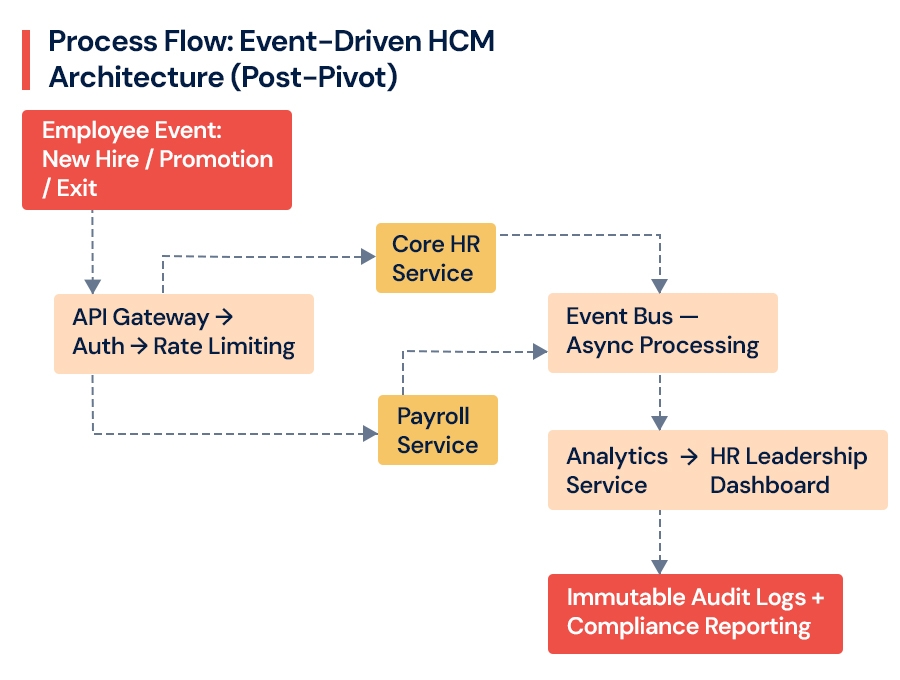
Stage 3: The Architectural Pivot From Monolith to Modular
Crossing 10,000 employees forces a fundamental choice: keep patching the monolith, or restructure toward a modular HR software architecture. This is where product engineering becomes critical not just maintaining HR systems, but designing them to scale as products. Companies that patch past this threshold consistently spend more and accumulate more technical debt than those who restructure intentionally.
Move to microservices only when domain boundaries are clear not before. Premature decomposition creates distributed complexity without the scalability benefit. This is one of the most common and costly mistakes in scaling HR systems.
The right sequence for most companies:
Map domain boundaries first Core HR, Payroll, Talent Acquisition, Analytics, and Compliance are distinct domains with different scaling profiles
Introduce a modular monolith with clean API boundaries as an intentional intermediate step, typically between 5,000 and 12,000 employees
Move to full microservices only after those boundaries are stable and independently deployable
This is where our Cloud and DevOps Engineering team helps companies reduce deployment risk and ensure zero-downtime migration moving architecture forward without disrupting the HR operations the business depends on daily.
A healthcare company we supported handled 3x their typical peak load without downtime during open enrollment after completing this architectural pivot something that had caused system-wide outages the two prior years.
Database Architecture: Where Enterprise HR Systems Quietly Break
At scale, your database becomes the number one bottleneck and the last place most teams look when performance degrades.
At 1,000 employees, a single PostgreSQL instance holds roughly 1 million records without strain. At 50,000 employees across global entities, you're managing 500 million+ records multi-currency payroll transactions, geographically isolated compliance data, and real-time analytics queries all competing simultaneously.
Most enterprise HR software architecture conversations focus on the application layer. The database layer gets far less attention. That's exactly where HR system performance issues silently accumulate before anyone identifies the root cause.
Database progression that supports enterprise HR system design at scale:
| Scale | Primary DB | Strategy | Latency Target | Recovery Time |
|---|---|---|---|---|
| 1,000 | PostgreSQL (Single) | None | <100ms | 4 hours |
| 10,000 | Aurora Multi-AZ | Regional sharding | <50ms | 1 hour |
| 50,000 | CockroachDB + Cassandra | Employee ID / Geo sharding | <10ms (P99) | <15 min |
Each stage requires a deliberate database strategy shift not just more hardware underneath the same structure.
The shift from relational-only to a hybrid modeltransactional RDBMS plus NoSQL for audit logs and event streams is what makes HRIS architecture design at scale maintainable. Sharding by geography simultaneously solves data residency compliance requirements that become legally significant as international headcount grows. Redis caching layers handle HR data's roughly 10:1 read-to-write ratio efficiently, while platforms like Snowflake absorb analytics load so operational databases aren't burdened with complex reporting queries.
Key Takeaway: Database architecture is the most underestimated variable in HCM scaling. Getting this right at 10,000 employees determines whether you operate smoothly or expensively at 30,000.
Not sure if your database architecture can carry your next growth phase?
Growing past 10,000 employees without a database scaling plan is the single highest-risk decision we see companies make. Our architecture audit includes a structured database readiness assessment identifying sharding needs, replication gaps, and latency risks before they become operational failures.
[Request a Database Architecture Review →]
Architecture Comparison: Monolith vs. Modular vs. Cloud-Native
Understanding which architecture fits your stage is what separates proactive scaling from reactive firefighting. Here's how the three models compare across the dimensions that matter to engineering and business leaders:
| Dimension | Monolith | Modular / Microservices | Cloud-Native Multi-Region |
|---|---|---|---|
| Database Model | Single shared DB | Domain-separated DBs | Geo-sharded, distributed |
| Service Coupling | High all services interdependent | Medium domain isolation | Low independently deployable |
| Scaling Model | Vertical only | Horizontal per service | Elastic autoscaling |
| Peak Load Handling | Fails at 5K–8K concurrent users | Scales to 15K–20K | Scales to 50K+ with dynamic expansion |
| Deployment Risk | High full system deploys | Medium service-level deploys | Low blue-green, zero downtime |
| Integration Capacity | 10–30 endpoints | 50–100 endpoints | 200+ with governance layer |
| Typical Failure Mode | DB contention, payroll delays | Premature decomposition complexity | Misconfigured multi-region routing |
| Best Suited For | 1,000–5,000 employees | 5,000–20,000 employees | 20,000–50,000+ employees |
| Engineering Overhead | Low | Medium | High requires DevOps maturity |
This table is a starting point, not a prescription. The right architecture depends on your current state, growth trajectory, and engineering capacity which is exactly what an architecture audit surfaces.
Stage 4: Cloud-Native Architecture at 20,000+ Employees
For HR system architecture for large organizations, cloud-native is not a preference it's a structural requirement. At 20,000+ employees, the system must support zero-downtime deployments, multi-region failover, and elastic scaling that responds to real-time demand. Multi-region architecture prevents global downtime and directly improves employee experience across geographies.
Scaling HCM platforms best practices at this stage:
Multi-region deployment with data residency controls critical for simultaneous EU, India, and US compliance
Serverless components for periodic compliance-heavy jobs that don't warrant always-on infrastructure
Horizontal pod autoscaling so services expand and contract based on actual usage
Blue-green deployments with automated rollback HR updates should never require maintenance windows at this scale
A 25,000-employee retailer we supported cut application latency by 70% and reduced infrastructure cost by 28% after sharding their HR platform architecture across three geographic regions with a service mesh managing inter-service communication. Incident frequency dropped significantly because regional failures stopped cascading globally.
This is where our Cloud and DevOps Engineering and Software Product Development capabilities work together building scalable infrastructure and the engineering practices (CI/CD, infrastructure as code, automated testing) that make it operationally sustainable long-term.
Integrations at Scale: From 10 APIs to 200+
HR software scalability is as much about ecosystem connectivity as it is about core application performance. At 1,000 employees, 10–15 integrations is typical. At 50,000, you're managing 200+ active connections Finance (SAP), CRM (Salesforce), Identity (Okta), Learning Management, Benefits platforms, and workforce analytics tools.
Integration volume by growth stage:
| Scale | Active Integrations | Data Volume/Day | Failure Rate Target |
|---|---|---|---|
| 1,000 | 10–20 | ~1 GB | <1% |
| 10,000 | 50–100 | ~100 GB | <0.5% |
| 50,000 | 200+ | ~10 TB | <0.1% |
An integration outage that was inconvenient at 1,000 employees is operationally critical at 50,000.
Challenges scaling HR software systems at the integration layer are consistently underestimated until an integration failure cascades into a payroll error or compliance gap. iPaaS platforms like MuleSoft or Boomi manage connector volume at enterprise scale. A GraphQL federation layer creates a unified API surface so downstream consumers don't need to understand internal service topology. Software Product Development patterns like domain-driven design prevent the integration layer from becoming a brittle tangle that breaks whenever the underlying architecture evolves.
AI and Analytics: Turning HR Data Into a Strategic Advantage
At 50,000 employees, the volume of HR data creates genuine predictive capability — if the architecture is designed to support it. Predictive attrition models reduce turnover costs when acted on before employees decide to leave. AI-assisted hiring workflows compress time-to-hire at volumes where manual review can't keep pace.
This is where our AI and Data Engineering team helps organizations move from reporting on what happened to predicting what happens next and building the data infrastructure to act on it reliably.
The infrastructure that makes AI in HCM work at scale:
Feature stores that make employee data available to models in a governed, reusable way preventing the data swamp problem that causes most ML initiatives to fail before they deliver value
MLOps pipelines for model training, validation, and deployment without manual intervention at each cycle
Real-time inference endpoints that serve predictions without degrading core HR application performance
Product Strategy & Consulting work upstream of engineering determines which predictions are actually useful to HR leadership and which data is reliable enough to train on. The technology is rarely the constraint. Knowing which problems are worth solving with ML is.
What This Actually Costs: Total Ownership at Scale
HCM system scalability has a real cost curve that leaders need to plan for honestly and most don't until the numbers are already out of control.
| Component | 1,000 Employees | 50,000 Employees | Optimization Lever |
|---|---|---|---|
| Infrastructure | ~$50K/year | ~$5M/year | Spot instances, right-sizing |
| Engineering | 2 FTEs | 40–50 FTEs | Platform standardization |
| Licensing | ~$50/emp/yr | ~$30/emp/yr | Multi-tenant consolidation |
| Total TCO | ~$100K | ~$35–40M | FinOps governance |
Per-employee cost decreases at scale, but total investment grows significantly and requires active FinOps practice to manage.
Companies that manage this cost curve well plan architectural transitions proactively. Organizations that wait for failure to force the decision typically spend 40–60% more on remediation than they would have on a planned migration. Poor architecture decisions don't just cost engineering time they delay product releases, slow hiring cycles, and create compliance exposure that registers as business risk at the board level.
Key Takeaway: The cost of fixing architecture reactively is 40–60% higher than fixing it proactively. Budget pressure is rarely a reason to delay it's usually the strongest reason to act sooner.
How to Fix HR System Performance Issues: A Step-by-Step Approach
If your HR system is already showing performance degradation, here's the structured approach our engineering teams use in the order that delivers results fastest without disrupting active operations.
Step 1: Diagnose before you prescribe.
Run a structured architecture assessment to identify whether the bottleneck is at the database layer, application layer, or integration layer. Most teams guess wrong here and invest in the wrong fix. Database contention looks like a slow application. Integration failures look like HR module bugs. Root cause diagnosis determines the right intervention.
Step 2: Address the database layer first.
In 80% of the cases we assess, database architecture is the primary bottleneck. Introduce read replicas to handle reporting load separately from transactional operations. Evaluate sharding strategy based on your data model and geographic footprint. This alone typically reduces payroll processing time by 50–70%.
Step 3: Decouple high-load workloads with async processing.
Payroll batch jobs, compliance report generation, and analytics queries should not compete with real-time HR operations on the same infrastructure. Introducing an event bus for async processing isolates peak workloads without requiring a full microservices migration.
Step 4: Establish API boundaries before decomposing services.
Define clear domain boundaries Core HR, Payroll, Talent, Analytics and introduce API contracts between them. This makes future decomposition safer and gives you the integration governance layer your ecosystem needs.
Step 5: Migrate to cloud-native infrastructure in phases.
Start with the highest-load service (typically Payroll), containerize it, and deploy with autoscaling. Measure the performance impact before migrating the next service. Phased migration reduces risk and builds organizational confidence in the new architecture.
Step 6: Implement observability before you need it.
Metrics, distributed tracing, and centralized logging are what make a distributed architecture manageable. Without visibility, a microservices architecture creates more operational burden than the monolith it replaced. Instrument everything before you go live.
When This Becomes Urgent: Decision Triggers for Leaders
Most teams know they have an architecture problem. What they lack is a clear signal for when to stop evaluating and start acting. These are the specific triggers that indicate your HR system architecture has crossed from "needs attention" to "needs immediate action":
Payroll delay exceeds 2 hours on a regular processing cycle this indicates database contention that won't resolve without architectural intervention
Reports failing during peak usage open enrollment, fiscal year-end, or mass onboarding events that cause system-wide degradation
Engineering ticket volume increasing quarter-over-quarter for HR system issues that used to be self-service
Active integrations crossing 50 the threshold where point-to-point integration management becomes operationally unsustainable
Expansion to 2+ geographies planned within 12 months multi-region data residency and latency requirements need architectural preparation, not last-minute configuration
Compliance audit findings related to data trail completeness or access control these don't improve without structural changes
Incident frequency increasing during hiring surges or business events that previously had no performance impact
If two or more of these apply, the decision window is now not after your next growth milestone makes the problem larger and more expensive.
Why Not Just Upgrade Workday or Switch Platforms?
This is the most common objection we hear and it deserves a direct answer.
Upgrading Workday or migrating to a new enterprise HRIS addresses the application layer. It does not address the database architecture, integration topology, deployment model, or observability gaps that are causing the performance issues. Most companies that switch platforms without fixing the underlying architecture find themselves with the same problems 18 months later on a new platform, with a higher licensing bill, and a migration cost they can't recover.
Platform upgrades are right when the problem is feature gaps. Architectural restructuring is right when the problem is performance, reliability, or scalability. These are different problems with different solutions. Conflating them is what makes HCM transformations expensive and ultimately unsuccessful.
Most vendors solve for features. Scaling problems come from architecture not features. That's why most platform migrations fail to resolve the performance issues that motivated them.
This is why our approach is architecture-first and vendor-neutral. We assess what's actually causing the problem before recommending a solution path and we help clients build the internal business case for the right fix, not the most familiar one.
Why Companies Choose AspireSoftserv for HCM Architecture Scaling
Across 12+ HCM transformations, the pattern is consistent: companies come to us after trying to patch their way through a scaling problem that requires architectural restructuring. Here's what makes our approach different:
Architecture-first, not tool-first. Every engagement starts with an honest evaluation of where your current system will break under growth not a recommendation for our preferred stack.
Vendor-neutral. We don't have a preferred platform to sell. We determine whether your current platform can be restructured to serve your needs, or whether migration makes sense and if so, to what and on what timeline.
Engineering depth with business framing. Our teams speak both languages. We help CTOs and CPOs make the technical case to CEOs and CFOs with cost models, risk quantification, and outcome projections that connect architecture decisions to business results.
Outcome accountability. We don't hand off architecture diagrams. We engage through implementation, with measurable outcomes: payroll processing time, P99 latency, integration failure rates, and infrastructure cost reduction as the measures of success.
Our product engineering services are designed specifically for companies that need to scale technology platforms not just maintain them.
What Leaders Should Do: A Decision Framework by Stage
How to scale HR systems for growing companies isn't a universal prescription. Here's the decision framework by stage:
At 1,000–5,000 employees build the foundation:
Audit your integration architecture now casual API connections become expensive technical debt at 10,000
Ensure your database has a documented scaling path even if you don't need it yet
Choose platforms with API-first design so future flexibility isn't locked away by proprietary integration patterns
At 5,000–15,000 employees begin structural evolution:
Start domain decomposition planning before performance forces the issue this is the highest-leverage window
Invest in observability tooling so architecture conversations are data-driven, not opinion-driven
Engage Product Strategy & Consulting early misaligned architecture decisions compound with every growth milestone you pass without addressing them
At 15,000–50,000 employees operate at enterprise scale:
Multi-region architecture is non-negotiable budget and plan for it explicitly, not reactively
Treat integration governance as a first-class engineering concern, with ownership and SLOs
Build or acquire MLOps capability if AI-powered HR features are on your product roadmap
Connect Cloud and DevOps Engineering and AI and Data Engineering capabilities to prevent operational burden from outpacing business growth
The most expensive HR software architecture decisions are the ones made too late. The architecture decisions you make in the next 12 months will determine what's operationally possible in the next five years.
FAQ: What Leaders Actually Ask About HR System Scaling
When should I upgrade my HR system architecture?
When performance issues start affecting operations typically between 5,000 and 10,000 employees. Slow payroll, report failures during peak periods, and engineering dependency for basic HR changes are the clearest signals. Don't wait for a critical failure to trigger the conversation. By that point, remediation cost is already significantly higher.
Is switching HR software enough to fix scaling problems?
No. Most HR software problems in large companies originate in the architecture, not the application layer. Switching vendors without addressing the underlying structure delays the problem by 12–18 months at best at significant cost and disruption. Fix the architecture first, then evaluate whether a platform change is still necessary.
What's the right time to move from monolith to microservices?
After domain boundaries are clearly defined not before. Premature decomposition creates distributed complexity without the scalability payoff. A modular monolith with clean API boundaries is often the right intermediate step between 5,000 and 12,000 employees.
How do I know if my HR system will fail at scale?
Look for payroll processing delays, slow report generation, increasing integration failure rates, and engineering involvement required for routine HR configuration changes. These are HRIS system limitations in growing companies that don't resolve themselves with patches or platform upgrades.
What does poor HR architecture actually cost the business?
Beyond engineering overhead, architectural debt shows up as delayed product releases, slower hiring cycles, compliance exposure, and unplanned downtime during critical business events. At board level, it registers as operational risk and execution drag not just a technical issue.
Why not just buy a bigger Workday instance?
Scaling up a monolithic platform instance addresses capacity, not architecture. You'll buy time typically 12–18 months before the same performance issues resurface at higher load. The underlying database contention, integration brittleness, and deployment rigidity remain. Address the architecture, and the platform often performs adequately without a costly migration.
How long does an HCM architecture transformation take?
A phased transformation for a company at 10,000–20,000 employees typically runs 9–18 months, depending on the current state of the architecture and the scope of change required. Waiting until the system is failing operationally compresses that timeline dangerously and increases the risk of disruption to payroll and compliance operations.
Ready to find out exactly where your HR system will break next?
Across 12+ HCM transformations, we've helped companies in fintech, retail, healthcare, and SaaS scale their architecture without payroll disruptions or compliance gaps. Get a 3-point risk summary of your HCM architecture a direct engineering assessment of where your system will fail under growth, and what to prioritize fixing first. No prep needed. No sales pitch.
Book Your 30-Minute HCM Architecture Audit