


 Updated on 21 July 2026


Modern factories run on connected systems where every work order, barcode scan, and inventory update depends on a stable link to the ERP. That connection has quietly become as critical to daily plant production as the equipment on the floor.
Yet network failures still happen, even inside well-equipped modern facilities. WiFi dead zones, temporary ISP outages, and switch or router faults are routine realities on large industrial sites, not rare exceptions, and no cloud investment removes that physical risk entirely.
Production, however, cannot simply pause because a connection drops. Manufacturers need processes built to keep running through short outages, capturing accurate data locally until systems reconnect. Odoo, implemented with the right architecture, can genuinely support this resilient, offline-ready manufacturing operation.
Why Network Downtime Still Happens in Modern Factories
Even in modern facilities, connectivity gaps remain common. Physical layout, infrastructure age, and environmental interference play a role, and most manufacturers underestimate how often these disruptions occur on the floor.
Poor WiFi coverage: Steel structures, shelving, and machinery block wireless signals, leaving patchy coverage across zones access points were never designed to reach.
Large production floors: Sprawling floors stretch signal range well beyond office layouts, so a single access point can't maintain consistent strength across such distances.
Warehouse dead zones: Racking, shelving, and dense storage create pockets with no reliable coverage, no matter how strong the facility's main network is.
Temporary ISP failures: Even dependable providers have outages, maintenance windows, and regional disruptions that take an otherwise well-connected site offline for minutes or hours.
Industrial interference: Welding equipment and heavy electrical systems generate interference that disrupts wireless signals exactly where production data matters most.
Switch/router failures: Aging or overloaded switches and routers fail without warning, and with limited on-site IT staff, that failure can take hours to resolve.
Left unaddressed, these gaps translate into delayed work orders, missing inventory updates, stalled production schedules, and shipping disruptions, each one compounding quietly until a frustrated customer finally notices the delay.

What Does 'Offline-First' Really Mean in Manufacturing ERP?
Offline-first is a design philosophy, not a workaround. It means systems are built to function locally by default, treating a live connection as a bonus rather than a strict requirement.
Offline-first vs offline-only: Offline-only tools work only without a connection and struggle to sync later. Offline-first tools work in both states and sync automatically.
Local data capture: Data is written to the device first, regardless of connection status, so an operator's entry is never delayed waiting on a server.
Background synchronization: Once connectivity returns, queued changes push to the server automatically, without requiring the operator to stop or notice anything.
Conflict handling: When the same record changes offline and online before syncing, offline-first architecture applies clear rules deciding which version wins.
Edge computing concepts: Processing happens closer to the source, on the device or a local server, reducing dependence on a distant cloud instance.
Business continuity: The goal is simple: operations keep running through outages, so a dropped connection becomes an inconvenience, not a production halt.
Understood this way, offline-first is an architectural decision made early in implementation, not a feature toggled on later. It's also worth being precise about the timeline: before 19.3, Odoo's offline capability outside Point of Sale was limited to muting unavailable features and re-running cached searches. Version 19.3 is what introduced full offline record creation, editing, and deletion.
Which Odoo Manufacturing Processes Are Most Affected by Connectivity Loss?
Not every process feels a network outage equally. Some Odoo manufacturing workflows depend heavily on a live connection, while others can tolerate short gaps with the right offline strategy and preparation.
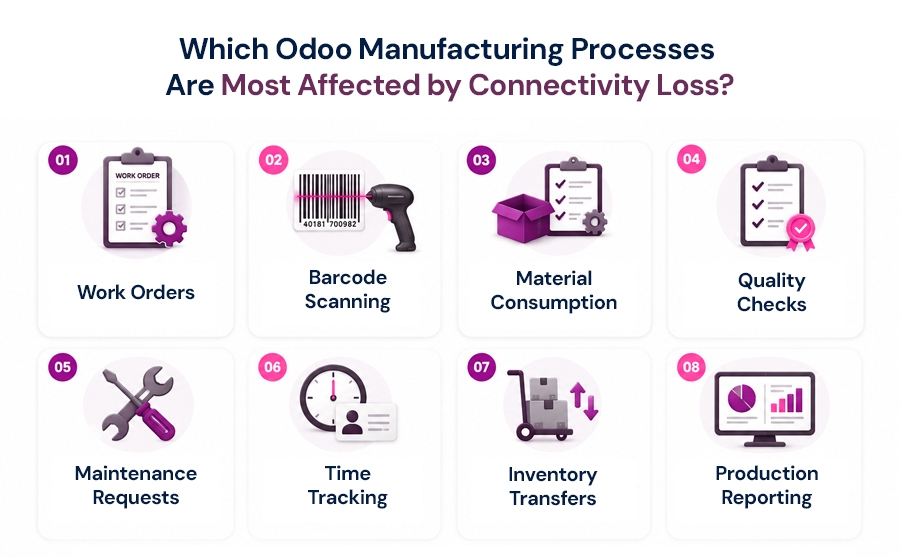
Work Orders: Work orders often require live validation against inventory and production scheduling data, so operators can typically view and update assigned orders offline, but creating an entirely new order usually needs a prior online sync first.
Barcode scanning: Barcode scanning for receipts, transfers, and picking supports real-time inventory control even offline, once product and location records have already synced to the device.
Material consumption: Recording component consumption against an already-open manufacturing order can happen offline, letting operators log usage in real time instead of relying on manual data entry after the fact.
Quality checks: Quality inspection results can be captured offline against existing quality checkpoints, preserving pass/fail data and inspector notes at the moment of inspection rather than losing detail during an outage.
Maintenance requests: Maintenance requests logged offline let technicians flag equipment issues immediately instead of waiting for connectivity, though assigning a request to a brand-new asset may require that record to sync first.
Time tracking: Clocking in, clocking out, and logging time against existing work orders keeps shop floor progress accurate instead of backfilled later.
Inventory transfers: Internal transfers, goods receipts, and stock adjustments across warehouse operations can be scanned and recorded offline, reconciling against the server once the network reconnects.
Production reporting: Production reporting and Manufacturing Kanban dashboards rely on aggregated server-side data, making them the least offline-friendly process here treat them as available only once the connection is restored.
| Process | Online Dependency | Offline Strategy |
|---|---|---|
| Work Orders | High for creating new orders; Low for updating existing ones | Pre-sync all open work orders before going to the shop floor to enable offline updates. |
| Barcode Scanning | Low, once products and locations are synced | Store scanned data locally and automatically sync when connectivity is restored. |
| Material Consumption | Low for existing work orders | Record material usage against preloaded work orders and sync later. |
| Quality Checks | Low for predefined inspection checkpoints | Capture pass/fail results and inspection notes offline, then sync on reconnect. |
| Maintenance Requests | Medium for creating requests involving new assets | Log maintenance issues immediately; sync new asset information once online. |
| Time Tracking | Low for existing employees and work records | Allow offline clock-in/clock-out and reconcile timesheets after reconnection. |
| Inventory Transfers | Low to Medium | Record transfers locally and automatically reconcile inventory during synchronization. |
| Production Reporting | High | Treat production reporting as an online-only function; generate and view reports after reconnecting. |
The pattern is consistent: processes that update or capture data against an existing record tolerate offline conditions well, while processes that create brand-new records or aggregate data across the system still need connectivity.
Practical Ways to Build an Offline-Ready Odoo Manufacturing Environment
None of this happens by accident. Building genuine offline resilience into Odoo manufacturing requires deliberate architecture choices, not just enabling a mobile app setting.
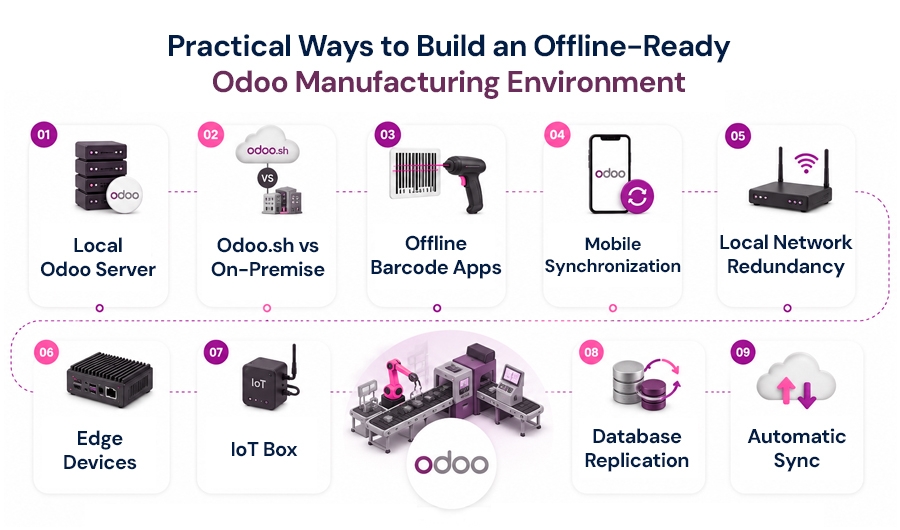
Local Odoo Server For facilities with severe or persistent connectivity issues, running Odoo on a local, on-premise server keeps core functionality available during extended internet outages, syncing to a central or cloud instance only when a wider connection is genuinely needed.
Odoo.sh vs On-Premise Odoo.sh offers strong managed-hosting reliability, but for factories where local resilience matters more than convenience, on-premise deployment or a hybrid setup can keep critical functions running independent of external connectivity entirely.
Offline Barcode Apps Offline-capable barcode and scanning workflows that queue data locally before syncing reduce dependence on a constant live connection for the highest-frequency, most repetitive floor-level data capture tasks manufacturers rely on daily.
Mobile Synchronization A well-configured mobile synchronization strategy ensures the right record types are pre-loaded onto devices before floor staff need them offline, minimizing the gap between what's cached locally and what's genuinely available.
Local Network Redundancy Redundant local switches, access points, and cabling reduce the odds that a single hardware failure takes down connectivity across an entire production zone rather than just one isolated segment.
Edge Devices Edge devices positioned closer to the production line can process and store data locally, reducing round-trip dependency on a central server for time-sensitive, floor-level operations and sensor readings.
IoT Box Odoo's IoT Box connects physical hardware like scanners, printers, and scales directly to local devices, letting floor operations continue functioning even when the broader facility network connection is temporarily unavailable.
Database Replication Database replication strategies keep a synchronized local copy of critical data available on-site, reducing how much a facility depends on constant round-trip communication with a single remote database instance.
Automatic Sync Automatic, rule-based synchronization ensures that once connectivity returns, queued transactions push back to the central system in the correct order, without requiring manual intervention from IT or floor staff.
None of this works well without deliberate design. Building an offline-ready Odoo environment means choosing the right combination of these elements based on your facility's specific connectivity risks.

Best Practices for Factory Connectivity and Odoo Implementation
Technology alone doesn't guarantee resilience. The best offline-ready Odoo deployments pair the right architecture with disciplined planning around physical infrastructure, device management, and how floor teams actually work.
WiFi heat mapping: A proper WiFi heat map identifies exact dead zones across the facility before deployment, so access points get positioned where coverage gaps actually exist, not guessed.
Redundant internet connections: A secondary internet connection, from a different provider or technology entirely, keeps the facility online if the primary ISP fails, reducing how often offline mode gets tested.
Access point planning: Thoughtful access point placement, accounting for machinery, shelving, and building materials, prevents the coverage gaps that force teams to rely on offline mode unnecessarily.
Backup power: Uninterruptible power supplies for network switches and access points ensure connectivity survives brief power interruptions, often the real cause behind what looks like a network failure.
Device management: Centralized mobile device management keeps every handheld and tablet on a consistent app version, so offline behavior works predictably instead of varying device to device.
Offline SOPs: Clear, written standard operating procedures for offline conditions tell floor staff exactly what to do and expect, removing guesswork during an actual outage on shift.
User training: Hands-on training that simulates a real outage builds operator confidence, so the first time someone uses offline mode isn't during a production-critical connectivity failure.
Data synchronization testing: Regularly testing sync behavior, including conflict scenarios, before relying on it in production catches configuration issues while they're still cheap to fix.
Together, these practices turn offline-first from a theoretical capability into something floor teams can actually depend on, tested and proven long before an outage forces the issue.
Common Mistakes Manufacturers Make
Even well-intentioned Odoo deployments, built without expert guidance, run into the same avoidable mistakes, often not discovered until an actual outage exposes them on the floor.
Assuming cloud means always available: Teams often assume a cloud ERP is inherently more reliable than the network delivering it, forgetting a cloud instance is only as accessible as the connection reaching it.
No backup connectivity: Relying on a single ISP with no secondary connection leaves an entire facility exposed to one provider's outage, with no fallback path to keep operations moving.
No offline workflows: Deploying Odoo without deliberately designing which processes should work offline leaves floor teams guessing what's actually available the moment connectivity drops.
No synchronization testing: Skipping real-world sync and conflict testing means the first genuine test of offline behavior happens during an actual production outage, not a controlled trial.
Weak barcode infrastructure: Underpowered scanners or inconsistent device configurations undermine offline data capture even when the software itself is technically ready to support it.
No disaster recovery plan: Without a documented recovery plan, a prolonged outage turns into extended downtime simply because no one defined what happens next.
How the Right Odoo Implementation Partner Helps Reduce Production Risk
Offline resilience isn't something you bolt on after go-live. It's designed in from the start, which is where the right Odoo implementation partner makes the real difference for manufacturers.
We've helped manufacturers across the US, Europe, and the Middle East build resilient, production-ready Odoo environments including IoT-driven monitoring that's cut unplanned downtime by 40% on factory lines.
Manufacturing workflow analysis: A thorough review of how work orders, materials, and quality checks actually flow on your floor identifies which processes need offline protection and which can stay online-only.
Infrastructure assessment: An honest assessment of existing WiFi coverage, network hardware, and dead zones reveals the real connectivity risks a facility faces before any configuration decisions get made.
Offline process design: Designing which records get pre-synced, which workflows run offline, and how conflicts resolve turns offline-first from a generic feature into a plan built around your operation.
Custom mobile apps: Where standard offline capabilities fall short of a facility's specific needs, custom mobile app development can extend offline functionality to cover the gaps that matter most.
Integration planning: Connecting Odoo to barcode hardware, IoT devices, and existing systems requires integration planning that accounts for what needs to keep functioning when connectivity temporarily disappears.
User training: Training floor teams on offline behavior, sync conflicts, and standard procedures ensures the technology gets used correctly and confidently from the very first outage it encounters.
Long-term support: Ongoing support after go-live catches configuration drift, device issues, and evolving connectivity needs before they turn into the production risk this approach is meant to prevent.
None of this requires a large team or a long timeline; it requires a partner who treats connectivity as part of the implementation plan, not an afterthought.
Conclusion
Production should never stop simply because a network connection does. With the right architecture, thoughtful implementation, and workflows designed for real floor conditions, manufacturers can keep operations moving through an outage and reconcile everything automatically once connectivity returns to normal.
Odoo provides the flexibility to support exactly these scenarios, but only when it's deployed with genuine manufacturing expertise behind it. The right implementation partner turns offline resilience from a checklist item into dependable, everyday operational reality on your factory floor.
Frequently Asked Questions
1. Does Odoo work fully offline?
No. Odoo 19.3's Offline Actions let the mobile app create, edit, archive, and delete records without internet, syncing automatically on reconnect but it's not a complete offline copy of your Odoo database. Creating a new record offline requires that record type was already created while online at least once.
2. What data can I access without internet in Odoo 19.3?
You can view and edit specific records the mobile app has previously opened while online for example, existing manufacturing orders, products, and work centers. Records that have never been opened online, along with reports and dashboards, aren't available offline.
3. Do I need Odoo Enterprise to get offline mode, or does Community include it?
Offline Actions is part of the Odoo mobile app functionality introduced with 19.3. Availability can vary by edition and module, so it's worth confirming against your specific Odoo setup before assuming full parity across Community and Enterprise.
4. How does Odoo handle conflicts when two people edit the same record offline?
Once devices reconnect, changes sync back to the server, and standard conflict-resolution behavior applies if the same record was modified by more than one user while offline. Walking floor teams through this scenario ahead of time avoids confusion when it happens for real.
5. Is offline mode available on Odoo 17 or 18, or only 19.3?
Offline Actions is specific to Odoo 19.3, released in May 2026. If you're running 17, 18, or an earlier 19.x release, you'd need to upgrade to access this offline-first mobile capability.
See How Offline-Ready Your Odoo Is!