
Key Takeaways
Define clear business goals and requirements before starting the Odoo ERP implementation.
Choose the right implementation strategy, project team, and experienced Odoo implementation partner.
Prioritize standard Odoo features and avoid unnecessary customization to reduce complexity.
Clean and validate data, plan integrations, and conduct thorough testing before go-live.
Invest in employee training, monitor system performance, and continuously optimize Odoo after implementation.
Implementing an ERP system is a major business decision. It affects how teams manage sales, inventory, accounting, purchasing, manufacturing, and day-to-day operations. While Odoo provides applications that can connect many of these processes, the success of an implementation depends on how well the system fits your business.
A successful Odoo ERP implementation starts with clear business goals, realistic project planning, and a good understanding of existing workflows. It also requires careful data migration, controlled customization, thorough testing, and employee training. Overlooking these areas can lead to delays, additional costs, unreliable reports, and low user adoption.
The goal is not simply to get Odoo running. It is to build a system that supports your current operations while remaining practical to maintain and adapt as your business grows.
It covers eight best practices for Odoo ERP implementation, common mistakes to avoid, and ways to evaluate whether your implementation is delivering the intended business value.
Common Challenges in Odoo ERP Implementation
Odoo implementation projects can run into trouble when businesses focus on software configuration before understanding their operational needs. Problems often begin during planning and become more expensive to address as the project progresses.
Common causes include:
Unclear requirements: Teams start configuring modules before agreeing on the processes and problems the ERP system must address.
Poor data quality: Duplicate customer records, outdated product information, and inconsistent financial data create problems during migration.
Excessive customization: Custom features increase development and testing requirements when standard functionality might be sufficient.
Limited user involvement: Employees who use the system daily are not consulted during requirements gathering or testing.
Insufficient testing: Teams discover broken workflows, incorrect calculations, or integration problems after go-live.
No post-launch plan: Businesses lack clear ownership for resolving issues, monitoring performance, and improving the system.
These challenges are easier to manage when they are addressed early. The following best practices help businesses make informed decisions throughout the implementation process.
8 Best Practices for a Successful Odoo ERP Implementation
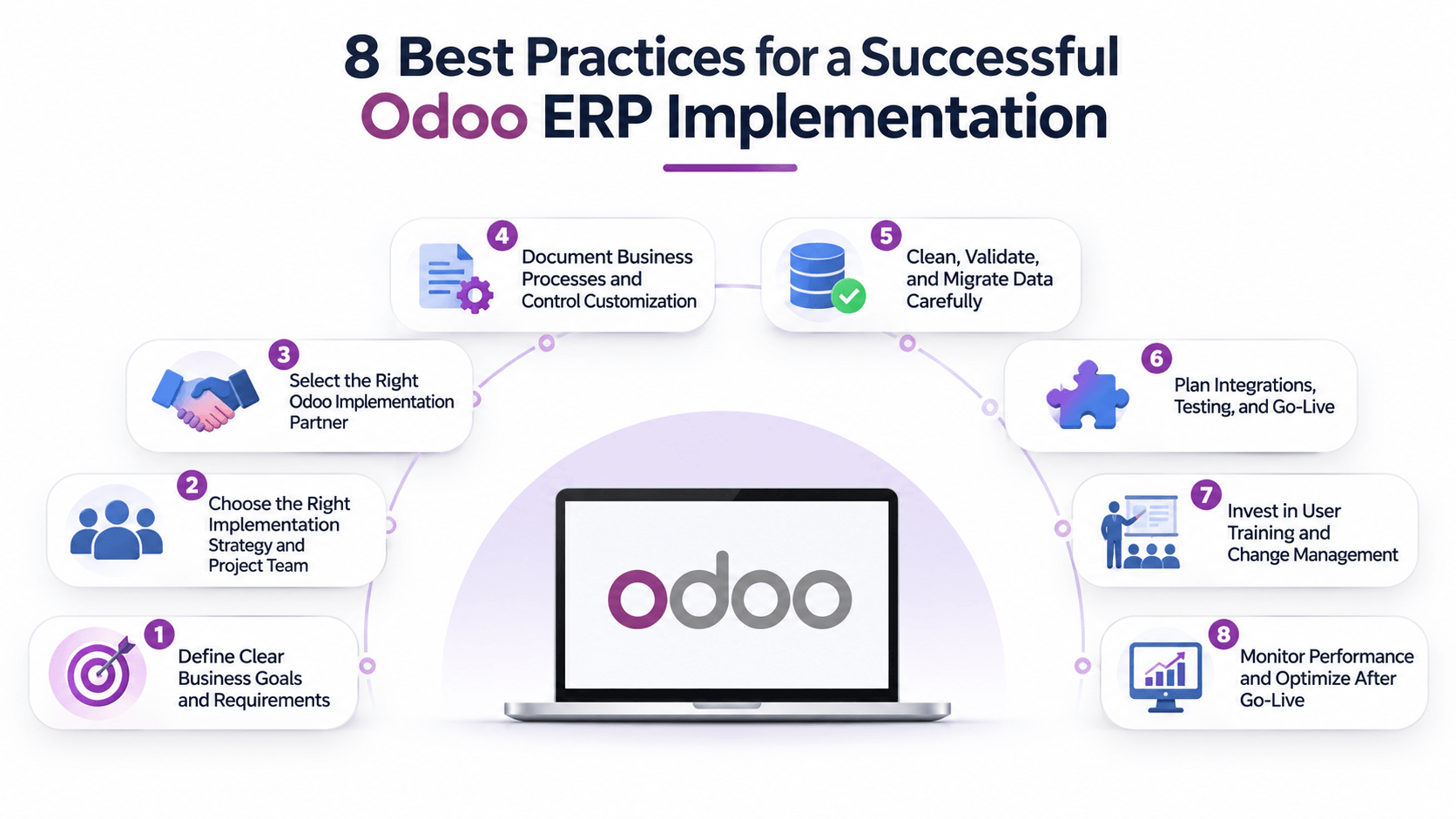
Successful Odoo ERP implementation requires more than configuring modules. It involves clear business goals, the right implementation strategy, accurate data, and effective team collaboration. The following eight best practices will help you plan implementation, avoid common challenges, and build an ERP system that supports long-term business growth.
1. Define Clear Business Goals and Requirements
Identify what your business needs to improve before selecting Odoo modules. Consult relevant departments to document existing workflows, operational challenges, reporting needs, and manual processes.
Set measurable objectives, such as improving inventory visibility or reducing manual accounting tasks. Document required workflows, applications, integrations, priorities, and acceptance criteria.
Use this ERP readiness checklist to identify potential gaps before implementation.
2. Choose the Right Implementation Strategy and Project Team
Choose a rollout strategy based on business size, process complexity, and available resources. Options include phased implementation, pilot deployment, or a coordinated big-bang rollout.
Establish a project team with an executive sponsor, project manager, departmental process owners, and technical specialists. Involve end users in requirements reviews and testing to ensure the solution supports daily operations.
3. Select the Right Odoo Implementation Partner
An experienced Odoo ERP implementation partner should understand both Odoo functionality and your business processes.
Evaluate potential partners based on their experience with module configuration, integrations, data migration, testing, and post-launch support. Clarify project scope, responsibilities, deliverables, customization ownership, and support arrangements before committing.
Review your internal requirements using the ERP readiness checklist before finalizing your implementation approach.
4. Document Business Processes and Control Customization
Conduct a fit-gap analysis to compare business requirements with standard Odoo functionality.
Use standard features wherever possible and consider Odoo customization only when essential requirements cannot reasonably be met through configuration or integrations. Evaluate development costs, maintenance needs, testing, and future upgrades before approving custom features.
Document approved changes and use a formal process to control additional requests.
5. Clean, Validate, and Migrate Data Carefully
Odoo data migration involves transferring essential business information from existing systems into Odoo. Inaccurate or duplicate records can affect reporting, inventory, and financial operations.
Follow these steps:
Review existing business data.
Remove duplicate and outdated records.
Map source fields to Odoo fields.
Test imports in a non-production environment.
Validate records and important totals.
Resolve errors before final migration.
Odoo's official data import documentation explains the import process and available validation options.
Panorama Consulting Group's 2025 ERP Report found that 63.6% of respondents with projects running over schedule cited data issues as a reason for delays. This highlights the importance of proper migration planning.
6. Plan Integrations, Testing, and Go-Live
Identify required integrations with e-commerce platforms, payment providers, shipping services, and other business applications early in the project.
Test complete workflows rather than individual modules. For example, verify the process from sales order creation through inventory, delivery, invoicing, and accounting.
Include functional testing, integration testing, user acceptance testing (UAT), data validation, and access checks. Odoo's testing documentation explains testing methods for developers.
Before go-live, confirm data readiness, user access, acceptance criteria, cutover responsibilities, and contingency procedures.
7. Invest in User Training and Change Management
Provide role-based training so employees understand how to use Odoo for their daily responsibilities. Use practical scenarios, quick-reference guides, and hands-on sessions.
Explain upcoming changes before deployment and involve employees in testing. Appoint knowledgeable users within departments to support colleagues after launch.
Monitor recurring errors and training gaps to improve Odoo user adoption. Panorama Consulting Group's 2025 ERP Report found that only 30.2% of surveyed organizations reported an intense focus on organizational change management.
8. Monitor Performance and Optimize After Go-Live
Going live does not mean implementation is complete. Review system performance against the original business objectives.
Monitor workflow completion, data accuracy, user adoption, integration errors, and operational improvements. Assign owners to review results and prioritize issues.
Also plan ongoing maintenance and future upgrades. Businesses using custom modules should review Odoo's customized database upgrade documentation to understand upgrade preparation requirements.
Odoo ERP Implementation Checklist
Use this high-level checklist to confirm that key implementation activities have been addressed. The detailed plan should reflect your project's scope and risk.
Before implementation
Define business goals and requirements.
Document workflows and project scope.
Confirm budget, team, and rollout strategy.
During implementation
Complete fit-gap analysis.
Clean and migrate business data.
Configure modules and integrations.
Test workflows and train employees.
Before go-live
Complete user acceptance testing.
Validate migrated data and user access.
Approve the cutover and contingency plans.
After go-live
Monitor workflows and resolve issues.
Collect user feedback.
Review performance and plan improvements.
For more detailed preparation, use Aspire SoftServ's ERP readiness checklist and refer to its Odoo ERP Implementation Checklist: A Step-by-Step Guide for Successful Deployment.
How Do You Measure Odoo ERP Implementation Success?
Odoo ERP implementation success should be measured against the business objectives agreed upon before the project began. Installing modules or completing deployment milestones shows that work has been delivered, but it does not establish whether the system has improved operations.
Choose a small set of relevant measures and record the baseline before implementation. Depending on the project, these may include:
Process efficiency: Time required to complete a key workflow, such as order processing or month-end reporting.
Data quality: Accuracy and completeness of important records.
User adoption: Whether employees consistently use the intended Odoo workflows.
Operational reliability: Frequency of critical errors, failed integrations, and unresolved issues.
Project delivery: Performance against the agreed scope, timeline, and budget.
Business outcomes: Progress toward the specific operational or financial objectives established at the outset.
Record baseline performance before implementation and review results regularly after go-live.
Build a More Successful Odoo ERP Implementation
A successful Odoo ERP implementation requires clear planning, accurate data, controlled customization, proper testing, and employee involvement. Businesses should also monitor results after go-live and continuously improve their workflows.
If your organization is planning an implementation or reviewing its existing ERP setup, explore Aspire SoftServ's Odoo implementation services to discuss your business requirements.
Frequently Asked Questions
What are the best practices for Odoo ERP implementation?
Define clear goals, document requirements, control customization, prepare data, test workflows, train employees, and monitor performance after go-live.
How long does an Odoo ERP implementation take?
The timeline depends on business size, applications, integrations, data migration, and customization requirements. Establish a realistic schedule after assessing project scope.
Should you customize Odoo or use standard features?
Prioritize standard Odoo functionality. Use custom development only when essential business requirements cannot be met through standard features or suitable integrations.
Why is data migration important in Odoo implementation?
Accurate data migration helps maintain reliable records, reporting, inventory information, and business workflows.
Is an Odoo implementation partner necessary?
An internal team may handle simpler implementations, while complex workflows, integrations, and custom development may require an experienced implementation partner.
What should businesses do after Odoo goes live?
Monitor workflows, resolve issues, support employees, validate data, and review performance against business objectives.
Make your Odoo implementation future-ready

Ramesh Karangiya is an ERP leader with extensive experience delivering enterprise solutions across the IT and services industry. With hands-on expertise in Odoo, web technologies, and Java-based frameworks, he builds stable, well-integrated ERP systems that improve process efficiency and scale with business growth.