

Key Takeaways
Odoo integration connects ERP with third-party applications such as Shopify, WooCommerce, PayPal, CRM, shipping, and marketing tools to automate workflows and reduce manual tasks.
Businesses can use ready-made connectors, REST APIs, webhooks, or middleware depending on their integration requirements and customization needs.
Successful integration requires proper requirement planning, compatibility checks, accurate data mapping, configuration, testing, and continuous monitoring.
Defining data ownership and mapping fields such as product SKUs, customer IDs, and order references helps prevent duplicate and inconsistent records.
Secure authentication, error handling, synchronization monitoring, and regular compatibility checks are essential for reliable integrations.
The right integration approach depends on business workflows, application compatibility, customization requirements, and ongoing maintenance needs.
Businesses often use multiple applications to manage different parts of their operations, from payment processing and eCommerce to marketing and customer management. Connecting these tools with Odoo helps bring business workflows together, making data exchange easier and reducing manual tasks.
Whether you want to integrate payment gateways like PayPal, eCommerce platforms like Shopify, or marketing tools such as Mailchimp, Odoo integration with third-party applications allows you to connect your existing tools with your ERP system.
By automating processes and synchronizing data across platforms, businesses can save time, minimize repetitive work, and focus more on growth. Depending on their requirements, they can use ready-made connectors or opt for Odoo custom integration to support specific workflows and application needs.
With the right Odoo third-party integration approach, businesses can streamline operations, improve data consistency, and get more value from the tools they already use.
What Is Odoo Integration With Third Parties?
Odoo integration with third parties involves connecting Odoo ERP with external software, services, or platforms to exchange data and coordinate workflows. Depending on the integration, information may move automatically, in response to an event, or through a scheduled synchronization.
For example, an online store can send order details to Odoo, where the sales and inventory teams can process them. Payment information or shipment updates may also flow between the connected systems.
A well-planned Odoo application integration reduces manual work, improves data consistency, and supports ERP workflow automation. It can also help businesses consolidate information for improved reporting and analytics without replacing every application they already use.
Which Third-Party Applications Can You Integrate With Odoo?
The applications worth connecting depend on your existing systems and business requirements. Common integration categories include:
eCommerce Platforms
Connecting Odoo with platforms such as Shopify or WooCommerce can help synchronize orders, product information, inventory, and customer details. Businesses should confirm connector capabilities and determine which system manages each type of data.
This type of Odoo ERP software integration can help maintain consistent information between an online store and the ERP system.
Payment Gateways
Payment integrations can connect transaction information with Odoo's sales and accounting workflows. Depending on the provider and configuration, businesses may be able to track payment status, reconcile transactions, and reduce manual financial updates.
Shipping and Logistics Applications
Shipping integrations can transfer order and delivery information between Odoo and supported carrier platforms. They may help teams generate shipping labels, retrieve tracking updates, and coordinate order fulfillment.
CRM, Marketing, and Financial Tools
CRM integration can synchronize customer records, leads, and sales information between Odoo and external customer management tools. Marketing integrations can support campaign workflows, while financial integrations can exchange relevant transaction or accounting data.
The important consideration is not simply whether two applications can connect. Their integration should support a clear workflow and maintain accurate records across systems.
What Are the Different Methods of Odoo Third-Party Integration?
Businesses can choose from several approaches based on the complexity of their workflows, available connectors, and technical requirements. The right Odoo system integration method depends on the applications involved and the level of customization required.
Ready-Made Connectors
Existing connectors or integration modules can be suitable when a supported solution already covers the required workflow. They may reduce development effort, but businesses should review maintenance, available features, security, and Odoo version compatibility before selecting one.
API-Based Integration
REST API integration allows applications to exchange data through supported endpoints. It is useful when a business needs specific data flows or functionality that an existing connector does not provide.
Odoo custom integration may involve API development, authentication, field mapping, and error handling to connect systems according to business requirements. The available API capabilities depend on the Odoo version, hosting arrangement, and external application's API.
Webhooks and Middleware
Webhooks can notify another system when a supported event occurs, helping trigger timely updates. Middleware or integration platforms can coordinate data flows between multiple applications, transform information, and centralize parts of the integration logic.
| Integration method | Best suited for | Main consideration |
|---|---|---|
| Ready-made connector | Common, supported workflows | Compatibility and maintenance |
| API integration | Customized data exchange | Development and ongoing support |
| Webhooks | Event-triggered updates | Failure handling and delivery reliability |
| Middleware | Workflows involving multiple systems | Additional configuration and monitoring |
How to Integrate Third-Party Applications With Odoo
A successful Odoo integration development project starts with the business workflow rather than the technology alone.
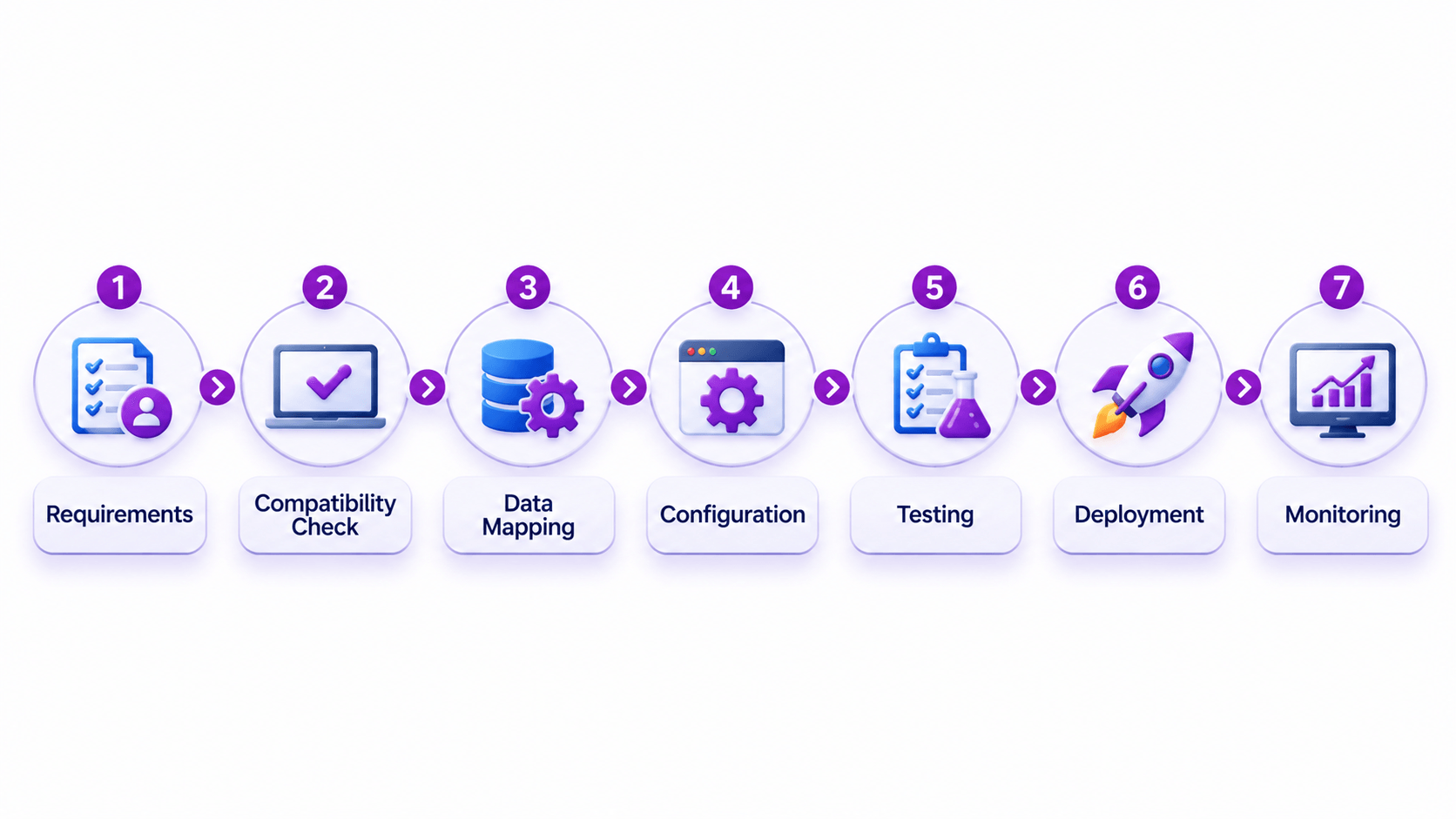
Step 1: Define Integration Requirements
Identify the problem the integration should solve. Determine which processes need to be connected, what data must move between systems, and whether updates should happen instantly or on a schedule.
For a custom Odoo integration for business applications, define the expected outcomes and workflow requirements before selecting a technical approach.
Step 2: Check Compatibility and API Access
Review the Odoo version, hosting environment, external application's API, authentication requirements, and available connectors. Confirm that both systems support the required operations before selecting an implementation approach.
Checking Odoo version compatibility at this stage can help prevent issues during development and future upgrades.
Step 3: Map Data Fields Between Systems
Determine how fields correspond across applications. For example, match product SKUs, customer identifiers, order references, and payment statuses. Define which system owns each field to avoid conflicting updates and duplicate records.
Step 4: Configure the Integration
Choose the appropriate connector, API-based approach, or middleware. Configure authentication, data transformations, synchronization rules, and permissions according to the intended workflow.
Depending on the requirements, Odoo customization may be needed to support specific business rules or workflows that standard connectors cannot handle.
Step 5: Test and Deploy the Integration
Test normal transactions as well as missing fields, duplicate requests, failed connections, and unexpected responses. For an eCommerce integration, verify that an order reaches Odoo correctly and that the relevant inventory and order statuses remain consistent.
Deploy after the critical workflows pass testing and the team understands how to identify integration failures.
Step 6: Monitor Integration Performance
After launch, review synchronization logs, failed requests, processing delays, and unexpected data changes. Establish a process for investigating errors and updating the integration when connected applications change.
Best Practices for Odoo Third-Party Integration
A reliable integration requires ongoing attention, not just a successful initial setup. Follow these practices to maintain a dependable integration architecture:
Define data ownership: Decide which application controls each important record or field.
Secure credentials: Use appropriate authentication, restricted permissions, and secure credential storage.
Plan for failures: Implement suitable error handling, retries, and duplicate-request protection where supported.
Monitor data flows: Track failed synchronizations and investigate recurring errors.
Document the setup: Record field mappings, dependencies, and recovery procedures.
Review compatibility: Reassess integrations when Odoo or the external application is upgraded.
These practices help maintain a dependable integration architecture and reduce avoidable operational disruptions.
Common Challenges in Odoo Integration
Businesses may encounter several issues during implementation and maintenance. Understanding common challenges in Odoo integration can help teams plan for them before deployment.
Compatibility problems: Different versions or unsupported API operations can prevent the intended connection. Verify compatibility before development.
Data inconsistencies: Incorrect field mapping can create inaccurate or duplicate records. Test mappings and define data ownership.
Synchronization failures: Network interruptions, API limits, or unavailable services can delay updates. Use appropriate monitoring and error recovery.
Maintenance requirements: Changes to an external API or connector can affect existing workflows. Document dependencies and test updates before deployment.
Addressing these risks during planning makes Odoo system integration easier to manage over time.
Plan Your Odoo Integration Around Business Workflows
Odoo integration with third parties helps businesses connect existing applications, coordinate workflows, and reduce manual data handling. Choosing the right integration method, mapping data accurately, testing critical processes, and monitoring performance are essential to maintaining reliable connections.
Whether a ready-made connector is sufficient or custom development is required, the approach should support the business's actual operational needs. Businesses that need tailored Odoo Integration solutions can evaluate their requirements and determine whether standard connectors or Odoo Customization are more suitable for their workflows.
Frequently Asked Questions
1. What Applications Can Be Integrated With Odoo?
Odoo can integrate with eCommerce platforms, payment gateways, CRM systems, shipping applications, accounting software, and marketing tools.
2. Does Odoo Have an API for Third-Party Integration?
Yes. Odoo provides API capabilities that allow external applications to exchange data with its ERP system.
3. Can Odoo Synchronize Data Between Two Applications Automatically?
Yes. Odoo supports automatic data synchronization through APIs, connectors, and webhooks, depending on the integration setup.
4. What Is the Difference Between an Odoo Connector and Custom API Integration?
A connector provides predefined integration features, while custom API integration supports specific business workflows and requirements.
5. Can Odoo Online Integrate With Third-Party Applications?
Yes. Odoo Online supports external integrations, but API access and customization options depend on the subscription plan.
6. How Much Does Odoo Third-Party Integration Cost?
The cost depends on the number of applications, integration complexity, customization requirements, and ongoing maintenance.
7. What Are the Common Challenges in Odoo Third-Party Integration?
Common challenges include API compatibility, data mapping errors, synchronization failures, security issues, and ongoing maintenance.

Ramesh Karangiya is an ERP leader with extensive experience delivering enterprise solutions across the IT and services industry. With hands-on expertise in Odoo, web technologies, and Java-based frameworks, he builds stable, well-integrated ERP systems that improve process efficiency and scale with business growth.