

 Updated on 25 August 2026

Odoo 20 Release Status: What We Know
Odoo 20 is officially announced, but it has not yet been released. Odoo's official Odoo Experience 2026 page says the latest version will be released during the event, where businesses can get an early look at its new features. The event runs from September 24–26, 2026, with an opening keynote titled “Unveiling Odoo 20.”
That means the complete feature list is still to come. However, Odoo's official event program already gives businesses a clear view of the areas to watch, including AI, automation, eCommerce, Accounting, Inventory, HR, MRP, CRM, Sales and development.
For businesses, the important question is not simply which features are new.
Which changes can improve your processes, reduce manual work, support your team, and help your business scale?
What Are the Latest Odoo 20 Features?
The key Odoo 20 latest features currently being highlighted point toward a more AI-driven, automated, and connected ERP experience. Since Odoo 20 has not yet been officially released, these are the main areas businesses should watch based on Odoo's current previews and Odoo Experience 2026 program.
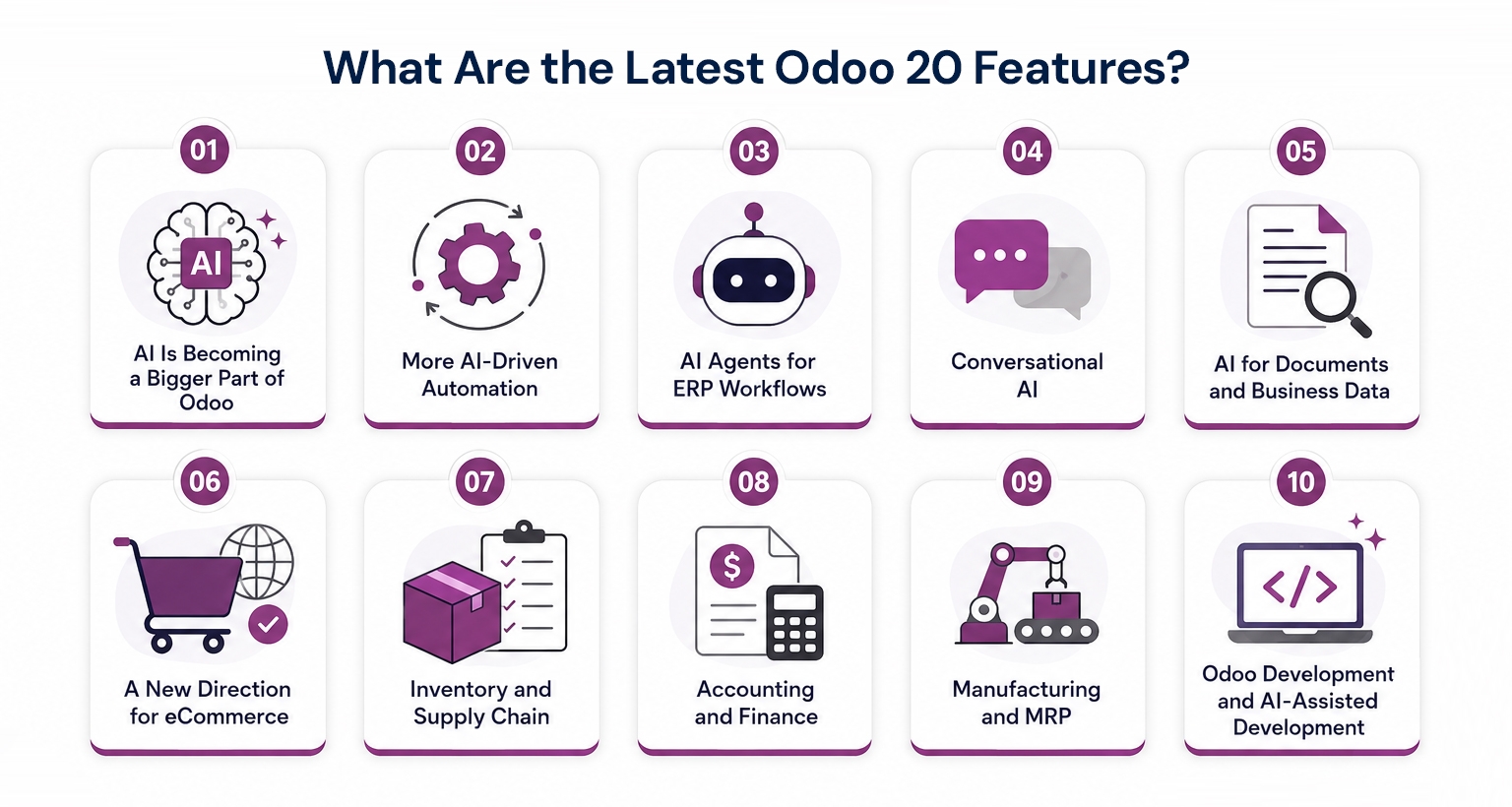
1. AI Is Becoming a Bigger Part of Odoo
AI is one of the strongest themes around Odoo 20, with the Odoo 20 AI features focusing on program highlights AI innovations, AI agents, conversational AI, smart automation, MCP integrations, and AI-native ERP.
The focus of these Odoo 20 AI features for businesses is bring AI closer to everyday ERP work, helping teams access information, manage records, and complete routine tasks more efficiently.
2. More AI-Driven Automation
Odoo 20 automation is moving toward smarter workflows that can use AI to make decisions and reduce repetitive manual work.
Odoo's AI program specifically highlights creating smart automation actions with AI, while its current AI capabilities include using AI within workflows to assign leads, update records, organize documents, and determine the next action.
This could help businesses automate activities such as:
Lead management
Customer support
Document handling
Data entry
Follow-ups
Record updates
Odoo VoIP
The important part is to automate the right process. AI can make a good process faster, but it cannot fix a poorly designed one.
2.1 Odoo 20 VoIP: Design Your Own Call Flows
Odoo 20 is also bringing more flexibility to business communication with a new VoIP call-flow capability. Businesses can design their own incoming and outgoing call flows, while phone numbers can be purchased directly through Odoo in a few clicks.
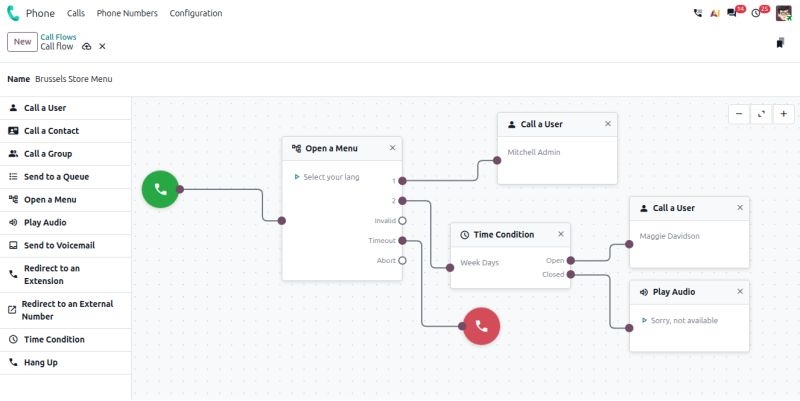
This can help businesses create call handling that better matches their own workflows, instead of relying on a fixed call structure.
3. AI Agents for ERP Workflows
AI agents are another important area to watch.
Odoo describes AI agents as assistants that can understand natural language, work with business information, and interact with Odoo tools to perform tasks. Odoo's 2026 program also includes a dedicated session on AI agents and RAG models.
This could make Odoo 20 ERP workflows more practical by helping users retrieve information, complete tasks, or trigger actions without manually moving through multiple screens.
4. Conversational AI
Odoo is also highlighting conversational AI for tasks such as smart search, email writing, creating records, and working faster inside Odoo.
Instead of navigating through several menus, users could increasingly interact with business information using natural language.
5. AI for Documents and Business Data
AI is also being applied to documents and business information, including document classification, information extraction, workflow triggers, and querying data.
This can help businesses make better use of invoices, contracts, customer documents, internal knowledge, and operational records.
6. A New Direction for eCommerce
Odoo 20 eCommerce is another area businesses should watch.
Odoo's 2026 program includes a new website experience in Odoo 20, along with AI-powered content, smart eCommerce, product recommendations, promotions, inventory, payments, shipping, returns, and loyalty.
The bigger opportunity is connecting these activities with the wider ERP rather than managing the website, orders, inventory, payments, and fulfillment separately.
7. Inventory and Supply Chain
Inventory remains an important part of the Odoo 20 program, with Odoo Experience covering Inventory, Purchase, Barcode, and supply-chain operations.
For businesses, areas to watch include purchasing, stock management, warehousing, replenishment, and supply-chain coordination.
The final release documentation should confirm which capabilities are new or changed.
8. Accounting and Finance
Accounting is also receiving dedicated attention around Odoo 20, including areas such as accounting reports, invoicing, payments, taxes, documents, reconciliation, analytics, budgets, and reporting.
For finance teams, the bigger benefit is connecting financial information with sales, purchasing, inventory, and other business operations.
9. Manufacturing and MRP
Manufacturing remains another important part of the Odoo ecosystem.
Odoo Experience 2026 includes dedicated manufacturing content alongside Inventory, Accounting, Development, and other applications.
For manufacturers, the focus should be on how Odoo connects production, inventory, purchasing, and operational workflows rather than simply counting new features.
10. Odoo Development and AI-Assisted Development
Odoo 20 is also expected to bring continued attention to Odoo Development, Odoo Studio, Odoo.sh, and AI-assisted development. Odoo Experience 2026 includes dedicated masterclasses covering these areas.
AI can help development teams work faster, but architecture, testing, security, and technical review remain essential for reliable and scalable Odoo development.
Odoo 20 Improvements Across Key Business Modules
Along with AI and automation, Odoo 20 is also bringing improvements across core business modules, helping businesses manage everyday operations more efficiently and keep information connected across teams.
Sales: More Connected Sales Workflows
Odoo 20 continues to improve the Sales experience by connecting quotations, sales orders, customers, inventory, and invoicing more closely. This can help sales teams reduce manual work and get better visibility across the sales process.
Contacts: Better Customer Information Management
The Contacts module remains central to managing customer and business information across Odoo. With more connected workflows, accurate contact data can help teams work more smoothly across Sales, CRM, Accounting, and other business functions.
Accounting: Smarter Financial Workflows
Accounting is another key area of focus in Odoo 20, with improvements around accounting reports, bank synchronization, automation, invoicing, payments, and reconciliation. The goal is to reduce repetitive financial work while giving finance teams better visibility into business performance.
Odoo 19 vs Odoo 20: What Should Businesses Expect?
For businesses currently using Odoo 19, the question is not simply whether Odoo 20 is newer.
The better question is whether the new capabilities address a real business requirement. Based on Odoo's current official previews, the direction can be understood like this:
| Area | Odoo 19 | Odoo 20 Direction |
|---|---|---|
| AI | Growing AI capabilities | Stronger focus on AI and agents |
| Automation | Workflow automation | More AI-driven automation |
| User Interaction | Traditional ERP interaction | More conversational interaction |
| eCommerce | Integrated eCommerce | New website and eCommerce experience |
| Development | Odoo development tools | Greater AI-assisted development |
What Should Businesses Prepare Before Odoo 20?
Whether you are planning a new Odoo implementation or considering an upgrade, preparation should start with understanding your business processes, data, integrations, customizations, and team readiness. An ERP readiness checklist can help you review these areas before moving forward and ensure the ERP supports your actual business needs.
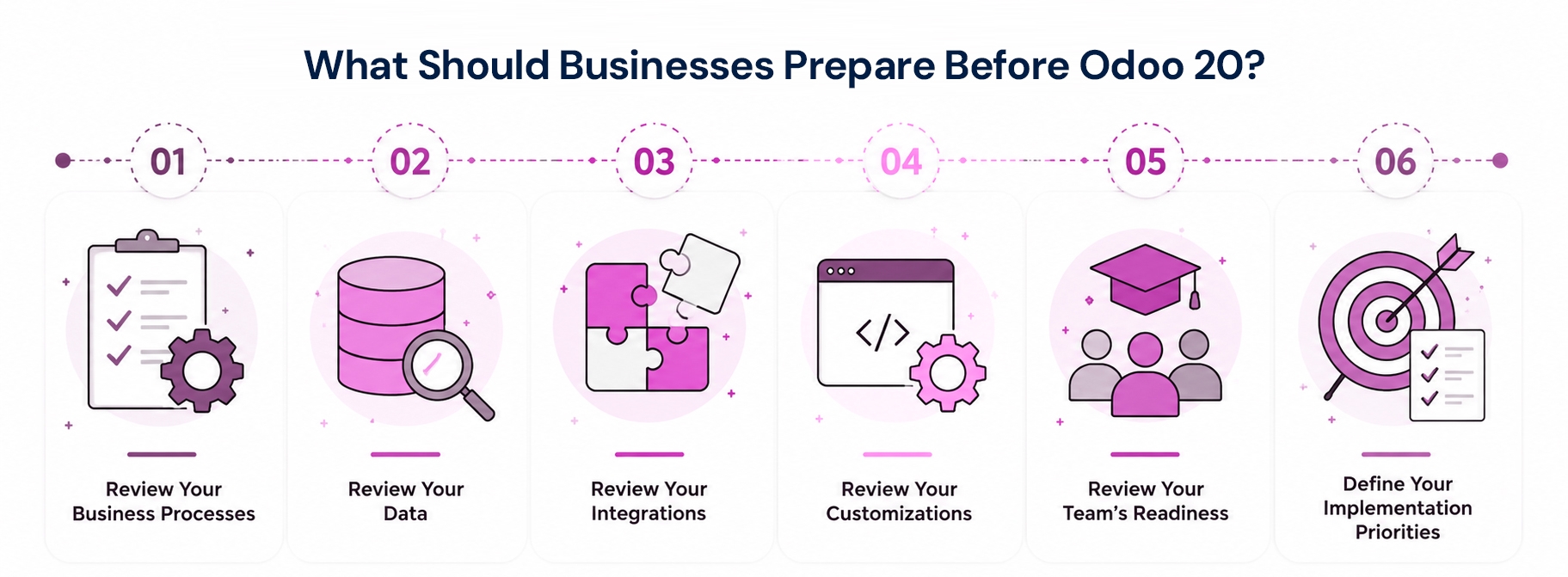
Review Your Business Processes
Start by looking at how your teams currently manage their daily work. Identify processes that are repetitive, time-consuming, inefficient, or difficult to manage. Pay attention to areas where teams rely heavily on spreadsheets, manual data entry, or disconnected tools. Understanding these gaps helps you see where Odoo can simplify operations. It also gives your team a clearer starting point for planning the implementation.
Review Your Data
Before moving to a new Odoo setup or upgrading your existing system, review the quality of your business data. Check whether customer, supplier, product, inventory, and financial information is accurate, complete, and properly organized. Remove outdated or duplicate records where possible. Clean and reliable data makes implementation easier and helps your teams work with more accurate information after the system is in place.
Review Your Integrations
Identify all external systems that currently support your business and determine which ones need to connect with Odoo. These could include payment platforms, eCommerce systems, CRM tools, accounting applications, shipping services, or other business software. Understanding these connections early helps define your integration requirements. It also reduces the risk of disconnected systems or unexpected issues during implementation.
Review Your Customizations
If you already use Odoo, review the custom features and modifications built into your current system. Identify which customizations are still important for your business and which ones may no longer be necessary. Some processes may now be possible using standard Odoo functionality. Reducing unnecessary customizations can make the system easier to maintain, upgrade, and manage over time.
Review Your Team's Readiness
An ERP change affects the people who use it every day, so your team should be part of the preparation process. Identify the employees and departments that will use Odoo and understand how their daily work may change. Consider what training they will need and where they may require additional support. Preparing users early can make adoption smoother and help teams feel more comfortable with the new workflows.
Define Your Implementation Priorities
You do not need to implement every feature or process at the same time. Start by identifying the areas that have the biggest impact on your business, such as sales, finance, inventory, manufacturing, or customer management. Prioritize the processes that need improvement most and plan other changes in manageable stages. This approach can make the implementation more focused, practical, and easier for your team to manage.
What Does Odoo 20 Mean for Businesses?
The direction of Odoo 20 is clear: ERP is becoming more intelligent, automated, and connected. AI is moving deeper into everyday workflows, while eCommerce, inventory, accounting, manufacturing, and development continue to evolve. For businesses, the real opportunity is not simply having access to more features, but using the right capabilities to reduce manual work, improve visibility, and make everyday operations more efficient.
The real value of Odoo 20 will depend on how well it fits a business's existing processes and future goals. Instead of evaluating an ERP by its feature list alone, businesses should first understand where they are losing time, visibility, or efficiency and then identify which Odoo capabilities can address those gaps. If you're considering Odoo for your business, Aspire SoftServ can help you assess your requirements, understand where Odoo fits your processes, and determine the right approach for implementation or upgrade.
Frequently Asked Questions
Is Odoo 20 officially released?
No. As of August 18, 2026, Odoo's official release page lists Odoo 19.4 as the latest released version. Odoo has officially announced Odoo 20 and says it will be released during Odoo Experience 2026.
How is AI in Odoo 20 different from previous Odoo versions?
Odoo 20 puts greater emphasis on bringing AI directly into everyday business workflows. Instead of using AI mainly as an assisting feature, the focus is moving toward AI agents, intelligent automation, conversational interaction, and AI-powered actions within the ERP.
Will Odoo 20 include AI features?
AI is a major focus of Odoo's Odoo 20 program. Odoo's official 2026 AI event specifically includes sessions on AI innovations in Odoo 20, conversational AI, smart automation, AI agents, MCP integrations and AI-native ERP.
Should businesses using Odoo 19 upgrade to Odoo 20?
It depends on the business. Before upgrading, review your current processes, customizations, integrations, data and business requirements. The decision should be based on the value the new version can provide rather than simply moving to a newer version.
Is Odoo 20 suitable for small and growing businesses?
Yes. Odoo can be adapted to different business sizes, allowing smaller businesses to start with the applications they need and expand as their operations grow. This makes it useful for businesses looking for an ERP that can scale with them.
Planning an Odoo Implementation or Upgrade?