
Key Takeaways
Odoo 19.3 already offers AI-agent capabilities for creating and updating ERP records, while Odoo 19.4 adds Model Context Protocol (MCP) support.
Odoo 20 takes agentic automation further, allowing configured AI agents to execute business workflows through automated and scheduled actions.
Upgrade to Odoo 20 when its AI capabilities solve measurable business problems, such as repetitive tasks and disconnected workflows.
Assess migration readiness before upgrading, including custom modules, third-party integrations, database integrity, testing, and AI permissions.
Staying on Odoo 19.3 or 19.4 can be practical when existing workflows meet business requirements and the benefits of upgrading do not yet justify the cost and effort.
Odoo's latest releases are changing how businesses automate ERP workflows. Odoo 19.3 introduced AI agents that can create and update records, while Odoo 19.4 added Model Context Protocol (MCP) support. Odoo 20 takes this further with agentic automation, allowing businesses to configure AI agents to execute workflows from natural-language instructions.
For businesses running Odoo 19.3, the decision is no longer simply whether to upgrade now or wait for Odoo 20. It is whether Odoo 20's additional capabilities justify the cost, compatibility work, testing, and operational changes involved in another ERP version upgrade.
Upgrade to Odoo 20 if its confirmed AI and workflow capabilities solve important business problems and your system is ready for migration. If Odoo 19.3 or 19.4 already meets your needs, staying on your current version while assessing the business case may be more practical.
Odoo 19.3 vs Odoo 20: What's the Difference?
The most relevant difference is how AI can participate in business processes. Odoo 19.3 introduced useful AI-assisted record creation and updates. Odoo 19.4 expanded connectivity through MCP. Odoo 20 adds agentic automation that can run through configured automated and scheduled actions.
| Area | Odoo 19.3 | Odoo 19.4 | Odoo 20 |
|---|---|---|---|
| AI agents | Create and update records, including from uploaded instructions | Builds on the existing AI capabilities | Adds agentic automation that can be triggered by automated and scheduled actions |
| External AI connectivity | Evaluate available integrations for your setup | Adds MCP server support | Includes AI and MCP-related capabilities in the broader release |
| Workflow automation | AI-assisted tasks and existing ERP automation | More options for connecting external AI tools | Agents can execute configured workflows based on instructions |
| Business applications | Improvements across accounting, manufacturing, eCommerce, inventory, and mobile use | Additional manufacturing, accounting, logistics, and commerce improvements | Further changes across AI and core business applications |
| Upgrade decision | Suitable when current capabilities meet business needs | Relevant for businesses that need its specific improvements | Worth evaluating when new capabilities provide sufficient business value |
What Is New in Odoo 20's Agentic AI?
Agentic AI refers to AI systems that can do more than generate suggestions or answer questions. Within a configured ERP workflow, an AI agent can interpret instructions, perform supported actions, and work toward a defined task, subject to its permissions and available tools.
Odoo 20 places greater emphasis on using agents to automate business processes through natural-language instructions. Odoo's official introduction describes examples such as confirming sales orders when matching emails arrive, assigning leads to salespeople, creating projects after contracts are signed, and notifying teams when stock runs low.
1. Automating multi-step business tasks
Consider a sales team that receives orders and requests through email. A workflow might identify an incoming message, check the relevant information, prepare a sales record, and notify the responsible employee.
Without automation, employees may need to move between email, CRM, sales, and inventory screens. A suitable agentic workflow could reduce some of these repetitive steps, depending on how the process is configured and which actions the system supports.
The key benefit is not simply that AI can generate text. It is that AI can participate in a defined sequence of ERP actions.
2. Connecting AI with everyday ERP operations
AI-powered ERP workflows are most useful when they address recurring operational tasks. Potential areas to assess include:
Sales and CRM: Lead assignment, follow-up preparation, and updates to customer records.
Inventory: Notifications or actions triggered by stock thresholds.
Project management: Creating project records when specified business events occur.
Finance: Assisting with information processing and routine administrative workflows supported.
These are examples of workflow opportunities, not a guarantee that every process can run autonomously out of the box. Each use case needs to be checked against the available Odoo features, data structure, permissions, and business rules.
3. Maintaining control over automated actions
Agentic automation does not remove the need for governance. Businesses should determine which actions an agent can perform, which require human approval, and how errors are identified and corrected.
For example, preparing a draft record may carry less risk than confirming a high-value order or changing a financial record. A sensible implementation starts with clearly defined tasks, restricted permissions, logging, testing, and human review for consequential actions.
When Should You Upgrade to Odoo 19.3?
Odoo 19.3 remains relevant to businesses evaluating an upgrade from older versions. It introduced several useful improvements beyond AI, including offline record operations, manufacturing Kanban changes, accounting enhancements, and eCommerce features.
However, the decision to move to Odoo 19.3 should depend on your current version and the improvements you need, rather than on the assumption that 19.3 is the newest release.
Upgrading to 19.3 may be worth evaluating when:
Your existing version lacks the capabilities your business needs now.
Field teams need to support offline record operations.
Your manufacturing team would benefit from the redesigned Kanban view.
Your eCommerce operation needs relevant improvements to product discovery and checkout.
Your finance team can benefit from the accounting changes introduced in 19.3.
You need to move away from an older version and have assessed the supported migration path.
If you are already on Odoo 19.3, the question changes. You should compare the benefits of Odoo 19.4 and Odoo 20 with the costs and risks of upgrading again.
For a detailed breakdown of the existing version, see Odoo 19.3 release notes and features.
When Does It Make Sense to Upgrade to Odoo 20?
Odoo 20 is worth evaluating when its new capabilities address a measurable business need. The presence of AI features alone is not enough to justify an ERP migration.
Your business has repetitive, rule-based workflows
Start by identifying processes that require employees to copy information, update records, assign tasks, or respond to predictable events. If these tasks consume meaningful time and can be safely expressed as supported workflows, agentic automation may offer practical value.
Document the current process before designing the automated version. This makes it easier to assess whether automation will reduce work or simply add complexity.
Your teams need connected workflows
The value of an ERP lies partly in how information moves between functions. If a business event requires repeated manual updates across sales, inventory, and project management, investigate whether Odoo 20 can support a more connected process.
Before committing, confirm the exact actions available, the required configuration, and whether custom modules or third-party integrations need changes.
Your current system is ready for migration
A system with well-maintained customizations, documented integrations, reliable backups, and an established testing process is generally easier to assess for an upgrade than one with undocumented code and fragile dependencies.
Technical readiness does not guarantee a smooth migration, but it helps identify the work needed before the production system changes.
The business value justifies the cost
Compare expected operational benefits with the full cost of the upgrade. Include development, module compatibility work, testing, training, temporary productivity changes, and ongoing AI usage costs where applicable.
Odoo's official Odoo 20 release notes state that AI features require credits purchased through its In-App Purchase (IAP) system. Confirm the current pricing and consumption requirements for your planned use cases before estimating total cost.
What Are the Risks of Upgrading Now or Staying on Your Current Version?
Both choices have trade-offs. An upgrade can introduce technical and operational work, while delaying an upgrade may postpone access to useful features.
Migration and customization compatibility
Custom modules, automated actions, and integrations may need changes after a version upgrade. Do not assume that existing custom code will work without modification.
Create an inventory of customizations and dependencies, identify business-critical functions, and test them against the target version before approving the migration.
Data integrity and business continuity
An ERP upgrade can affect records, permissions, reports, integrations, and workflows. Backups and a tested recovery plan are essential.
The migration should first run in a controlled test environment. Users should validate representative business processes before the upgraded system is approved for production.
AI governance and access permissions
AI agents should only have the access required to perform their assigned tasks. Review what information they can read, which records they can change, and which actions require approval.
For finance, customer data, and other sensitive operations, define review procedures and logging requirements before enabling automation.
The cost of waiting
Remaining on a working version can be sensible when there is no clear business reason to upgrade. But if a newer release can remove a persistent operational bottleneck, delaying evaluation also has a cost.
The right comparison is not simply “newer is better” versus “upgrading is risky.” It is whether the expected business value outweighs the implementation and ongoing operating costs.
How to Decide Between Odoo 19.3 and Odoo 20
Use the following decision table to organize your ERP upgrade planning.
| Decision factor | Consider staying on 19.3 or 19.4 when… | Consider upgrading to Odoo 20 when… |
|---|---|---|
| Current operations | Your existing workflows meet business requirements | Important processes remain unnecessarily manual |
| AI requirements | Existing AI capabilities meet the use case | Odoo 20's confirmed agentic features address a specific need |
| Customizations | The system is stable but dependencies need assessment | Compatibility work is understood, scoped, and feasible |
| Integrations | Critical integrations require more testing | Integration owners confirm a viable migration plan |
| Budget | Upgrade costs outweigh the expected benefit for now | The expected operational value justifies the total cost |
| Team readiness | Users need more time to prepare | Testing, training, ownership, and rollout plans are ready |
Use this table as a starting point rather than an automatic scoring model. A business with one critical integration may face a different decision from a business using mostly standard Odoo modules.
A practical decision rule
Upgrade: A confirmed Odoo 20 capability addresses an important problem, and the technical and financial case is sound.
Prepare first: The feature is valuable, but customizations, integrations, data quality, or testing need attention.
Stay temporarily: Your current version meets business needs, and there is no compelling reason to take on the upgrade work yet.
How to Prepare for an Odoo Version Upgrade
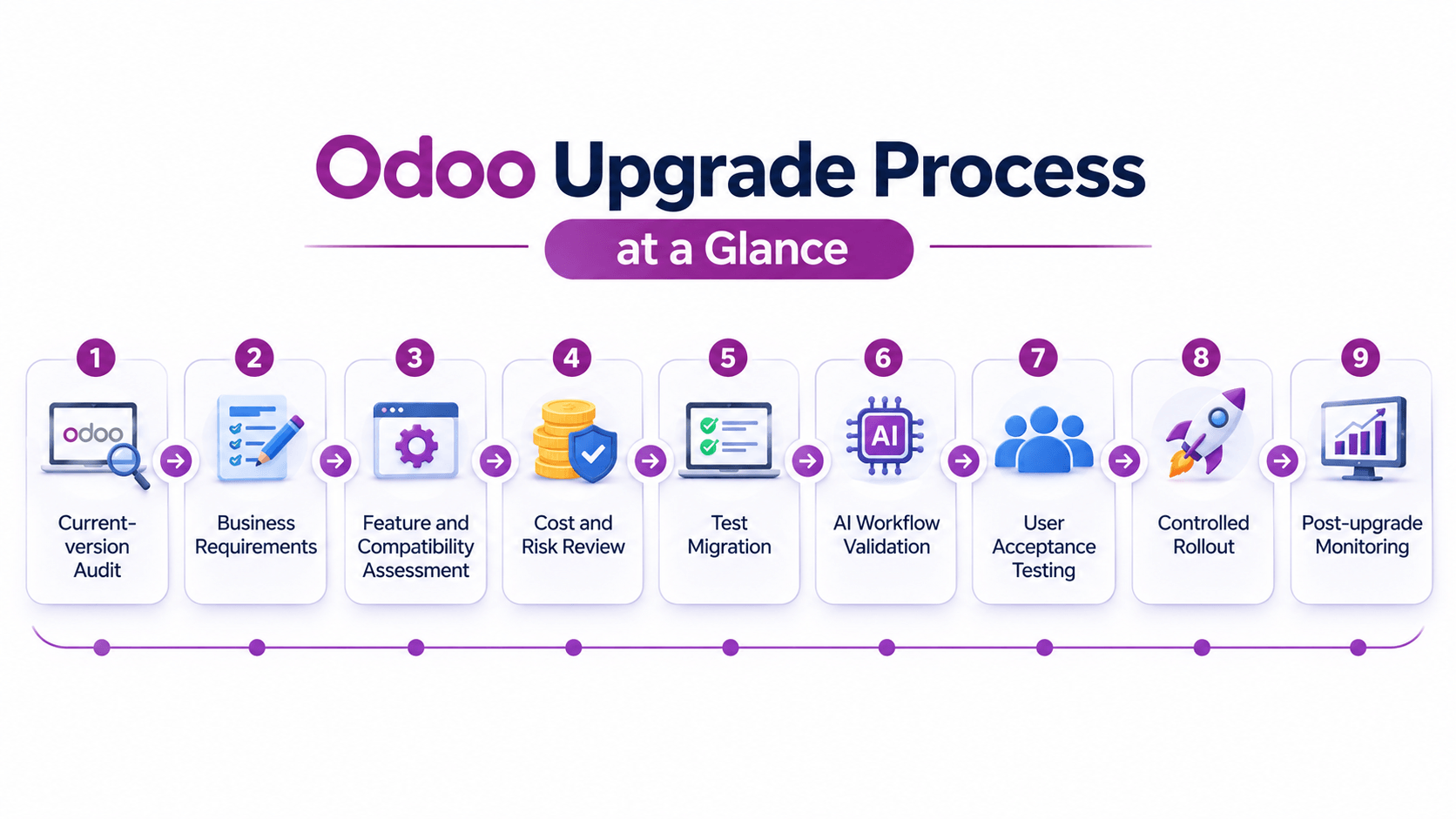
A structured ERP migration process reduces avoidable surprises. Follow these steps before committing to a production upgrade.
Step 1: Audit your current Odoo environment
Record your current version, installed applications, custom modules, integrations, automated actions, and critical workflows. Identify any unsupported or poorly documented dependencies.
Step 2: Map business requirements to target-version features
List the problems you want the upgrade to solve. For each requirement, identify the relevant Odoo 20 capability and verify that it supports the intended workflow.
Avoid upgrading solely because a feature appears in release announcements. Confirm its practical fit first.
Step 3: Estimate the full upgrade cost
Include migration work, custom-code updates, integration changes, testing, training, deployment, and ongoing AI usage costs where relevant.
Use estimates based on your actual environment rather than applying a universal timeline or price.
Step 4: Back up data and test the migration
Prepare backups and a recovery plan. Run the database migration in a test environment and validate records, access rights, reports, and integrations.
Step 5: Test AI workflows and permissions
For each proposed agent, define its objective, permitted actions, expected outputs, failure conditions, and human approval requirements. Test normal cases and edge cases before enabling production automation.
Step 6: Roll out in a controlled way
Train affected users, document changes, and monitor the system after deployment. Where feasible, introduce higher-risk workflows gradually so that problems can be identified before they affect more operations.
Should You Upgrade to Odoo 20 or Stay on Odoo 19.3?
The decision should start with your business requirements, not the release number. Odoo 19.3 introduced useful AI-agent capabilities, and Odoo 19.4 added further improvements, including MCP support. Odoo 20 extends the agentic automation approach and may be valuable for businesses with suitable workflows and a clear implementation plan.
If your current system meets operational needs, take time to evaluate the business case rather than upgrading simply to access a newer version. If Odoo 20 can address meaningful process bottlenecks, assess the feature fit, migration effort, and total cost before proceeding.
A structured review of your current Odoo environment can help you decide whether to stay on your existing version, prepare an upgrade, or move to Odoo 20.
Planning an Odoo upgrade? Explore Aspire SoftServ's Odoo services and discuss your version, customization, integration, and automation requirements with the team.
Frequently Asked Questions
Is Odoo 20's Agentic AI worth upgrading for?
It can be, if its confirmed automation capabilities solve an important business problem. Assess the workflow, implementation effort, permissions, reliability, and ongoing AI usage costs before deciding. A newer AI feature is not automatically a financial or operational benefit.
Can Odoo 19.3 already use AI agents?
Yes. Odoo 19.3 introduced AI-agent capabilities for creating and updating records, including through instructions supplied in an uploaded PDF. Odoo 20 expands the agentic automation direction rather than introducing AI to Odoo for the first time.
What is new in Odoo 20 compared with Odoo 19.3?
One major difference is agentic automation through configured automated and scheduled actions. Odoo 20 also includes changes across business applications. Review the official release notes for the complete list and validate the specific features relevant to your deployment.
Should businesses upgrade from Odoo 19.3 directly to Odoo 20?
First verify the supported upgrade path for your database, hosting arrangement, and installed modules. Then assess customizations, integrations, and testing requirements. The appropriate migration route depends on the current environment, so it should not be assumed without an audit.
What should I check before an Odoo database migration?
Review the current version, custom modules, third-party applications, integrations, data integrity, permissions, backups, and critical workflows. Test the migration in a non-production environment and obtain user acceptance before deployment.
Does Agentic AI eliminate manual work completely?
No. Agents can automate supported tasks, but business rules, data quality, permissions, and exception handling still matter. Human oversight remains important for high-impact decisions and workflows where errors could affect financial, customer, or operational outcomes.

Ramesh Karangiya is an ERP leader with extensive experience delivering enterprise solutions across the IT and services industry. With hands-on expertise in Odoo, web technologies, and Java-based frameworks, he builds stable, well-integrated ERP systems that improve process efficiency and scale with business growth.