

 Updated on 25 May 2026

What Is Odoo 19.3 and Why Does It Matter?
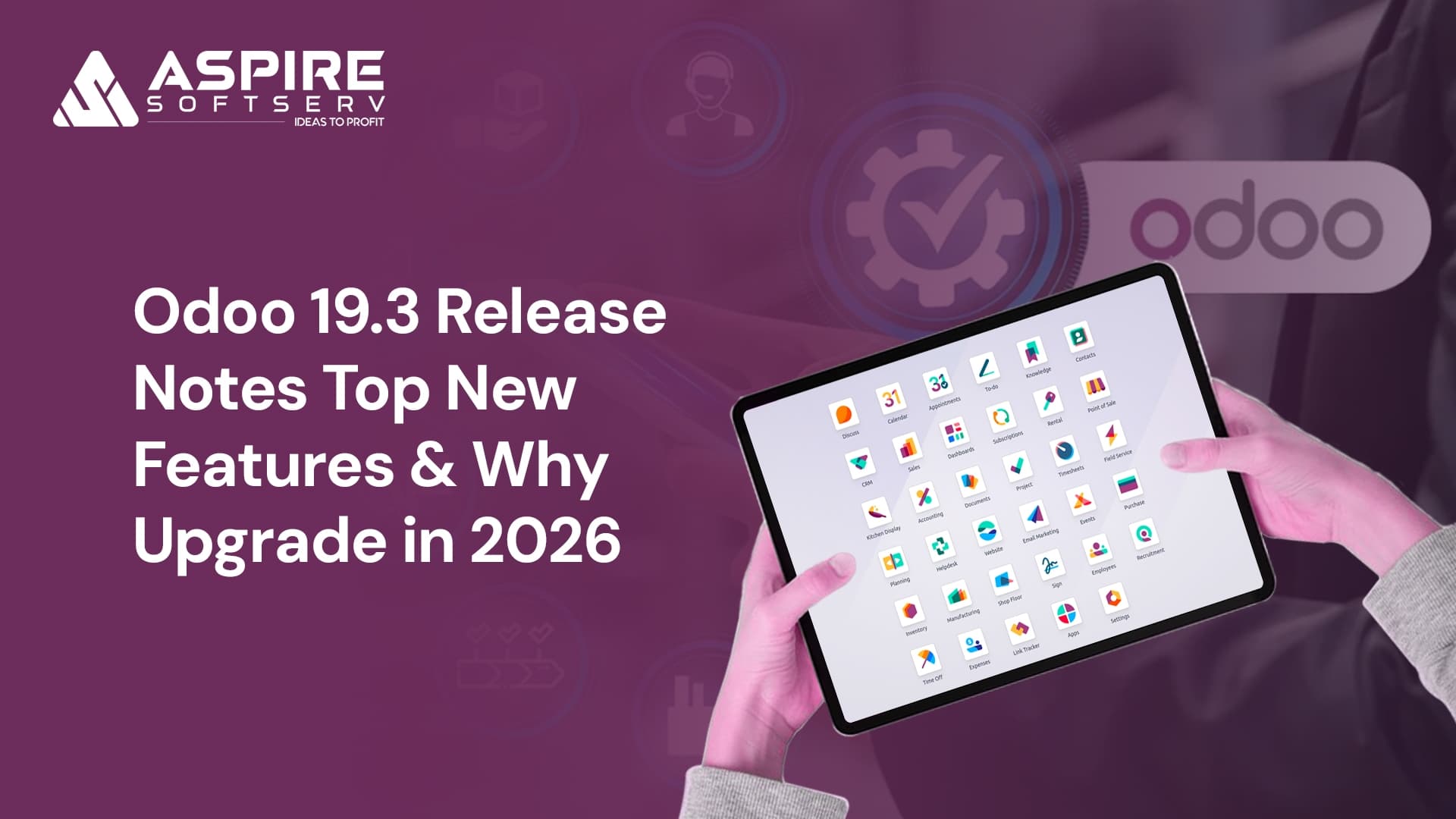
Odoo 19.3, released in May 2026, is the latest version of Odoo ERP. It introduces AI agents that create and update records autonomously, offline-first mobile capabilities, a redesigned Manufacturing Kanban view, conversion-focused eCommerce features, and dozens of productivity improvements across more than 35 modules.
If you are running Odoo 17, 18, or an earlier version of 19, you are missing capabilities that are already shaping how competitive businesses operate AI-driven automation, field-ready mobility, and modern eCommerce conversion tools.
This guide breaks down every major Odoo 19.3 feature, what it means for your industry, and exactly why May 2026 is the right window to act.
About the author: Aspire SoftServ is an official Odoo Ready Partner working with businesses across India in manufacturing, retail, eCommerce, construction, and services. This article is based on direct analysis of the official Odoo 19.3 release notes published by Odoo S.A. in May 2026.
What's New in Odoo 19.3? A Feature-by-Feature Overview
Odoo 19.3 ships improvements across more than 35 modules. Here is a structured overview before we dive deep into the highest-impact areas.
General & Mobile Improvements
Offline actions: Create, edit, archive, and delete records without an internet connection.
Mobile form view redesign: Improved touch-optimised layout for field teams and on-floor workers.
Command palette on mobile: Swipe down on the dashboard to quickly jump anywhere in Odoo.
Redesigned labels: Product, manufacturing, and packaging labels refreshed for clarity.
AI — The Biggest Leap Forward
AI agents can now create records including by uploading a PDF of instructions.
AI agents can update existing records on command.
AI image generation for websites and email campaigns directly from the AI agent.
AI Website Assistant vibe-code your website by choosing snippets, generating images, and pulling web content.
eCommerce & Website
Automated cross-sell suggestions: accessories, alternatives, and optional products generated automatically.
Loyalty progress bar in cart shows customers how close they are to a reward.
Preferred delivery date selector reduces failed deliveries.
Smarter attribute filters only shows filter values with matching products.
Automated review request emails schedule post-order review requests.
Age verification popup for regulated product categories.
Manufacturing
Kanban view redesigned: cards grouped by scheduled week, show component status, active work center, and remaining time.
Component replacement simplified: "Used In" smart button now shows BoM component lines directly.
Barcode: Pre-encoded package contents scan once to receive an entire vendor package.
Accounting & Finance
Reconcile any account manually no longer limited to specific account types.
Pay bills via PISP individually or in batches with a single signature, directly from Odoo.
Cumulative Translation Adjustment (CTA) auditable balance sheet line for multi-currency businesses.
Parent accounts replace account groups more flexible chart of accounts structure.
Analytic distribution for write-offs during reconciliation.
Sales, Inventory & Other Highlights
Sales: Product images on orders and PDFs; save quotation section templates for reuse.
Inventory: Simplified returns (no wizard), variant-specific packagings, Sendcloud pickup points.
Spreadsheet: Named ranges, tabular pivot view, axis scale customisation, print preview.
Payroll: Net-to-gross simulation, salary indexation, improved pay run workflow.
Planning: Live technician map, routing optimisation, customer satisfaction ratings.
Which Odoo 19.3 Features Will Have the Biggest Business Impact?
Of the 35+ modules updated in Odoo 19.3, five upgrades deliver outsized impact for most businesses. Below is a deep dive on each what it does, why it matters, and where it fits in your operations.
What Can Odoo 19.3 AI Agents Actually Do?
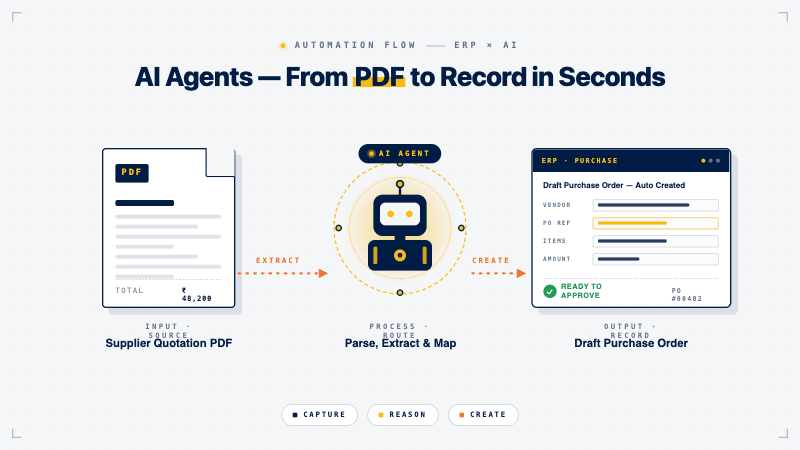
Think of Odoo 19.3 AI agents the way you would think of a brilliant new office assistant who never sleeps. You hand them a PDF say, a vendor's price list or a purchase requisition and they read it, understand it, and create the relevant records in Odoo automatically. No manual data entry. No copy-paste errors.
What the AI agents can do in 19.3
Create records from natural language prompts or uploaded files (PDFs included).
Update existing records change a delivery date, update a contact, modify a product price on command.
Generate images for website banners and email campaigns, reducing dependency on design tools.
Build and edit website content via the AI Website Assistant choose snippets, source Unsplash images, generate AI visuals, and pull web content.
Real-world impact for Indian manufacturers and retailers: A purchase manager can upload a supplier quotation PDF and have Odoo create a draft RFQ automatically. A marketing executive can prompt the AI to generate a Diwali sale banner and insert it into the website in minutes, not hours.
This is not a gimmick. AI-driven record creation removes one of the most time-consuming administrative bottlenecks in any ERP manual data entry from supplier documents and frees your team to focus on higher-value work.
How Does Odoo 19.3 Improve eCommerce Conversions?
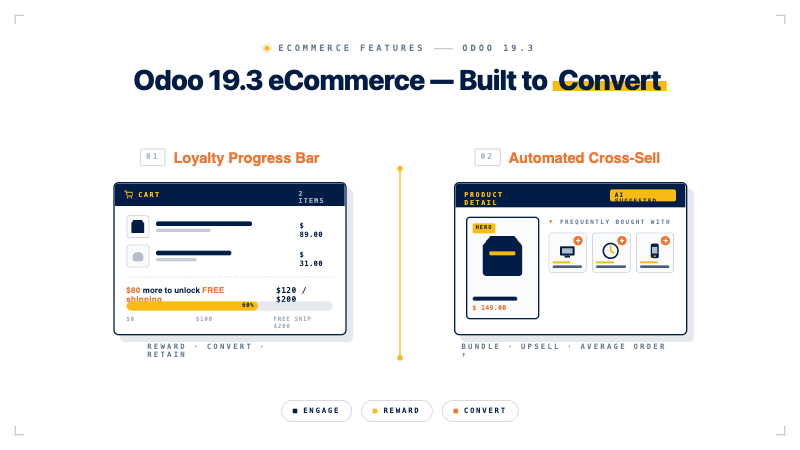
Direct answer: Odoo 19.3 improves eCommerce conversions through six built-in features that target the highest-leverage points in the buyer journey discovery, cart, checkout, and post-purchase. These were previously available only via expensive third-party platforms or custom development.
India's D2C and eCommerce market is fiercely competitive Amazon, Flipkart, and Shopify-powered brands set the user experience bar. Odoo 19.3 brings native parity on the conversion features that matter most.
Automated cross-sell suggestions: Odoo now automatically identifies and suggests accessories, alternatives, and optional products. A customer adding a laptop bag is shown compatible chargers and laptop stands without you configuring anything manually. Industry research consistently shows cross-sell can lift average order value materially.
Loyalty progress bar: Showing customers exactly how close they are to unlocking a reward is one of the most proven tactics to increase average order value. Odoo 19.3 displays this progress bar directly in cart notifications and the cart summary.
Preferred delivery date: Let customers choose when they want to receive their order. This is especially powerful for retail gifting (Diwali, Raksha Bandhan, Valentine's Day) and B2B supply windows where the customer needs to align delivery with their own schedule.
Smarter attribute filters: Filters now automatically hide values that would return zero results eliminating a major cart-abandonment friction point. A shopper filtering by 'Red' will no longer be shown a 'Size XXL' option that doesn't exist for that colour.
Automated review requests: Schedule post-delivery review emails at the optimal interval after order confirmation building social proof without manual work.
Simplified inventory management: eCommerce can now work with a simpler inventory setup without requiring the full Inventory ap one general on-hand quantity per product, no required transfers. Ideal for small D2C brands getting started.
Product variant thumbnails and dynamic snippet improvements round out the upgrade making product discovery richer and more visual on the storefront.
How Do Odoo 19.3 Offline Capabilities Work on the Field?
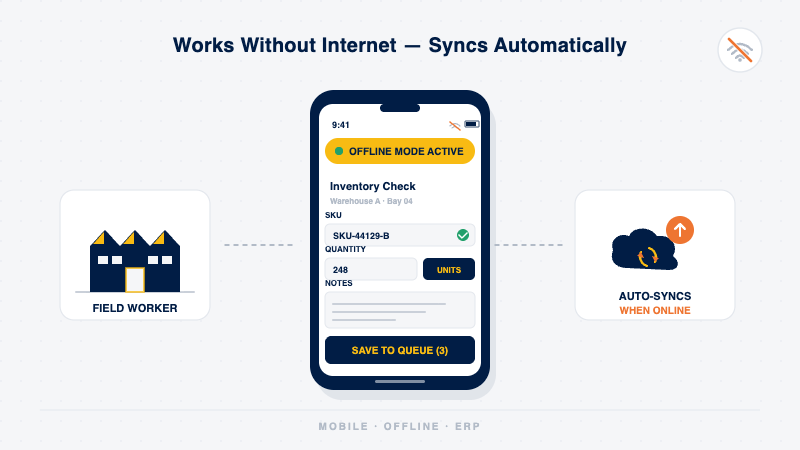
Direct answer: Odoo 19.3 offline mode allows users to create, edit, archive, unarchive, and delete records without an internet connection. Changes sync automatically once connectivity is restored. To create a record offline, that record type must have been previously opened online; to edit a record offline, it must have been previously opened online.
This is a meaningful upgrade for manufacturing plants, construction sites, warehouses, and retail stores where internet connectivity is patchy. Prior to 19.3, a network dropout meant your team had to wait or fall back to paper.
With Odoo 19.3, field workers can now:
Create new records offline (when the record type was previously opened online).
Edit existing records offline (when the record was previously opened).
Archive, unarchive, and delete records without connectivity.
Practical impact: Shop-floor supervisors logging production data, warehouse staff updating stock movements, and field service technicians completing job reports no longer have to wait for connectivity. Data entry happens in real time, syncing automatically when the connection returns.
Combined with the redesigned mobile form view and the new command palette (swipe down to search and navigate), Odoo 19.3 delivers a genuinely field-ready mobile experience.
What Changed in the Odoo 19.3 Manufacturing Kanban View?
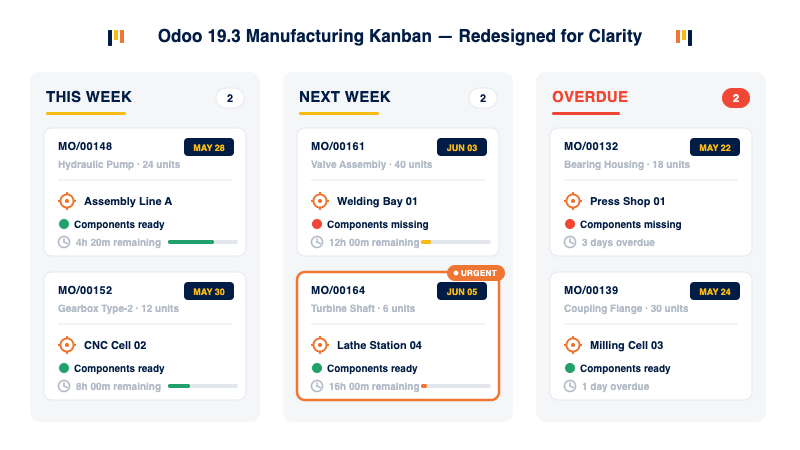
Direct answer: The Odoo 19.3 manufacturing Kanban view has been completely redesigned. Cards are now grouped by scheduled week and display component status, active work center, deadline, and remaining time at a glance. Total remaining time across all manufacturing orders is now shown in every 'Group By' search.
The old Kanban was functional but lacked the at-a-glance information production managers actually need. Now, every card shows:
Scheduled date group (by week) plan the week's production at a glance.
Component availability status know before you start whether materials are ready.
Active work center see which machine or line each order is running on.
Deadline and remaining time track urgency without drilling into each order.
Total remaining time across all orders in any grouped view.
Additionally, the 'Used In' smart button on product forms now shows Bill of Materials component lines directly making component substitution during shortages far faster. For Indian manufacturers dealing with supply chain variability (a daily reality), this is a practical time-save
What Are the Key Odoo 19.3 Accounting Enhancements?
Direct answer: Odoo 19.3 accounting introduces PISP-based bill payments, manual reconciliation on any account, a Cumulative Translation Adjustment line for multi-currency businesses, and parent accounts as the new structural method for the chart of accounts. These changes significantly reduce manual work for finance teams.
The improvements are particularly meaningful for businesses dealing with multi-currency operations, batch vendor payments, and complex charts of accounts:
PISP bill payment: Pay vendor bills individually or in batches with a single approval signature directly from Odoo via Payment Initiation Service Providers. A significant time-saver for finance teams processing dozens of invoices a week.
Manual reconciliation on any account: Previously restricted. Now available across all accounts, giving accountants more control. The 'Allow Reconciliation' checkbox has been renamed 'Payment Reconciliation' for clarity.
Cumulative Translation Adjustment (CTA): An auditable line automatically balances exchange-rate discrepancies across account categories critical for Indian exporters, IT services companies billing overseas, and businesses with foreign subsidiaries.
Asset depreciation with rates and float numbers: More flexibility in defining depreciation schedules particularly useful for fixed-asset-heavy industries.
Parent accounts: Replace account groups for a cleaner, more intuitive chart of accounts structure. Account codes are now optional.
Bill options display: Depreciation models, vehicles, and deferred payments now stack vertically under the account instead of horizontally easier to read and audit.
Reset to Draft action in list views: Batch-reset entries to draft in any list view, saving clicks for finance teams.
How Does Odoo 19.3 Compare to Odoo 19.2 and Earlier Versions?
The table below summarises the most significant changes between Odoo 19.2 (and earlier) and Odoo 19.3 across the modules that matter most to manufacturing, retail, and eCommerce operations.
| Feature / Area | Odoo 19.2 & Earlier | Odoo 19.3 (May 2026) |
|---|---|---|
| AI Capabilities | Basic AI suggestions | AI Agents for record creation & updates, plus AI image generation for websites and emails |
| eCommerce | Manual cross-sell setup | Automated cross-sell, loyalty progress bar, preferred delivery date, and smarter product filters |
| Mobile & Offline | Online-only record management | Full offline support to create, edit, archive, and delete records |
| Website Builder | Manual snippet editing | AI Website Assistant with vibe-coding, AI visuals, and integrated Unsplash images |
| Manufacturing Kanban | Standard list/Kanban view | Redesigned Kanban with weekly grouping, component status, active work center, and deadlines |
| Barcode / WMS | Limited package pre-encoding | Pre-encode vendor package contents and scan once to receive complete packages |
| Accounting | Limited manual reconciliation | Reconcile any account, PISP bill payments, and CTA line for exchange rate compliance |
| Sales Orders | No product images in PDFs | Product images displayed in quotations & PDFs with reusable quotation section templates |
| Inventory | Complex return workflow | Simplified returns, variant-specific packaging, and Sendcloud pickup point integration |
| Spreadsheet | Basic pivot tables & charts | Named ranges, tabular pivots, axis scaling, column statistics, and print preview |
Why Should You Upgrade to Odoo 19.3 Now?
Odoo releases three versions per year. Each new version is a window to modernise your operation and staying on older versions carries real costs that compound over time.
The Business Case for Upgrading Now
AI features are compounding: AI agents in 19.3 lay the groundwork for deeper automation in 19.4 and beyond. The earlier you adopt, the faster your team develops AI-native workflows.
eCommerce competition is accelerating: Features like automated cross-sell, loyalty progress bars, and smart filters are not just nice to have they directly impact conversion rates and revenue.
Compliance requirements are tightening: GST, ZATCA, e-invoicing, and other localisations are updated with every release. Staying on older versions means manual workarounds.
Security and support: Odoo's active support and security patches are focused on current releases. Older versions accumulate unpatched exposure.
Cost of delay: Every month on an older version is a month your team spends on manual work that Odoo 19.3 would automate.
Think of it like upgrading from a scooter to a modern motorcycle. The scooter still gets you there but the motorcycle does it faster, safer, and with far less effort. Odoo 19.3 is that upgrade for your ERP operations.
How Can Aspire SoftServ Help With Your Odoo 19.3 Upgrade?

Aspire SoftServ is an official Odoo Ready Partner offering end-to-end Odoo 19.3 upgrade services pre-upgrade audit, gap analysis, sandbox migration, custom module upgrade, user training, and post-go-live hypercare. We work with businesses in manufacturing, retail, eCommerce, construction, and services across India.
Upgrading Odoo is not just a technical task it is a business transformation exercise. The right partner makes the difference between a smooth go-live and weeks of disruption.
What Is Our Step-by-Step Odoo 19.3 Upgrade Process?
Pre-Upgrade Audit: We analyse your current configuration, custom modules, integrations, and data to identify compatibility gaps before any code changes.
Gap Analysis & Roadmap: We map your business requirements to Odoo 19.3 features identifying quick wins, customisation needs, and training priorities.
Sandbox Migration: Full migration in a test environment. Your team validates business processes before go-live.
Custom Module Upgrade: We upgrade your existing customisations for 19.3 compatibility preserving your business-specific functionality.
Training & Change Management: Hands-on training on new features, particularly AI agents, the redesigned Kanban, and eCommerce conversion tools.
Go-Live & Hypercare: We monitor the first weeks post-go-live closely, resolving any issues before they impact operations.
Which Industries Does Aspire SoftServ Specialise In?
Manufacturing: Auto-components, textiles, food processing, FMCG, furniture we understand BOM complexity, work center planning, and quality control workflows.
Retail & eCommerce: D2C brands, multi-location retailers, marketplace sellers we help you leverage every eCommerce feature in 19.3 to drive measurable revenue improvement.
Construction & Real Estate: Project costing, procurement, subcontractor management, change-order handling.
Services & Consulting: Timesheet-based billing, project profitability tracking, subscription and retainer management.
Conclusion: Is Odoo 19.3 Worth Upgrading To?
Yes,for most businesses running Odoo 17, 18, or 19.0–19.2, the upgrade to Odoo 19.3 delivers tangible value through AI automation, offline mobility, eCommerce conversion features, and improved manufacturing visibility. The decision is not whether to upgrade, but when and with whom.
Odoo 19.3 is not just a collection of new buttons and bug fixes. It is a meaningful shift toward AI-native ERP, field-ready mobility, and conversion-optimised commerce capabilities that directly affect your top line, your team's productivity, and your operational resilience.
For manufacturers, the redesigned Manufacturing Kanban and offline mode alone justify the upgrade. For retailers and eCommerce businesses, automated cross-sell, the loyalty progress bar, and the AI Website Assistant close the gap with platforms that cost several times more.
The right partner makes the difference between an upgrade that unlocks real value and one that becomes a multi-month disruption. As an official Odoo Ready Partner, Aspire SoftServ has the structured methodology and industry expertise to deliver the former.
Frequently Asked Questions: What Else Should I Know About Odoo 19.3?
What is Odoo 19.3 and when was it released?
Odoo 19.3 is the third minor release of Odoo version 19, officially released in May 2026. It delivers over 35 module-level improvements including AI agents, eCommerce conversion tools, offline capabilities, a redesigned Manufacturing Kanban view, and significant accounting enhancements. Source: odoo.com/odoo-19-3-release-notes.
Can I upgrade directly from Odoo 17 or 18 to Odoo 19.3?
Yes. Odoo supports upgrades from older versions to the latest release. However, the complexity depends on how customised your current instance is. Aspire SoftServ conducts a pre-upgrade audit to assess your specific situation and plan a safe migration path.
What are the AI agent capabilities in Odoo 19.3?
Odoo 19.3 AI agents can create any record in Odoo including by reading an uploaded PDF file and update existing records on command. They can also generate images for websites and email campaigns. This is a significant step toward agentic ERP workflows where repetitive data entry and content creation are automated.
How does Odoo 19.3 offline mode work?
The offline mode allows users to create, edit, archive, unarchive, and delete records without an internet connection. To create a new record offline, that record type must have been created at least once while online. To edit a record offline, it must have been previously opened while online. Changes sync automatically once connectivity is restored.
What eCommerce features are new in Odoo 19.3?
Key eCommerce additions in 19.3 include: automated cross-sell/upsell/alternative product suggestions, a loyalty progress bar in the cart, a preferred delivery date selector, smarter attribute filters (hide zero-result values), automated post-order review requests, age verification popups, and simplified inventory management without requiring the full Inventory app.
Is Odoo 19.3 suitable for manufacturing businesses in India?
Absolutely. The redesigned Manufacturing Kanban view, simplified component replacement via the 'Used In' smart button, pre-encoded barcode package contents, and offline mobile capabilities are all features directly relevant to Indian manufacturing operations. Aspire SoftServ has deep experience implementing Odoo for manufacturing companies across India.
How long does an Odoo upgrade to 19.3 typically take?
Timelines vary based on the complexity of your existing instance. A lightly customised Odoo instance can typically be upgraded in 4–8 weeks. Heavily customised instances may take 10–16 weeks. Aspire SoftServ provides a detailed project plan after the initial audit.
Does Odoo 19.3 have any India-specific features?
Odoo 19.3 itself does not introduce new India-specific localisations in this minor release, but existing GST, e-invoicing (IRN/QR), and Indian accounting standards remain fully supported. Aspire SoftServ also provides India-specific customisations for GST compliance, TDS/TCS handling, and e-way bill integration.
How does the Odoo 19.3 Website AI Assistant work?
The AI Website Assistant allows you to build and edit your Odoo website using natural language prompts. You can ask it to choose and place snippets, source images from Unsplash, generate AI-created visuals, retrieve web content, and more without needing design or development skills.
How can Aspire SoftServ help with our Odoo 19.3 upgrade?
Aspire SoftServ is an official Odoo Ready Partner offering end-to-end upgrade services: pre-upgrade audit, gap analysis, sandbox migration, custom module upgrade, user training, and post-go-live hypercare support. We serve manufacturing, retail, eCommerce, construction, and services businesses across India. Contact us to book a free 30-minute consultation.
Ready to Upgrade to Odoo 19.3?