


 Updated on 6 March 2026

Manufacturing businesses running on legacy ERP systems face growing challenges every single day. Outdated platforms limit shop floor visibility, slow down production planning, and make operational scaling far more difficult.
Odoo ERP migration services offer manufacturers a smarter, more connected path forward. With integrated MRP, real-time inventory tracking, and quality control tools, Odoo brings your entire manufacturing operation into one platform.
This guide walks you through a structured Odoo migration strategy built for manufacturers who cannot afford production downtime, from initial audit and data cleansing all the way through to a successful go-live.
1. Why Manufacturers Are Leaving Legacy ERP Behind
Legacy ERP systems were not built for the speed and complexity of modern manufacturing. They create data silos, block real-time decision-making, increase manual errors, and leave production managers without the visibility they need to run operations efficiently.
No real-time inventory sync means warehouse teams constantly work with outdated stock data, causing production delays, material shortages, and costly order fulfilment errors that damage customer relationships and delivery timelines significantly.
Poor shop floor visibility forces production managers to rely on manual updates and verbal check-ins. Without live work order tracking, identifying production bottlenecks before they affect daily output becomes nearly impossible.
Legacy systems have no native IoT or machine integration, making automation impossible. Shop floor staff must enter data manually, which increases errors, wastes shift time and prevents manufacturers from scaling their operations efficiently.
Multi-warehouse and multi-company management becomes extremely painful without a modern ERP. Manufacturers spend hours reconciling stock across locations instead of focusing on production efficiency and fulfilling customer orders on time.
Limited demand forecasting in legacy systems leads to overproduction or material shortages. Without accurate MRP planning, manufacturers cannot align procurement schedules with real production needs, resulting in wasted resources and missed deadlines.
Migrating to Odoo solves all of these problems. Its modular architecture, real-time dashboards, and manufacturing-specific features give production teams the control and visibility needed to grow operations without adding unnecessary complexity.
2. What Can Go Wrong: Real Migration Risks in Manufacturing
Migrating a manufacturing ERP is not like switching software in an office. Every module is connected. A single data mapping error in your BOM structure can trigger inventory mismatches, production failures, and delayed customer shipments across your entire operation.
Production stoppage during ERP cutover is the top risk. Without a proper parallel run strategy, manufacturers can lose days of output and miss critical customer delivery deadlines.
BOM data corruption during migration creates cascading errors across inventory, procurement, and production planning. One incorrect multi-level BOM can shut down an entire production line unexpectedly.
Open manufacturing orders frequently get lost during ERP transitions. Migrating without freezing and validating active orders first causes immediate shop floor confusion and delays production schedules significantly.
Inventory misalignment between old and new systems is a common post-migration issue. Stock levels that do not match reality lead to wrong procurement decisions and unnecessary emergency purchasing.
Custom module conflicts arise when upgrading Odoo versions. Modules that worked in an older version may break in newer releases, requiring thorough compatibility testing before any manufacturing data is transferred.
Third-party integration failures with machines, barcode scanners, or MES platforms can paralyze shop floor operations. Every integration must be tested in a staging environment well before your planned go-live.
3. Why Odoo ERP is a Game-Changer for Manufacturers
Odoo ERP migration give manufacturers more than just a software upgrade. Odoo is purpose-built for production environments, offering real-time visibility, integrated MRP, and shop floor automation that legacy systems simply cannot match.
Odoo's fully modular architecture lets manufacturers install only what they need, from MRP and inventory to quality control, and scale easily as operations grow.
Real-time production tracking gives managers live visibility into every work center, shift, and work order, eliminating the guesswork that slows down daily manufacturing decisions.
Integrated MRP connects demand forecasting directly to procurement and shop floor planning, ensuring materials are available exactly when production needs them without overstocking.
Native IoT and machine integration supports barcode scanners, CNC machines, and PLC systems out of the box, bringing true shop floor automation without expensive third-party middleware.
Odoo's open-source foundation delivers a significantly lower total cost of ownership compared to proprietary ERPs like SAP or Oracle, making it ideal for growing manufacturers.
Built-in quality control, preventive maintenance scheduling, and subcontracting management make Odoo a complete manufacturing platform, not just another ERP system to manage.
4. Step-by-Step Odoo Migration Strategy Without Production Downtime
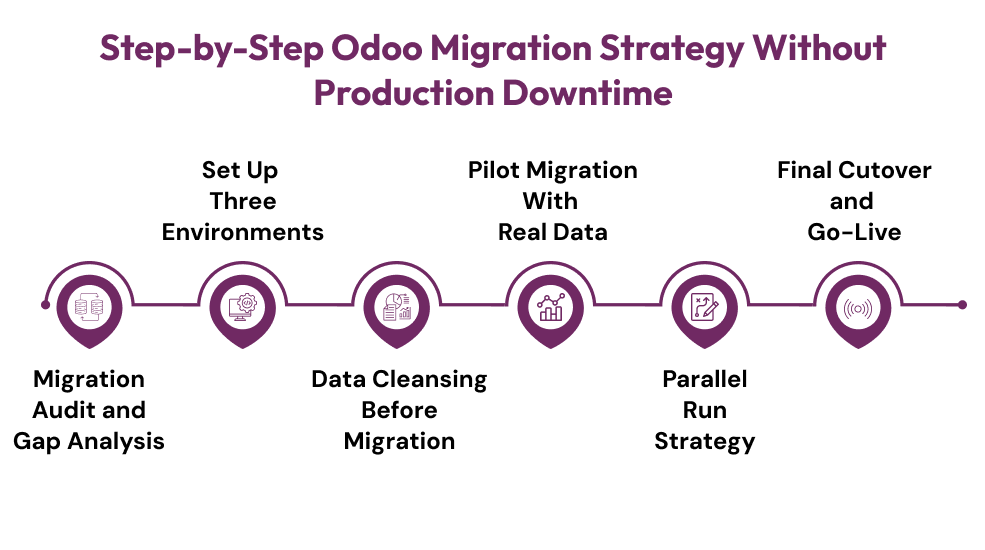
A successful Odoo ERP migration in manufacturing is not about moving fast. It is about moving smart. The following six-step strategy is designed to keep your production floor running throughout the entire migration process, from initial planning to go-live.
Step 1: Migration Audit and Gap Analysis
Start by mapping every active ERP module, customization, integration, and manual workaround in your current system. Interview production managers, procurement leads, and inventory controllers. Their daily pain points directly shape your Odoo configuration requirements and overall migration scope.
Step 2: Set Up Three Environments
Never migrate directly into production. Set up a Development environment for module configuration, a Staging environment for user acceptance testing, and a Production environment for go-live. This three-tier setup protects your live manufacturing operations throughout the entire Odoo implementation process.
Step 3: Data Cleansing Before Migration
Migrating dirty data imports your legacy problems into a new system. Clean all BOM structures, remove duplicate SKUs, standardize units of measure, and validate vendor and customer records. Use ETL tools like Talend or Python with Pandas for large, complex manufacturing datasets.
Step 4: Pilot Migration With Real Data
Run your first migration using real production data inside the staging environment. Follow this import sequence: units of measure, products, vendors, BOMs, inventory levels, work centers, routings, then open manufacturing orders. Validate every batch with error checks before moving to the next step.
Step 5: Parallel Run Strategy
Keep your legacy ERP running in read-only mode while Odoo processes live transactions. Validate real-time stock moves, work orders, and procurement rules simultaneously across both systems. Run at least two to three complete production order cycles before signing off on the parallel run.
Step 6: Final Cutover and Go-Live
Schedule your cutover during a low-production window or planned maintenance shift. Freeze open manufacturing orders 24 to 48 hours before switching. Migrate delta data, activate Odoo fully, and keep your implementation team on call for the critical first two weeks post-migration.
5. Manufacturing Data That Needs Extra Attention
Not all manufacturing data carries equal migration risk. These are the specific data types that require the most careful planning, validation, and testing during any Odoo ERP migration project.
Multi-level Bills of Materials require precise mapping. One wrong BOM
level creates cascading errors across inventory, procurement, and production scheduling.Routing and work center configurations tied to machine capacity must be rebuilt accurately in Odoo to prevent scheduling conflicts and production bottlenecks.
Lot and serial number traceability is critical for regulated industries. Any loss during migration creates compliance gaps and quality control
failures post-launch.Quality control checkpoints embedded in work order flows must be fully reconfigured in Odoo to maintain inspection triggers and production standards.
Subcontracting flows with external vendors involve complex data relationships that must be tested end-to-end in staging before go-live.
Open manufacturing and purchase orders cannot be lost during migration. Freezing and validating active orders carefully is essential to prevent immediate shop floor disruption.
6. Why Your Migration Partner Matters?
Choosing the right Odoo implementation partner is one of the most important decisions in your entire migration project. You need someone who understands manufacturing workflows, MRP logic, and shop floor realities, not just an Odoo consultant who has only handled retail or service businesses.
Look for a partner with proven experience in complex manufacturing data migrations, end-to-end support from consultation through post-go-live, and a documented rollback plan for unexpected issues. Manufacturing domain knowledge combined with Odoo expertise is worth far more than any software certification alone.
Conclusion
Migrating to Odoo does not have to mean production downtime. Poor planning causes downtime, not migration itself. With a structured approach, clean data, a phased rollout, and the right Odoo ERP migration services partner, your production floor can keep running throughout the entire transition.
Manufacturers who invest in proper Odoo migration planning consistently report better inventory accuracy, faster MRP runs, reduced manual errors, and stronger on-time delivery performance. The investment pays for itself quickly when the migration is done right the first time with an experienced team.
Frequently Asked Questions
1. What is the biggest risk when migrating a manufacturing ERP to Odoo?
Production stoppage during cutover is the top risk. Without a parallel run strategy and frozen open orders, manufacturers can lose days of output and miss critical customer delivery deadlines.
2. How long does an Odoo ERP migration take for a manufacturing business?
Migration timelines vary based on data complexity, number of integrations, and company size. Most manufacturing migrations range from two to six months when following a structured phased approach.
3. Can we keep production running during the Odoo migration?
Yes. A parallel run strategy keeps your legacy ERP active in read-only mode while Odoo processes live transactions. This ensures zero production disruption before your final cutover.
4. What manufacturing data needs the most attention during migration?
Multi-level Bills of Materials, open manufacturing orders, lot and serial number traceability, routing configurations, and subcontracting flows carry the highest migration risk and require the most careful validation.
5. Do we need an Odoo implementation partner for manufacturing migration?
Most manufacturers benefit significantly from an experienced Odoo partner who understands MRP logic, shop floor workflows, and complex data migration reducing costly errors and keeping the project on schedule.