

 Updated on 24 December 2025

Your Odoo migration is now live. The data has moved, the system is running, and everyone is getting settled in. But here's the reality: going live is just the beginning. What you do in the weeks following determines whether your Odoo investment delivers real business value or becomes underutilized.
Many organizations spend heavily on planning and executing the migration itself, then drop the ball afterward. Without proper attention during the stabilization phase, you'll face messy data, frustrated employees, slow performance, and ROI that doesn't materialize. This is where professional Odoo migration services help they guide you through post-migration optimization to ensure your system delivers lasting value.
Why Post-Migration Matters?
When your Odoo system goes live, several challenges typically emerge. Data problems slip through despite planning. A mismatched customer record or wrong inventory count seems minor but cascades into bigger operational headaches. Vendors get wrong addresses. Inventory numbers don't match physical stock. Financial records don't reconcile properly.
Your team was trained before go-live, but now they face real business situations with live data. Without continued support, employees find workarounds that undermine system integrity or resist using Odoo altogether. User confusion leads to inconsistent data entry and lost productivity. This is why ongoing training and user support prove essential during stabilization.
Performance issues surface under real-world load. What ran smoothly during testing slows down when hundreds of actual transactions process simultaneously. Users get frustrated, productivity drops, and confidence in the system suffers. Organizations implementing structured post-migration practices report higher user satisfaction, faster benefit realization, and fewer support headaches.
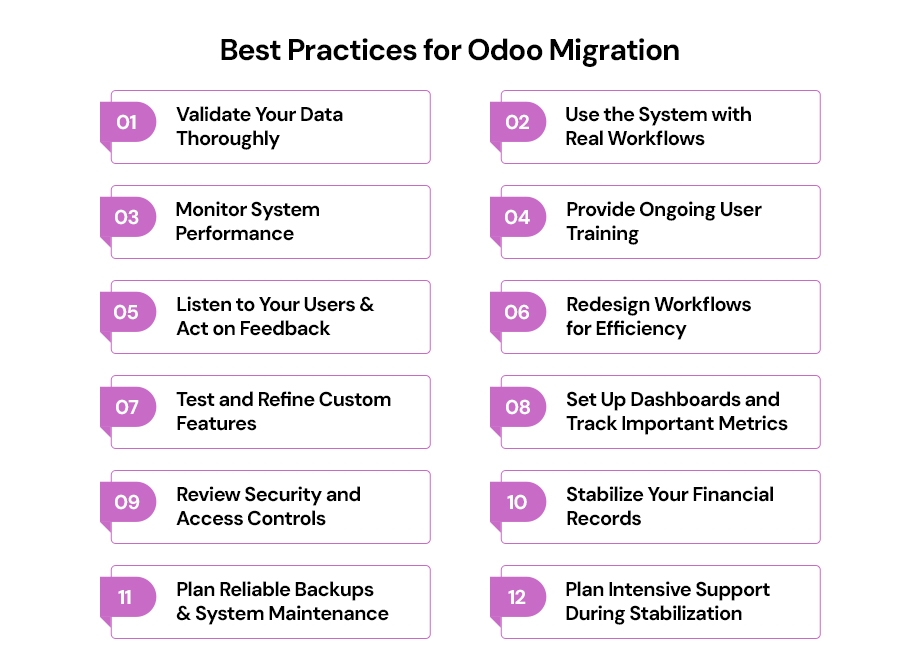
12 Best Practices for Post-Migration Success
A. Data Validation & System Stability
1. Validate Your Data Thoroughly
Your Odoo system is only as good as the data in it. Even successful migrations can introduce subtle errors causing problems later. Start by systematically checking all master data customers, suppliers, products, employees, and inventory records. Cross-check information against your old system ensuring nothing was lost or corrupted. Pay special attention to financial data, comparing opening balances and inventory values.
Create a checklist for each department and assign verification responsibilities. Finance verifies customer payment histories match. Warehouse staff count physical inventory against Odoo records. Procurement confirms all supplier data transferred correctly. This distributed approach ensures thorough checking with people who understand the data best.
2. Use the System with Real Workflows
Testing before go-live is essential, but real-world usage reveals issues that controlled testing misses. Now that you have live data, conduct thorough testing of actual business processes. Have sales teams process real quotes, procurement create purchase orders, and warehouse staff pick actual orders. Run complete workflows from sales order through invoicing.
Pay careful attention to custom features and third-party integrations these hide most post-migration problems. Verify external connections work properly under actual business load. Check that data flows correctly between Odoo and systems like payment processors or shipping providers. Document every problem found and track resolution.
3. Monitor System Performance
Performance issues go unnoticed until users complain. Be proactive by tracking how fast your Odoo system responds to common tasks. Measure page loading times, database query speed, and server response rates as your baseline. Use Odoo's built-in monitoring tools or integrate additional software for detailed performance insights.
Watch for warning signs like high CPU usage, memory problems, or slow database queries. As you see how the system actually gets used, optimize database and server settings based on real patterns. Set up automated alerts when performance dips below acceptable levels to catch problems early.
B. User Enablement & Adoption
4. Provide Ongoing User Training
Initial training helps your team understand basics, but real proficiency requires time. Move beyond generic overviews to training tailored to how each department actually uses Odoo. Sales teams master CRM features and quotation processes. Warehouse staff gain hands-on experience with inventory operations. Finance teams understand journal entries and reconciliation.
Create an internal knowledge base with video tutorials, step-by-step guides, and written procedures for common tasks. Identify power users in each department and train them more deeply these internal champions become first-line support. Schedule refresher training as the team gains experience and discovers new ways to use the system effectively.
5. Listen to Your Users and Act on Feedback
Your users are on the front lines and will discover issues and opportunities before anyone else. Create multiple feedback channels surveys, suggestion boxes, support channels, and regular check-in meetings. Have conversations with department leaders about what's working. Talk with power users about workflow problems they encounter.
Communicate back what improvements you're implementing based on their feedback. When users see their input leads to change, they become engaged partners rather than frustrated complainers. Keep track of all feedback, separating critical problems from nice-to-have improvements. Use simple rating systems to measure whether user satisfaction is improving over time.
C. Optimization & Fine-Tuning
6. Redesign Workflows for Efficiency
Migration is a perfect opportunity to eliminate inefficiencies that piled up in your old system. Look at every migrated process with fresh eyes, questioning whether each step adds value. Identify repetitive manual work ripe for automation. Odoo can automatically send follow-up emails, update record statuses, or generate routine reports.
Many organizations discover that custom features they built into their old system are actually built into Odoo's standard functionality. Eliminate custom workarounds and use native Odoo features instead. This simplifies your system and makes it easier to maintain. Work with both IT and the people who actually do the work to redesign processes effectively.
7. Test and Refine Custom Features
Custom code and third-party apps represent your highest-risk areas for problems. Verify every customization works correctly with your new Odoo version under real business conditions. Test third-party apps with actual transactions, not just test data. Sometimes custom code that worked fine creates problems when interacting with other features.
Update custom code for compatibility and performance optimization. Document all customizations thoroughly so anyone can understand what they do and how to maintain them. Test custom features under peak business conditions ensuring they work properly even with high transaction volume.
8. Set Up Dashboards and Track Important Metrics
Better decisions come from good information. Set up dashboards showing each department the metrics they care about most. Sales teams see pipeline value and conversion rates. Inventory managers track stock levels and reorder points. Finance monitors cash flow and accounts receivable. Configure automated reports delivering key metrics on regular schedules.
Track your migration success by measuring business improvements: faster order processing, better inventory accuracy, fewer manual errors, quicker financial closing. Measure ROI by calculating both what you're saving less manual work, fewer errors, lower system maintenance and what you're gaining faster fulfillment, better service, improved cash management.
D. Security, Compliance & Governance
9. Review Security and Access Controls
Your new Odoo system requires a fresh security review. Review all user roles and permissions, applying the principle of least privilege people access only what they need. Set up security rules for sensitive data. Sales representatives see only their own opportunities. HR data stays restricted to authorized personnel. Financial records remain visible only to appropriate users.
Enable detailed audit logs for financial transactions and sensitive operations ensuring accountability and compliance documentation. For users with elevated access to financial data, enable two-factor authentication as additional security. Review permissions regularly to ensure they're still appropriate as people change roles.
10. Stabilize Your Financial Records
Financial accuracy is non-negotiable. Verify your tax rules, fiscal settings, and localization preferences match your jurisdiction's requirements. Reconcile financial statements carefully with old system data, investigating any discrepancies immediately. Validate your chart of accounts mapping ensuring every account transferred correctly from your old system structure.
Test your period-end closing procedures before your actual financial close to spot workflow issues or reporting gaps. Consider running old and new systems side-by-side for complete financial close cycles, giving you confidence that Odoo calculates everything correctly. Work closely with your finance team and external auditor throughout this process ensuring everything reconciles properly.
E. Ongoing Maintenance & Support
11. Plan Reliable Backups and System Maintenance
Your business depends on your Odoo system, so you need reliable disaster recovery. Set up automated daily database backups and regular full system backups. Store backup copies in multiple locations both local storage and cloud repositories preventing single point of failure from costing everything. Most organizations overlook this critical step: actually, test that you can restore from those backups.
Don't just assume restoration works verify it does. Schedule regular system updates and security patches during quiet business hours minimizing disruption. Document your backup and recovery procedures clearly so any team member can execute them if needed.
12. Plan Intensive Support During Stabilization
The weeks following go-live are critical. Your system is under stress as real users work with real data for the first time. Dedicate technical resources to watching system performance and responding quickly to user questions and problems. Create a dedicated support channel for migration-related issues so they don't get lost in regular support channels.
Ensure rapid responses to critical problems affecting business operations. Keep your technical team available during business hours addressing urgent issues quickly. This intensive support prevents small issues from escalating into major problems. As users become comfortable and the system stabilizes, gradually transition to your normal support model.
13. Plan for Continuous Improvement
Your Odoo system should evolve as your business evolves. Odoo releases new features regularly and your business needs change over time. Create a roadmap for future enhancements based on business value and ROI potential. Schedule regular reviews assessing how well the system performs, identifying optimization areas, and evaluating whether new Odoo features could help.
Stay informed about platform updates and consider how new capabilities benefit your operations. Align system improvements with strategic business goals. If expanding internationally, prioritize multiple currency and localization features. If focusing on customer experience, emphasize CRM and customer portal improvements.
Working with Odoo Migration Services Providers
If you're working with professional Odoo migration services, these practices become significantly more manageable. Experienced migration partners have already helped other organizations through this phase. They know which problems typically emerge, what solutions work best, and how to accelerate your path to success. Odoo migration services providers guide data validation, provide specialized training, monitor performance, establish security controls, and maintain dedicated support during stabilization.
Even if managing migration internally, many organizations supplement their internal team with targeted Odoo migration services support for specific areas like data validation, custom development, security hardening, or financial reconciliation.

Conclusion
Your Odoo migration is now live, but your journey toward maximum business value is just beginning. Success requires attention to data quality, user support, system optimization, security, and ongoing improvement. Take honest stock of where you stand right now which practices need attention? Where are your biggest gaps?
Remember that maximizing Odoo's benefits is an ongoing journey, not a one-time project. Organizations that thrive with Odoo treat their system as a living platform evolving with business needs. Whether handling this internally or partnering with experienced Odoo migration services, stay focused on these fundamentals and watch your investment deliver increasing value over time.
Ensure Long-Term Odoo ERP Success