

Introduction
Migrating your ERP system isn't just another IT project. It's a strategic business decision that can either unlock new levels of efficiency or create months of headaches if handled poorly.
Odoo has grown from a simple business management tool into a comprehensive ERP platform used by thousands of companies worldwide. As the platform evolves with regular updates and new features, businesses face a critical choice: stick with outdated versions or take the leap and migrate.
The stakes are high. A smooth migration means access to powerful new features, better performance, and improved security. A botched migration can mean data loss, broken workflows, and disrupted operations. This guide walks you through the most common Odoo migration challenges and gives you practical strategies to overcome them. whether you're handling the process internally or working with professional Odoo migration services.
Understanding Odoo Migration
Odoo migration is the process of transferring your business data, configurations, and customizations from one Odoo version to another or from an entirely different ERP system like SAP, QuickBooks, or Tally. Migrations come in several forms: version-to-version upgrades move between Odoo releases, while platform migrations switch from competing systems entirely. You might migrate specific modules when only certain functionalities are needed, or undertake complete database migrations moving everything at once.
Companies migrate to Odoo to access transformative new features like enhanced inventory management, improved accounting modules, and superior CRM capabilities that streamline daily operations. As businesses grow, scalability becomes critical newer Odoo versions handle larger databases and support more concurrent users efficiently. Security is non-negotiable since older versions stop receiving security patches, leaving systems vulnerable to threats. Additionally, Odoo's open-source foundation significantly reduces total ownership costs while delivering equal or superior functionality.
The decision to migrate involves careful consideration of multiple factors affecting business operations. Data migration requires handling years of transactions, customer records, and historical information with precision. Custom modules developed for older versions often break due to framework changes and deprecated APIs. Third-party integrations demand validation to ensure compatibility with new versions. Infrastructure must support potentially different resource requirements, and users need proper training to adopt new workflows.

Top 8 Odoo Migration Challenges
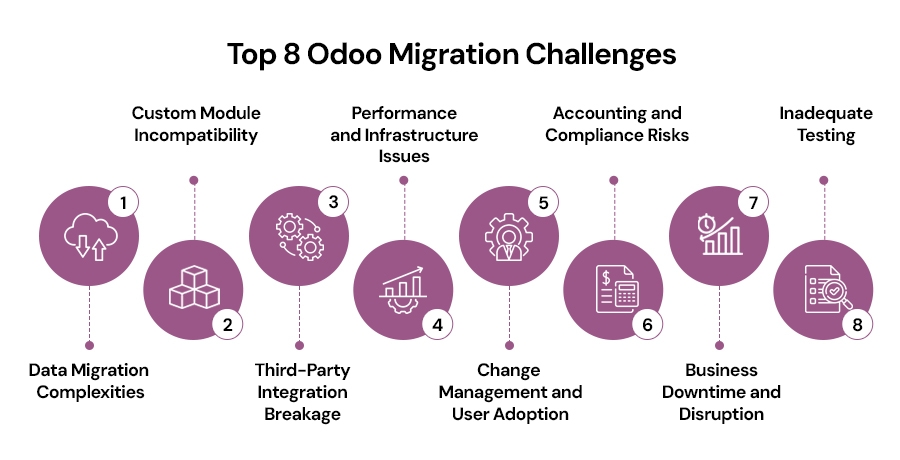
1. Data Migration Complexities
Data migration is where most projects hit their first major roadblock. The sheer volume of data poses challenges, years of transactions, customer records, and historical information need careful handling. Data quality issues lurk in every legacy system, duplicate customer records, inconsistent product names, and missing required fields multiply during migration.
How to Overcome: Start with a thorough data audit before migration. Run reports to identify duplicates, missing data, and inconsistencies. Create detailed data mapping documents where every field in your old system has a clear destination in Odoo. Use staging environments to test imports multiple times and maintain validated backups at every stage. Odoo data migration services typically include comprehensive data cleansing and validation processes to ensure accuracy.
2. Custom Module Incompatibility
Custom modules break spectacularly when Odoo's core framework changes. The framework evolves with each version, APIs get deprecated, coding standards change, and entire architectural patterns shift. Hard-coded customizations cause particular pain as direct modifications to core code become maintenance nightmares.
How to Overcome: Conduct a complete customization inventory before starting. Document every custom module, what it does, and how critical it is. Refactor code to current Odoo standards using modern APIs and following best practices. Replace custom features with native Odoo capabilities wherever possible since native features get maintained with each release.
3. Third-Party Integration Breakage
Your Odoo instance probably connects to payment gateways, shipping providers, e-commerce platforms, and CRM systems. Migration can break every single one. API versions change, connector modules need updates, and hidden integrations are the worst since you might not realize processes depend on external connections until they stop working.
How to Overcome: Document all integrations early in the planning phase. Create a comprehensive list including obvious ones like payment processors and subtle ones like automated email systems. Validate connector compatibility with your target version and test each integration separately in a sandbox environment before rollout.
4. Performance and Infrastructure Issues
What runs smoothly on older versions might crawl on newer ones. Resource requirements change, and infrastructure that seemed adequate suddenly isn't. Different versions have different appetites for computing power, newer releases often use more memory or require faster processors. Poorly optimized custom code gets exposed during migration.
How to Overcome: Assess your current infrastructure requirements and compare them to recommendations for your target version. Follow Odoo performance best practices from the start, enable proper indexing and use efficient query patterns. Load test with real-life scenarios before going live and optimize heavy custom code and reports.
5. Change Management and User Adoption
Technology is the easy part, people are the challenge. Employees comfortable with the old system see migration as unnecessary disruption. Learning curves affect productivity as experienced operators struggle with new interfaces. Post-launch productivity dips are inevitable, but poor change management extends the pain unnecessarily.
How to Overcome: Involve key users early in the planning process to get input from people who live in the system daily. Provide role-based training sessions tailored to what each department actually does. Run a pilot phase or parallel systems for a transition period and offer strong post-launch support with quick issue resolution.
6. Accounting and Compliance Risks
Accounting errors have serious consequences. Misconfigurations can corrupt financial data, break audit trails, or violate compliance requirements. Chart of accounts misconfiguration causes cascading problems where every transaction goes to the wrong place. Tax and compliance rules vary by region and change over time.
How to Overcome: Involve your finance team from day one as they understand requirements and can validate that everything works correctly. Validate opening balances and reconciliations meticulously where every account must match. Test tax logic and regulatory compliance thoroughly and ensure clean financial close post-migration by avoiding mid-period transitions.
7. Business Downtime and Disruption
Even in the best-case scenario, migration causes some disruption. System unavailability during migration is unavoidable at some point. Interrupted order processing directly impacts revenue, and customer service suffers during transitions when support staff can't access customer information or track orders.
How to Overcome: Plan migration during non-peak hours like Sunday nights for retail or year-end shutdowns for B2B companies. Create a detailed rollback plan and test it beforehand. Communicate timeline clearly to all stakeholders including employees, customers, and partners, and have a contingency plan ready for unexpected delays.
8. Inadequate Testing
Skipping proper testing turns migration into disaster. Sandbox testing gets skipped or rushed as teams migrate directly into production. User Acceptance Testing is more than a formality, it's where actual users confirm the system works for real-world scenarios. Missing real business scenario simulations leaves gaps.
How to Overcome: Use a dedicated test environment that mirrors production with same hardware specifications and data volumes. Conduct functional, performance, and load testing systematically. Run UAT with actual users performing real tasks and simulate complete business workflows from start to finish testing what you actually do.
Best Practices for Smooth Odoo Migration
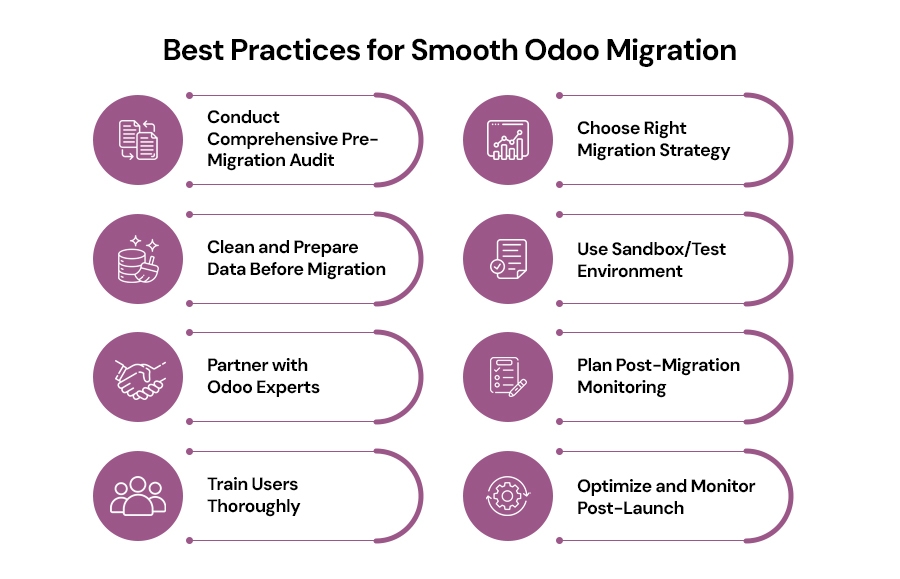
Conduct a comprehensive audit, clean your data, test thoroughly in sandbox environments, involve certified partners, train users properly, and monitor performance continuously post-launch with regular health checks for ongoing optimization and success.
1.Conduct Comprehensive Pre-Migration Audit
Start by understanding exactly what you're working with. Analyze your current system thoroughly, documenting which modules you use, what customizations exist, and how workflows actually function. Identify every customization that needs refactoring, some custom code is essential while some solved problems that native Odoo features now handle. Create a detailed migration checklist covering data to migrate, code to update, integrations to test, and users to train. Estimate timeline and resources realistically, building in buffer time for unexpected issues.
2.Choose Right Migration Strategy
Decide between big bang and phased migration approaches. Big bang means switching everything at once with shorter downtime but higher risk. Phased migration means gradually moving modules or departments with less risk but more complexity. Define clear scope and priorities where core business functions come first and nice-to-have features can wait. Set realistic milestones that create momentum without setting your team up for failure. Assign a dedicated project manager who owns the project, coordinates teams, and drives progress.
3.Clean and Prepare Data Before Migration
Remove duplicates and fix formatting issues in the source system. Deduplicating customer records is tedious but necessary. Archive historical data that doesn't need to migrate, transactions from years ago might be legally required but rarely accessed. Validate field mappings meticulously where every important field needs a destination in Odoo. Ensure database schema compatibility by understanding both source and target structures.
4.Use Sandbox/Test Environment
Mirror your production environment as closely as possible with similar hardware and realistic data volumes. Run multiple test migrations, learning from each iteration where the first reveals obvious problems and later attempts catch subtler issues. Allow users to explore safely without fear of breaking anything. Catch errors before live deployment since every issue found in testing won't disrupt your business during go-live.
5.Partner with Odoo Experts
Certified Odoo partners bring experience you can't easily develop in-house. They've handled dozens of migrations and know the pitfalls and solutions. Access to proven frameworks and tools accelerates your project with migration scripts and testing checklists refined over years. Reduced downtime and fewer surprises matter tremendously as partner expertise means more accurate timelines and better planning.
6.Plan Post-Migration Monitoring
Monitor performance closely in the days and weeks after go-live. Watch for slow queries and errors in logs. Address bugs immediately as some issues won't appear in testing but emerge under real-world usage. Provide ongoing user support beyond initial training since questions arise as people encounter new scenarios. Schedule regular system health checks weekly during the first month, then monthly thereafter.
7.Train Users Thoroughly
Role-based training programs target specific needs. Warehouse staff need inventory modules while sales teams need CRM tools. Create documentation and guides that people actually use like screen recordings and quick reference cards. Establish clear support channels so users know where to get help. Build internal champions who become go-to resources for their departments.
8.Optimize and Monitor Post-Launch
Track system performance continuously including response times and server resource usage. Validate data accuracy regularly through reconciliation reports. Fine-tune workflows based on real usage patterns since how people actually use the system often differs from expectations. Gather user feedback continuously and act on their input.
When to Hire Professional Migration Services?
Some situations overwhelm even capable internal teams. Very old Odoo versions require specialized expertise, jumping multiple major versions compounds complexity. Heavy customizations create unique challenges where migration becomes significantly more complex. Multi-company and multi-country deployments add layers of complexity with different legal requirements and tax structures.
Benefits of odoo migrations partners extend beyond technical skills. They bring proven migration frameworks that reduce risk and accelerate timelines. They provide both functional expertise understanding business processes and technical expertise knowing Odoo architecture deeply. When choosing a partner, look for relevant experience with businesses similar to yours, check references and verify certifications.
Conclusion
Odoo migration is more than a technical upgrade. It's a strategic opportunity to rethink processes and position your business for growth. With proper planning, thorough testing, and expert support when needed, the real challenges of data complexities, custom code issues, and user adoption become manageable obstacles that lead to lasting benefits.
A migration done right delivers powerful new features, improved system performance, enhanced security, and more efficient user workflows. The difference comes down to preparation and execution: start with a thorough audit, clean your data, test exhaustively, train users properly, and take the first step today by assessing whether your team needs partner support for successful transformation.
Frequently Asked Questions
1. How long does an Odoo migration typically take?
Timeline varies by complexity. Simple version upgrades take 2-4 weeks, while complex migrations with heavy customizations or large databases take 3-6 months. Key factors include data volume, custom modules, third-party integrations, and user training requirements.
2. Can I migrate Odoo without losing my historical data?
Yes. Preserve all historical data through proper data mapping, comprehensive audits, detailed field mappings, multiple staging tests, and complete backups at every stage to ensure accurate transfer.
3. What happens to my custom modules during Odoo migration?
Custom modules require refactoring since Odoo's framework evolves between versions. Inventory all customizations, determine necessity, and rewrite them using current standards. Some features may become redundant if native Odoo now provides similar functionality.
4. Should I migrate Odoo myself or hire a professional partner?
In-house migration works for simple upgrades with minimal customizations and skilled teams. Hire professional partners for complex scenarios involving very old versions, heavy customizations, multi-company deployments, or limited expertise.
5. How much does Odoo migration cost?
Costs vary widely. Simple upgrades cost $5,000-$15,000, while complex migrations reach $50,000-$100,000 or more. Factors include version age, data volume, custom modules, integration complexity, and training requirements.
Secure your Odoo migration!