

 Updated on 15 December 2025

Introduction
Digital transformation is essential for businesses to remain competitive in today's fast-paced market. As organizations grow, outdated ERP systems cause slowdowns, limit functionality, and expose security risks. Odoo, a modern open-source ERP platform, solves these challenges. Odoo migration strategically upgrades your business infrastructure to operate faster, smarter, and more securely. Professional odoo migration services ensure smooth transitions, secure data, and maximize investment value from day one.
Companies investing in Odoo migration experience streamlined workflows, better data insights, and enhanced productivity. Professional odoo migration services ensure smooth transitions, secure data throughout the process, and maximize investment value from day one.
What Is Odoo Migration?
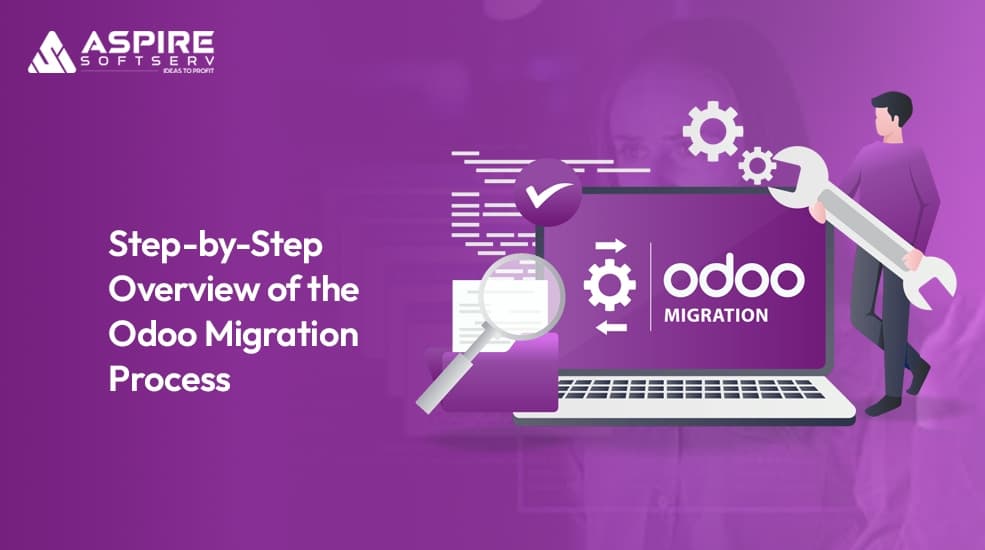
Odoo migration is the strategic process of upgrading your ERP system to leverage modern technology, enhanced features, and improved performance. Whether moving from an older Odoo version or transitioning from another ERP platform, migration transforms your business infrastructure to meet current operational demands and future growth requirements.
Definition and Scope
Odoo migration is the process of transitioning your business from an older version of Odoo or a different ERP system to the latest Odoo release. This involves transferring critical data, reconfiguring workflows, updating custom modules, and ensuring seamless system functionality in the new environment.
Types of Migration
Three primary types exist: version upgrades (moving from older Odoo versions like v8, v11, v13 to newer releases like v18, v19), platform shifts (transitioning from on-premise to cloud or Cloud on Premises, and cross-ERP migration (switching from systems like SAP or NetSuite to Odoo). Each type presents distinct challenges requiring tailored approaches.
Why Professional Services Matter
Migration impacts every business function sales, accounting, inventory, customer relationships, and human resources. Professional odoo migration services provide technical expertise, project management, and risk mitigation strategies that ensure secure, future-proof transitions while protecting operations and delivering measurable benefits.
Why Businesses Choose Odoo Migration
Companies migrate to Odoo for compelling reasons that directly impact their bottom line. Many faces slow systems that hinder productivity, lack critical features like advanced reporting or mobile accessibility, or struggle with legacy platforms that consume excessive maintenance resources. Technical support becomes scarce, customizations break with updates, and systems grow increasingly rigid.
Odoo's modular architecture, continuous improvements, and strong community support reduce long-term costs while improving functionality. Businesses also migrate when growth demands scalability expanding into new markets, adding product lines, or increasing transaction volumes. Odoo's scalable design grows with you, adding new modules and capabilities without complete overhauls.
The 8-Step Odoo Migration Process
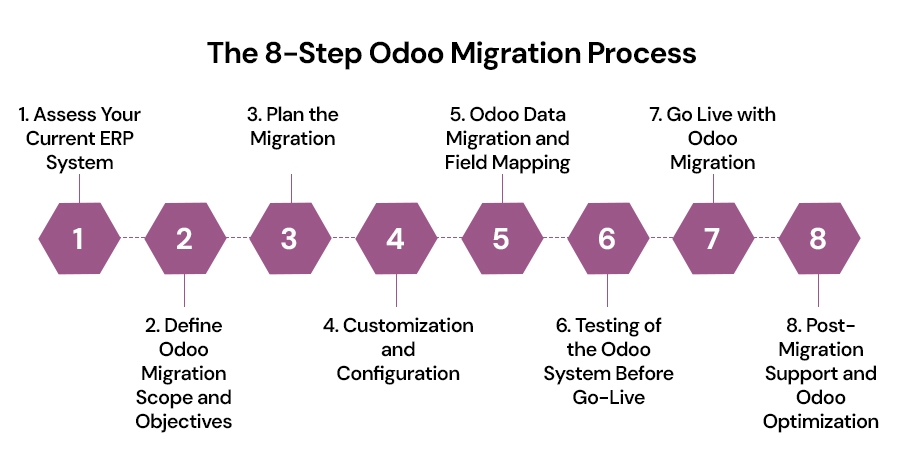
Step 1: Assess Your Current ERP System
The foundation of every successful migration is a thorough understanding of your current environment. Whether upgrading from an older Odoo version or switching from a different ERP platform, comprehensive assessment is crucial for identifying requirements and establishing priorities.
Which business processes are currently automated in your system?
What data needs to be migrated, and how extensive is it?
Which features or modules are essential in the new Odoo version?
What pain points exist in the current system that migration should address?
This audit reveals all customizations, custom-built functionalities, and third-party integrations essential to your business, establishing a clear roadmap that guides your entire upgrade strategy.
Step 2: Define Odoo Migration Scope and Objectives
Once you've thoroughly assessed your current system, precisely define the scope of your migration project. This scoping phase determines specific goals and objectives that will guide every decision throughout the implementation process.
Are you migrating from an old version of Odoo, or are you switching to Odoo from another ERP system?
Do you need to move all your historical data, or only a specific set of records (e.g., customers, inventory, sales orders)?
What specific modules of Odoo do you need to implement in the new system (e.g., sales, accounting, inventory, CRM)?
Are there any customizations or third-party integrations that need to be accounted for?
Defining clear, measurable objectives such as reducing processing time by 30%, eliminating manual invoicing, or improving reporting accuracy provides concrete targets. Professional odoo consulting services help distinguish essential features from technical debt.
Step 3: Plan the Migration
With scope and objectives clearly defined, develop a comprehensive plan for executing your migration. Planning involves detailed project timelines, resource allocation, budget parameters, and clear expectations for all parties involved throughout the process.
Key components of a successful migration plan include:
Data Migration Strategy: Define precisely what data needs moving and how it transfers from your legacy system to Odoo, including whether full migration or staged approach is optimal.
Customization and Integrations: Identify all custom modules or third-party integrations you need to implement, including unique workflows, specialized reports, or custom fields requiring configuration.
Testing Environment Setup: Before migrating production data, establish a comprehensive testing environment allowing your team to test features, workflows, and customizations thoroughly before go-live.
Timeline and Deadlines: Create a realistic, detailed timeline with clear deadlines for each migration phase, including buffer time to address unforeseen issues or unexpected complications.
Your comprehensive plan determines whether you'll use a "Big Bang" approach, phased strategy, or parallel running. Planning also encompasses communication strategies ensuring all stakeholders understand their roles and responsibilities.
Step 4: Customization and Configuration
One of Odoo's greatest strengths is its remarkable flexibility and ability to be customized to meet your unique business requirements. During this phase, customize Odoo's modules and workflows to align precisely with your established business processes and operational requirements.
Key tasks to complete during this phase:
Module Selection: Choose the specific modules that best align with and support your business operations such as Accounting, CRM, Sales, Inventory, Manufacturing, HR, and other modules your organization will actually use.
Customization: Strategically customize workflows, reports, data fields, and other system aspects to fit your specific operational and reporting needs, including configuring custom fields, specialized reports, and precise user roles.
Integrations: Integrate Odoo with all other third-party tools and software platforms your business actively uses daily, such as payment gateways, email marketing platforms, shipping software, and eCommerce platforms.
Older custom modules frequently fail with newer Odoo versions due to framework changes and API evolution. Your development team analyzes each custom module to determine viability, required updates, or replacement with native features.
Step 5: Odoo Data Migration and Field Mapping
Data migration is one of the most critical and complex steps in the entire Odoo migration process. Depending on database size and system complexity, this phase can take anywhere from several days to several months for large enterprise operations.
Essential data migration best practices:
Data Mapping: Map all data fields in your current system to corresponding fields in Odoo with precision customer names, product SKUs, and all identifiers must align correctly to prevent confusion.
Data Cleansing: Before transferring any data to Odoo, thoroughly clean and standardize your data to eliminate errors, remove duplicates, correct inaccuracies, and fill missing required information consistently.
Data Import: Once mapping and cleansing work is complete, begin carefully importing data into Odoo using built-in import tools for smaller datasets or custom migration scripts for large-scale operations.
The import process includes rigorous validation where each data batch is checked for accuracy and completeness before finalization. Error logs are reviewed systematically; discrepancies are thoroughly investigated and resolved. This meticulous approach prevents data loss.
Step 6: Testing of the Odoo System Before Go-Live
Testing is an essential part of the migration process, ensuring the system works as expected before full deployment. This phase identifies issues early, validates functionality, and confirms data accuracy across all modules and integrations.
Critical testing phases include:
Functional Testing: Test every feature and workflow in Odoo to ensure it functions properly.
Data Testing: Ensure that all data has been accurately migrated and is available for use in the new system.
Integration Testing: Test integrations with third-party applications to ensure they work seamlessly with Odoo.
User Acceptance Testing (UAT): Allow end-users to test the system and provide feedback on its usability.
Each test phase produces reports where issues are logged, prioritized, and resolved before proceeding. Only after all testing phases pass and stakeholders approve does the system move toward go-live.
Step 7: Go Live With Odoo Migration
Once you've completed testing and received approval from key stakeholders, it's time to go live with Odoo. During this phase, the new system is fully deployed for use by all employees across your organization.
Essential go-live activities:
Backup Your Data: Always create a backup of your data before migrating to Odoo. This serves as a safety net in case any issues arise during or after the migration.
Post-Go-Live Support: Provide users with immediate support after the migration to address any issues or questions they may have.
Monitor System Performance: Monitor the system closely for any performance issues or user feedback. Address any challenges promptly.
During go-live, your IT team monitors system performance closely, watching for errors, bottlenecks, or connectivity problems. Support teams stand ready helping users navigate the new interface and troubleshoot questions immediately.
Step 8: Post-Migration Support and Odoo Optimization
The work doesn't stop after you go live. It's essential to provide post-migration support to ensure everything continues to run smoothly. Some key activities during the post-migration phase:
Bug Fixes and Improvements: Address any issues that weren't discovered during testing and make improvements based on user feedback.
Optimization: Continuously monitor system performance and optimize processes to ensure your business operates at peak efficiency.
System Updates: Keep Odoo updated with the latest patches and upgrades to ensure you remain secure and benefit from new features.
Post-migration support includes addressing issues promptly. Bug fixes are deployed, configurations adjust based on user feedback, and solutions are documented for future reference. Performance monitoring tools reveal bottlenecks; user feedback identifies features needing adjustment.
Conclusion
Successful Odoo migration is a carefully structured journey requiring meticulous planning, precise execution, rigorous testing, and continuous optimization. When implemented correctly, businesses experience faster performance, smoother workflows, updated capabilities, and a modern ERP environment that supports long-term growth and competitive advantage.
Professional odoo consulting services and odoo implementation services play essential roles in transforming this challenging journey into successful transformation. Experienced partners bring technical expertise, proven project management, comprehensive risk mitigation, and strategic guidance that maximizes value delivered, making your Odoo migration a pivotal moment in your company's digital evolution.
FAQs
1. What is Odoo migration and why should my business consider it?
Odoo migration moves your business from an older ERP version to the latest Odoo release or from another ERP entirely. It ensures better performance, improved security, and new features. Migration eliminates operational bottlenecks while positioning your business for sustainable growth and competitive advantage.
2. How long does a typical Odoo migration process take?
Timeline depends on database size, custom modules, and integrations. Simple migrations take 3-6 weeks; larger environments may require several months. Professional guidance provides realistic estimates based on your specific requirements. With structured planning, timelines become predictable and manageable.
3. What are the main risks of not upgrading to a newer Odoo version?
Delaying migration exposes your business to security vulnerabilities, performance issues, and unsupported modules. Legacy systems become expensive to maintain while lacking integrations your teams need. You'll miss productivity gains and scalability improvements that competitors already enjoy.
4. Why should we hire professional Odoo migration services instead of handling it internally?
Professional services bring specialized expertise, proven methodologies, and technical knowledge preventing costly mistakes. Experts handle data backups, module upgrades, and deployment efficiently. They minimize downtime and risks while your internal team maintains business continuity, ensuring successful transitions.
5. How can we minimize downtime during our Odoo migration process?
Minimize downtime through careful planning and strategic execution. Schedule go-live during low-activity periods. Conduct thorough staging environment testing before going live. Implement phased migrations when possible. Professional teams use proven techniques and backup strategies reducing disruption significantly.
Transform your business with expert migration.