

 Updated on 6 April 2026

A practical, decision-focused guide for CFOs, CTOs, and finance leaders navigating the shift from manual workflows to intelligent, scalable invoice operations.
What Is Accounts Payable Automation?
Accounts payable automation is the use of invoice processing software, AI, and workflow technology collectively known as AP automation solutions to manage the end-to-end invoice lifecycle without manual intervention at each step. This includes everything from capture and data extraction to three-way matching, approval routing, and payment execution.
For finance teams handling more than 1,000 invoices per month, it replaces error-prone, time-intensive manual processes with structured, auditable, and scalable systems. The result: lower processing costs, fewer errors, faster payment cycles, and finance staff freed from repetitive data entry to focus on higher-value work.
Why Finance Teams Are Rethinking Invoice Operations Right Now
In today's fast-paced financial operations, businesses grapple with mountains of invoices that demand accuracy, speed, and compliance. For companies managing invoice automation for growing companies, the pressure is even greater: manual processes that worked at 500 invoices a month become dangerously fragile at 5,000. The real cost isn't just in time lost it's in errors that compound, audits that expose gaps, and finance talent burned out on repetitive data entry.
This guide is built for decision-makers CFOs modernizing legacy systems, CTOs evaluating build-versus-buy trade-offs, and product leaders architecting custom solutions. We'll cover the full spectrum: manual vs automated invoice processing, the steps in invoice processing automation, where AI genuinely adds value, and the product engineering principles that separate systems that scale from systems that break.
The Real Pain Points of Manual Invoice Processing
Manual invoice handling persists because it feels manageable until it suddenly isn't. Here's what teams handling more than 1,000 invoices per month consistently report:
Time-intensive data entry: AP clerks spend hours keying details from PDFs, emails, or paper forms a process inherently prone to typos that trigger payment disputes.
Error-prone matching: Verifying invoices against purchase orders and receipts manually leads to overpayments, missed early-payment discounts, and strained vendor relationships.
Approval bottlenecks: Routing invoices through email chains or spreadsheets introduces delays that risk late fees and damage supplier trust.
Compliance risk: Manual audit trails expose firms to regulatory liability under frameworks like SOX and GDPR particularly as transaction volumes scale.
Linear scalability limits: Manual teams handle roughly 100 invoices per day per person. At 10,000+ monthly, the process collapses under its own weight.
The hidden cost most firms underestimate: a 1% error rate on $10M annual invoice spend equals $100,000 in avoidable losses before accounting for staff time spent chasing discrepancies.
⚠️ Most teams don't fail at automation because of tools they fail because they automate broken workflows.
In short: Manual invoice processing isn't just slow it's a structural risk that compounds as your business grows.
Manual vs Automated Invoice Processing: A Quantified Comparison
Manual vs automated invoice processing isn't a philosophical debate the operational delta is measurable and significant:
| Aspect | Manual Invoice Processing | Automated Invoice Processing |
|---|---|---|
| Processing Time | 5–10 days | 1–4 hours |
| Error Rate | 3–5% | <0.5% |
| Cost per Invoice | $10–$15 | $1–$3 |
| Scalability | Poor (linear growth) | Excellent (handles 10× volume) |
| Compliance | Manual audits | Automated audit trails |
| Staff Focus | Data entry & matching | Exceptions & strategy |
Real-world ROI data supports this: a mid-sized B2B payments firm processing 18,000 invoices per month reduced their per-invoice cost from $12.40 to $3.20 a 74% reduction within the first two quarters of automation. Break-even was reached in month five. According to Gartner research, a $500M company automating via AI invoice processing automation can realize $2.4M in annual savings, with break-even typically achieved within six months.
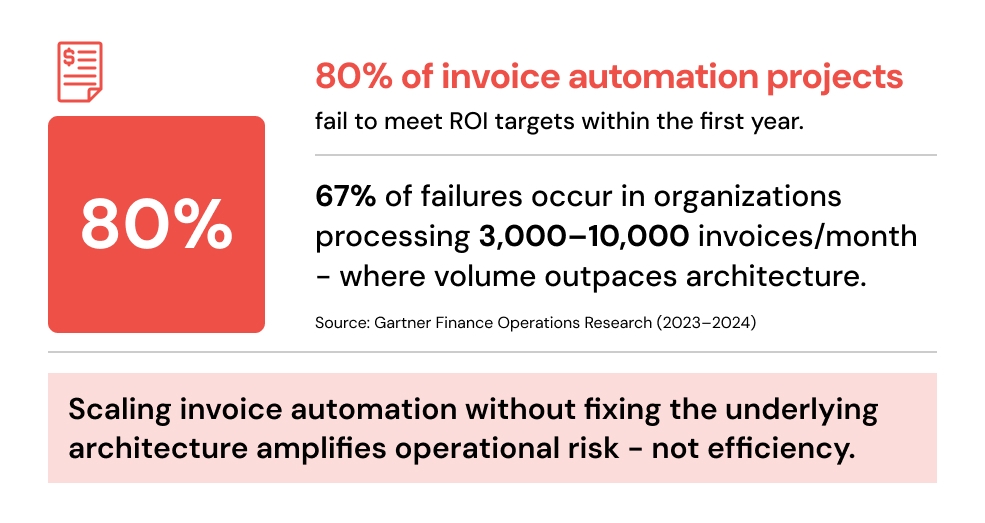
When Invoice Automation Starts Breaking (And Why This Matters for Your Architecture)
This is the section most vendor guides don't include but it's the one your team needs most before making a build or buy decision.
The Volume Thresholds
Works smoothly: 500–1,000 invoices/month with basic automation and minimal ERP integration.
Starts showing strain: 1,000–5,000 invoices/month approval workflow bottlenecks emerge, exception queues back up, and matching rules need refinement.
Breaks without the right architecture: 5,000–10,000+ invoices/month ERP integration failures compound, multi-format invoice handling becomes critical, and processing lag affects cash flow forecasting.
The Common Failure Points
ERP integration complexity: Most off-the-shelf tools connect cleanly to one ERP. The moment you're running SAP alongside QuickBooks for a subsidiary, or Odoo for one region and NetSuite for another, integration breaks silently.
Multi-format invoice chaos: Vendors send PDFs, EDI files, CSV exports, and paper scans. OCR accuracy degrades sharply on non-standard layouts especially handwritten or low-resolution documents.
Approval workflow rigidity: Static rule sets don't adapt to organizational changes. A CFO restructuring approval thresholds shouldn't require a developer to update code.
Data quality debt: Automation surfaces every dirty data problem your team worked around manually vendor master duplicates, inconsistent PO references, mismatched GL codes all at once.
Understanding these failure modes is the starting point for any serious accounts payable process automation initiative. The question isn't "will this tool automate my invoices?" it's "what does the system do when something unexpected happens?"
In short: Most invoice automation failures happen due to integration and data issues not tool limitations. Knowing your volume threshold before you hit it is the difference between a planned migration and an emergency rebuild.
🚨 Common Mistake
Automating invoice workflows without fixing data quality first.
Result:
High exception rates that overwhelm AP staff
Low AI accuracy that erodes trust in the system
Failed ROI that kills executive buy-in
Fix: Start with a data audit before tool selection every time.
📌 Approaching 3,000–5,000 invoices/month?
This is the range where most automation setups begin showing structural strain and where teams typically benefit most from an architecture review before scaling further. Identifying where your system will break before it actually does is the most cost-effective decision you can make at this stage.
Build vs Buy vs Customize: What Finance Teams Actually Need
Automated invoice processing projects fail most often not because teams chose the wrong software but because they chose the wrong approach. Here's how to think about it clearly.
Off-the-Shelf Tools
Platforms like Tipalti, Coupa, and Bill.com offer fast deployment, pre-built ERP connectors, and reasonable accuracy for standard invoice formats. They're the right choice when your invoice volume is stable, your vendor base is predictable, and you don't have deep customization requirements. The limitation: rigidity. These tools are designed for the median use case not yours.
Fully Custom Systems
A fully custom invoice management system gives you complete control over workflows, integrations, and data models. It handles the edge cases that break every off-the-shelf product. The trade-off: time to value is longer, ongoing maintenance requires expertise, and the architecture decisions made at the start have long-term consequences. This path requires genuine software product development discipline not just implementation work.
The Hybrid Approach (Most Practical)
The most successful implementations combine a proven core platform with custom engineering layers for high-complexity elements: custom OCR models for non-standard invoice formats, bespoke ERP integration middleware, configurable approval workflow engines, and custom analytics dashboards for DPO and cash flow forecasting.
This is where product engineering services deliver the most measurable value bridging the gap between what packaged software offers and what your finance operations actually require.
In short: Off-the-shelf gets you to 80%. Custom engineering gets you to 100%. The hybrid approach gets you there faster and with less risk than either extreme alone.
⚠️ The most expensive architecture decision isn't what you build it's what you build first and have to rebuild later.
Core Components of a Scalable Invoice Processing System
An enterprise-grade automated invoice processing system isn't a single application it's an architecture of interconnected modules, each of which can become a bottleneck if designed in isolation.
Capture and ingestion: Multi-channel intake from email monitors, vendor portals, EDI feeds, and mobile scan applications with format normalization before downstream processing.
Intelligent data extraction: OCR combined with machine learning to extract line items, totals, vendor identifiers, due dates, and PO references with confidence scoring to flag low-certainty extractions for human review.
Validation and three-way matching: Automated reconciliation of invoice data against purchase orders and goods receipts, with configurable tolerance rules and exception routing.
Approval workflow automation: Configurable, multi-level routing based on invoice amount, vendor category, cost center, or custom business rules adjustable without developer involvement.
ERP and payment integration: Bi-directional data flows with systems like SAP, Odoo, QuickBooks, and NetSuite with error handling that surfaces integration failures rather than silently corrupting records.
Reporting and analytics: Real-time visibility into DPO (Days Payable Outstanding), processing cycle times, exception rates, and cash flow forecasting the metrics that matter for strategic financial decision-making.
Architecting these modules correctly from the start is precisely the kind of work that benefits from early-stage Product Strategy & Consulting where system design decisions are defined before development begins, and course corrections cost a fraction of what they do later.
Invoice Processing Workflow Automation: Step-by-Step
Invoice processing workflow automation follows a structured sequence. Here's how each stage works and where the engineering complexity actually lives.
Step 1: Invoice Capture
Invoices arrive via email attachments, vendor portals, EDI transmissions, and paper scans. Effective capture means channel-agnostic ingestion with format detection and deduplication logic preventing the same invoice from entering the system twice via different channels, which is more common than most teams expect.
Step 2: Invoice Data Extraction Automation
Invoice data extraction automation is where the quality of the entire downstream process is determined. AI improves invoice accuracy from ~90% to 99% but only when supported by clean, structured data pipelines.
Modern invoice OCR automation powered by AI (including tools like Google Cloud Vision and ABBYY) achieves near-99% accuracy on structured digital invoices. Intelligent document processing for invoices employs ML models trained on diverse document samples to handle layout variations, low-resolution scans, and non-standard formatting. Accuracy drops sharply for handwritten invoices and poorly formatted PDFs without domain-specific model fine-tuning.
Step 3: Validation and Three-Way Matching
Rules engines compare extracted invoice data against PO records and goods receipts. Mismatches trigger exception routing for example, if an invoice total exceeds the corresponding PO by more than a configurable threshold, it routes to a supervisor queue rather than auto-approving. The sophistication of these rules directly determines your exception rate.
Step 4: Invoice Approval Workflow Automation
Invoice approval workflow automation replaces static email chains with dynamic, rules-based routing. Common configurations: invoices under $5,000 auto-approve if they match a PO exactly; invoices above $50,000 escalate to CFO review regardless of match status; invoices from new vendors always require manual approval on first submission. The critical design requirement: these rules must be configurable by finance administrators without developer intervention.
Step 5: Payment Integration and Archiving
ERP plugins trigger payment execution via ACH, SEPA, or other payment rails. Audit-ready archiving with immutable records and complete processing history supports compliance with SOX, GDPR, and other frameworks. Blockchain-based ledger solutions are increasingly used for high-value enterprise deployments requiring tamper-proof records.
Step 6: Analytics and Continuous Improvement
KPIs that matter: total reduce invoice processing time (target: under 24 hours), exception rate (target: under 5%), cost per invoice (target: under $3), and DPO variance. Regular review of these metrics surfaces the workflow bottlenecks that prevent you from realizing the full ROI of automation investment.
In short: Each step in the workflow is a potential failure point. Designing for resilience at every stage not just accuracy at extraction is what separates automation that holds under load from automation that creates new operational debt.
⚡ Architecture checkpoint: If your invoice volume is growing but your processing times, exception rates, or ERP integration errors are also growing this is not a tooling problem. It's an architecture problem. Structured product engineering disciplines system design, integration strategy, scalable data pipelines are what separate automation that scales from automation that creates new debt.
AI for Accounts Payable: What Actually Works (and What's Still Hype)
AI improves invoice processing accuracy from ~90% to 99% and reduces manual intervention by over 70% but only when supported by structured data pipelines. Here's where machine learning genuinely improves outcomes in AI for accounts payable, and where the limitations still apply:
Predictive GL coding: ML models auto-categorize general ledger codes based on vendor history and invoice content reducing coding errors and the manual review burden on accounting staff.
Anomaly and duplicate detection: Pattern recognition flags duplicate invoices, inflated line items, and unusual vendor payment patterns that indicate potential fraud before payment is triggered.
Vendor onboarding automation: AI cross-references new supplier submissions against public data to verify business registration, bank details, and sanction list status automatically.
Cash flow forecasting: NLP analysis of invoice metadata, payment terms, and historical patterns produces more accurate liquidity projections than spreadsheet-based approaches.
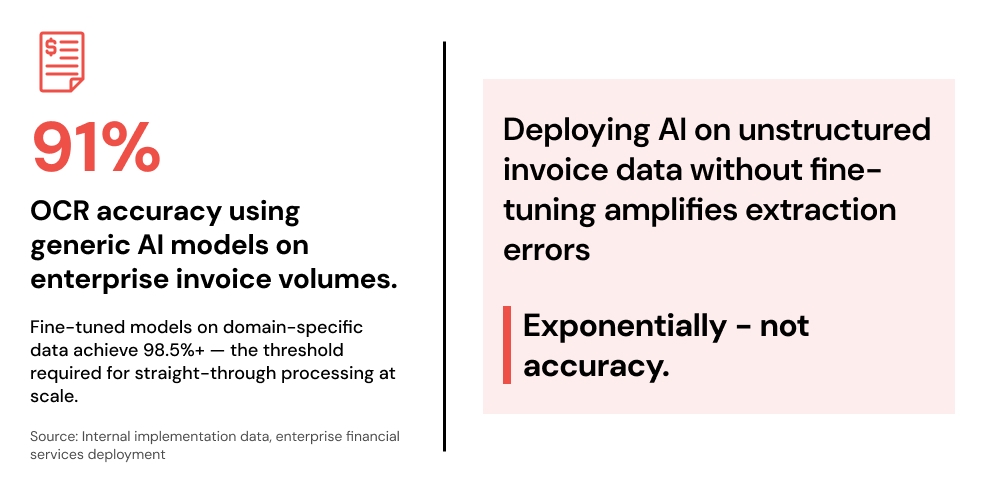
The important caveat: AI invoice processing accuracy improvement is only achievable when supported by clean, structured data. One enterprise financial services firm processing 50,000+ invoices per month discovered this firsthand generic OCR models achieved 91% accuracy, well below their required 98.5%. Only after fine-tuning models on 18 months of historical invoice data were accuracy targets met. Post-deployment, manual review requirements dropped by 83%. AI applied to messy, inconsistent data produces confidently wrong answers and that's the most expensive mistake to fix post-deployment.
| AI Technology | Use Case | Accuracy Gain | Tools / Example |
|---|---|---|---|
| Invoice OCR | Data Extraction | 95% → 99% | Tesseract + ML fine-tuning |
| NLP | Contract Matching | ~90% | BERT-based models |
| Computer Vision | Handwritten Invoices | 85% → 98% | Custom CNNs |
| Generative AI | Dispute Summaries | N/A | GPT-class models for notes |
In short: AI is a genuine accelerator for accounts payable not a marketing term. But it's an accelerator that only works when the data and architecture underneath it are sound.
What Most Finance Teams Underestimate Before Implementation
Honest implementation experience produces a consistent list of surprises. These aren't reasons not to automate they're factors to plan for:
Data cleaning effort: Legacy invoice data is almost never as clean as it looks. Vendor master deduplication alone can take weeks. ERP records contain years of manual workarounds that surface the moment you automate matching logic.
ERP integration complexity: Documented API connectors rarely cover every edge case. Custom Cloud and DevOps Engineering work is almost always required to handle multi-entity accounting structures, subsidiary-level configurations, and legacy ERP versions.
Change management: AP teams often perceive automation as a threat rather than an enabler. Phased rollout starting with the lowest-complexity invoice types builds confidence and surfaces process issues at manageable scale.
Multi-format invoice handling: Your top 20 vendors probably send clean, structured PDFs. The other 200 send everything from EDI files to scanned handwritten invoices. The edge cases represent 80% of the engineering work.
Approval workflow governance: Finance teams frequently change approval thresholds, add cost center requirements, and restructure signatory authority. Systems that require developer involvement for these changes create ongoing operational friction.
The teams that succeed at invoice automation are the ones who planned for complexity not the ones who assumed simplicity.
In short: Budget for data cleaning. Design for integration failure. Plan for workflow evolution. These three decisions, made early, determine whether your automation investment delivers or disappoints.
Why Invoice Automation Is a Product Engineering Problem Not Just a Tool Selection
Selecting the right software platform is maybe 30% of the challenge. The other 70% is architecture, integration, data, and governance all of which fall under product engineering services disciplines.
System design: A scalable accounts payable system requires microservices architecture, not monolithic deployment. Each modul capture, extraction, matching, approval, payment needs to scale independently based on actual processing load.
Integration strategy: API-first design for ERP connectivity, with retry logic, error surfacing, and data reconciliation capabilities not just one-way data pushes that fail silently.
Continuous evolution: Invoice formats change. Regulatory requirements update. Business rules shift. Systems designed without extensibility in mind require full rebuilds within 18–24 months of deployment.
Product Design and Prototyping: Approval workflow interfaces must be designed for finance administrators, not developers. Usability directly determines adoption and adoption determines whether the automation investment delivers ROI.
A financial workflow automation solution built with true product engineering discipline modular, API-first, configurable, and cloud-native can handle 10× invoice volume growth without architectural rework. One built as a tactical tool selection project usually can't.
In short: Invoice automation built as a software procurement decision fails at scale. Invoice automation built as a product engineering initiative doesn't.
Real-World Implementations: What Outcomes Look Like
FinTech Operations Team (B2B Payments Platform)
Transitioned from email-based invoice routing to a custom invoice management system with ML-based data extraction and configurable approval workflows. Per-invoice cost dropped from $12.40 to $3.20 across 18,000 monthly invoices a 74% reduction. Exception rate fell from 12% to under 3% within the first quarter. The critical success factor: six weeks of data cleaning before go-live, not rushed deployment.
Multi-Region Manufacturer
Implemented invoice processing workflow automation with IoT integration for real-time goods receipt matching across three regional ERP instances. Vendor disputes reduced by 60%, and average processing time compressed from 8 days to under 6 hours. The architecture required custom integration middleware built through dedicated Cloud and DevOps Engineering work off-the-shelf connectors couldn't handle the multi-entity structure.
Enterprise Financial Services Firm
Deployed intelligent document processing for invoices at 50,000+ documents per month. AI models were fine-tuned on 18 months of historical invoice data before deployment. Accuracy targets were only met after the fine-tuning investment generic OCR models alone achieved 91%, well below the required 98.5%. Post-deployment, manual review requirements dropped by 83%.
Implementation Challenges and How to Address Them
Every AP automation solutions project encounters predictable obstacles. The difference between projects that succeed and those that don't is whether these were planned for or discovered mid-deployment:
Data quality: Conduct a data audit before selecting any platform. Understand your vendor master duplication rate, PO reference consistency, and GL coding accuracy. These determine your realistic baseline and your target improvement timeline.
Integration complexity: Engage Cloud and DevOps Engineering expertise early to map your full ERP landscape. Build integration layers as services not point-to-point connections so they can be updated when ERP versions change.
Change management: Involve AP team leads in workflow design. Their knowledge of edge cases will prevent post-go-live surprises. Their buy-in determines adoption speed.
Security and compliance: Zero-trust architecture, role-based access controls, and complete audit logging are non-negotiable for financial operations. They should be designed in from the start not added as post-deployment patches.
Future-Proofing Your Invoice Automation Architecture
The next wave of capabilities that forward-thinking teams are already architecting for:
Generative AI for dispute resolution: Large language models can draft dispute correspondence, summarize invoice history, and generate audit explanations reducing the time finance staff spend on exception handling.
Blockchain audit trails: Immutable, distributed ledgers for high-value invoice records provide tamper-proof compliance documentation that satisfies the most demanding audit requirements.
Real-time cash flow intelligence: Integration of invoice processing data with broader treasury management systems enables dynamic cash flow forecasting turning AP operations from a cost center into a strategic finance capability.
Natural language querying: Finance managers will routinely ask systems: "Show all unpaid invoices over $10K from vendors with disputes in the last 90 days" without SQL expertise, without dashboards, without waiting for a report.
A custom invoice processing system built on modern software product development principles API-first, cloud-native, modular can adopt these capabilities incrementally. Legacy monolithic deployments typically can't.
Is Your Invoice System Ready to Scale? A Self-Assessment
Answer these questions honestly before your next planning cycle:
Can your current system handle 5× your current invoice volume without performance degradation?
Are approval workflows configurable by finance administrators without developer support?
Does your system provide real-time visibility into DPO, exception rates, and processing cycle times?
Can you produce a complete, audit-ready processing history for any invoice within 60 seconds?
Does your ERP integration surface and alert on failures or silently drop records?
Are your OCR and extraction models fine-tuned on your specific invoice formats or are you using a generic model?
If you answered "no" to two or more of these: your current architecture has a scaling ceiling. The question is whether you hit it at 3,000 invoices per month or 30,000.
Who This Is For
Before reaching out, here's a quick filter. This conversation is typically most valuable for:
Finance teams currently processing 1,000+ invoices per month and approaching a scaling inflection point.
Organizations operating in multi-entity or multi-ERP environments where off-the-shelf connectors are already causing friction.
Teams planning automation in the next 3–6 months and wanting to get the architecture right before committing to a platform.
If that's your situation, the next step isn't a demo it's a diagnostic.
🔍 Identify where your invoice system will break at scale before it actually does.
Our team will map your current process against the volume thresholds and failure modes covered in this guide and give you a clear, actionable picture of where your architecture holds and where it doesn't.
No sales pitch. No generic recommendations. Just a structured diagnostic from engineers who build these systems.
Frequently Asked Questions
What is accounts payable automation?
Accounts payable automation is the use of invoice processing software and AI to manage the invoice lifecycle from capture and data extraction to matching, approval, and payment without manual processing at each stage. It replaces error-prone, paper-based or email-based workflows with structured, auditable systems that scale with invoice volume.
How long does invoice automation implementation take?
For off-the-shelf platforms with standard ERP configurations, basic deployment typically takes 6–12 weeks. For hybrid or custom automated invoice processing systems particularly those involving multiple ERP integrations, custom OCR models, or complex approval workflows realistic timelines range from 3 to 6 months, with data cleaning and integration work often accounting for the majority of that time.
What is the ROI of invoice automation?
ROI varies by volume and starting point, but consistent benchmarks indicate: processing cost reduction of 70–80% (from $10–$15 per invoice to $1–$3), error rate reduction from 3–5% to under 0.5%, and processing time compression from 5–10 days to under 4 hours. For a company processing 10,000 invoices monthly, that translates to $100,000–$140,000 in direct cost savings per month.
Can AI fully automate invoice processing?
AI can automate the majority of invoice processing automation steps data extraction, GL coding, duplicate detection, and anomaly flagging for structured, digital invoices with high accuracy. Full automation, including complex exception handling and multi-format edge cases, still requires human oversight at defined checkpoints. The realistic target for mature implementations is 85–95% straight-through processing, with the remaining invoices routed for human review.
What's the difference between invoice OCR and AI invoice processing?
Invoice OCR automation refers specifically to optical character recognition converting scanned or image-based invoices into machine-readable text. AI invoice processing is broader: it includes OCR, but also adds machine learning for field classification, pattern recognition for anomaly detection, predictive GL coding, and continuous model improvement based on correction feedback. OCR is a component of AI invoice processing, not a substitute for it.
What makes an invoice automation project fail?
The three most common failure causes, in order: poor data quality going into the system (vendor master issues, inconsistent PO references), underestimated ERP integration complexity (especially in multi-entity environments), and approval workflow rigidity that requires developer involvement for routine business rule changes. Tool selection is rarely the primary failure point.
Conclusion: The Architecture Decision Determines the Outcome
Transitioning to invoice processing automation is no longer optional for finance teams operating at scale. But the transition's success depends far more on architectural decisions than on platform selection.
Understanding how to automate invoice processing at a technical level the data pipelines, integration patterns, exception handling, and workflow governance that underpin reliable automation is the difference between a system that scales and one that creates new problems at scale. The companies that get this right treat it for what it actually is: a product engineering challenge that requires system design expertise, not just software procurement.
By applying accounts payable automation principles with the architectural rigor that the discipline demands, finance teams can reduce invoice processing time by 80%, cut per-invoice costs by 70%, and build operations that scale with the business rather than constrain it.
The path forward starts with an honest assessment of where your current architecture's limits are. This is typically addressed during early-stage product strategy and consulting where system design decisions are made before development begins, and where course corrections cost a fraction of what they do later. If you're ready to have that conversation, that's where it starts.
See how invoice automation improves finance operations