

 Updated on 13 August 2026

A successful Odoo ERP implementation requires more than installing software. It involves careful planning, requirement analysis, data preparation, system configuration, testing, user training, and post-go-live support. Following a structured Odoo ERP Implementation Checklist cuts the risk of a messy rollout.
Many ERP projects fall behind not because of the software, but because small tasks get skipped mid-rollout a permission left unset, a workflow left untested, a department left out of the conversation. A checklist catches these gaps before they surface as go-live surprises.
Why an Odoo ERP Implementation Checklist Matters
Implementing an ERP system touches every department, from sales and finance to inventory and operations, and each one measures success differently. Finance wants accurate reporting from day one, sales wants uninterrupted quote-to-cash, and operations wants inventory numbers it can trust. A checklist forces the project team to address all three before go-live, not just the loudest one.
That same discipline carries past launch: teams that follow a structured plan through hypercare reach full adoption weeks faster than teams that treat go-live as the finish line.
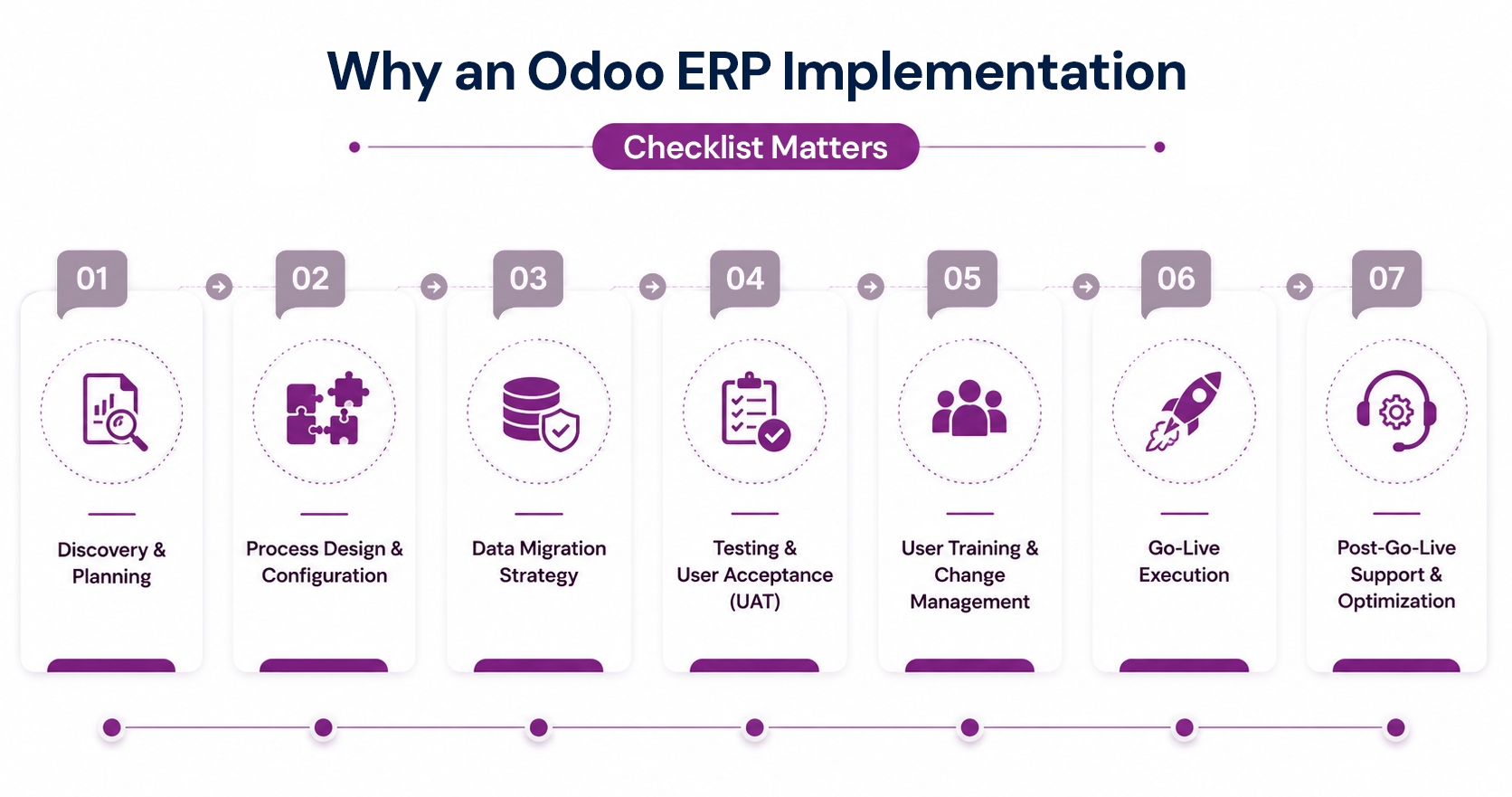
Every successful Odoo rollout follows the same seven Odoo implementation phases, from discovery through post-go-live optimization. Completing each phase fully before starting the next is what keeps timelines, budgets, and user adoption on track.
1. Discovery & Planning
Discovery sets the direction every later decision depends on. Skip it, and later phases end up correcting assumptions nobody validated upfront, costing far more time than the planning ever would.
Define Clear Goals. Set specific, trackable objectives before scoping the project further, so success can actually be measured.
Appoint Project Champion. Give one person real decision-making authority to prevent small approvals from stalling for weeks.
Select Core Modules. Focus on today's most urgent pain points, not every option available, to control cost.
Decide Community vs. Enterprise. Match the edition to your actual feature needs Enterprise adds accounting, helpdesk, and multi-company support Community doesn't include.
2. Process Design & Configuration
Configuration turns real workflows into working Odoo processes that people can actually use daily. Over-customizing here is the single most common way projects quietly go over budget and timeline.
Map Real Workflows. Document existing processes exactly as staff perform them today, including informal daily workarounds nobody documented.
Prioritize Standard Features. Use Odoo's out-of-the-box functionality first, and customize only where it truly differentiates the business.
Set User Permissions. Configure role-based access before any real records enter the system, to protect sensitive data early.
Start Integrations Early. Name every third-party integration now and request specifications early, since external teams set their own delivery pace.
3. Data Migration Strategy
Data migration decides whether your reports can be trusted from day one. Clean, validated data prevents the majority of post-launch firefighting that otherwise consumes the first month after go-live.
Clean Data First. Remove duplicate, inactive, and outdated records from source systems before migrating anything at all.
Map Fields Manually. Handle records like the chart of accounts by hand, since automated tools miss business logic.
Run Trial Migration. Verify a sample of migrated records against source data before scaling to the full set.in a recent Salesforce-to-Odoo migration we ran for a distribution client, this step caught mismatched customer credit terms that would otherwise have gone live silently.
Use External IDs & Import Templates. Use external IDs and structured import templates so data loads stay repeatable, auditable, and easy to rerun.
4. Testing & User Acceptance (UAT)
Testing exposes the gaps that configuration alone cannot catch. Every workflow needs real, hands-on validation before real users start depending on it for daily operational decisions and reporting.
Test Modules Individually. Validate each workflow in isolation before combining them into longer, more complex end-to-end processes.
Run Full Scenarios. Follow one order from quotation through invoicing and delivery to confirm accurate cross-module data flow.
Require UAT Sign-Off. Get formal, written approval from every department involved, not just IT, before scheduling go-live.
Use a Staging Environment. Test on a mirrored staging branch, if you're on Odoo.sh, so live data is never touched during UAT.
5. User Training & Change Management
Training determines whether Odoo actually gets used the way it was designed to be used. Resistance managed early rarely turns into resistance that derails adoption months into the rollout.
Train By Role. Focus each session on real daily tasks, not generic system demos that cover everything loosely.
Communicate Early Clearly. Share exactly what's changing, and when, starting at least two weeks before launch day.
Plan For Resistance. Identify likely resistant teams early and involve their managers as visible champions of the system.
Use Role-Based eLearning. Use Odoo's eLearning module so training material stays available to staff well after go-live day itself.
6. Go-Live Execution
Go-live should feel like a rehearsed event, not a leap of faith taken under pressure. A documented cutover plan and a tested rollback option remove most of the real risk.
Document Cutover Plan. Assign a specifically named owner responsible for every single step involved in the launch.
Rehearse Rollback Plan. Prepare it fully before launch day arrives, not during an unfolding live production crisis.
Time Launch Carefully. Avoid month-end financial close or peak seasonal periods, when teams have no slack to spare. in a recent 228-store retail rollout we supported, this rule kept the cutover to one weekend with zero POS downtime.
Fix Go/No-Go Criteria. Agree in advance exactly who has the authority to call go or no-go on launch day.
7. Post-Go-Live Support & Optimization
Go-live marks the start of the system's real life, not the end of the project itself. Ongoing monitoring and steady optimization are what turn early adoption into lasting business value.
Run Hypercare Period. Stay on standby for the first two to four weeks after launch to resolve issues fast.
Monitor Real Usage. Track actual adoption patterns closely to catch gaps that technical uptime monitoring alone would miss.
Treat Optimization Ongoing. Revisit business KPIs quarterly and expand modules only once current workflows are fully stable.

Why Choose Aspire Softserv as an Odoo Implementation Partner
We treat every Odoo implementation as a working plan, not paperwork to file away after go-live. With 10 years delivering ERP projects and 50+ completed Odoo implementations, we stay hands-on through discovery, data migration, testing, and hypercare, not only the launch date, so nothing critical slips through unnoticed along the way.
As an experienced Odoo implementation partner, our team is built around phased delivery, role-based training, and named support during your first month live, so adoption is measured and reported honestly, not simply assumed once the system goes live and stays quiet.
Frequently Asked Questions
1. What is included in an Odoo ERP implementation checklist?
An Odoo ERP implementation checklist covers Seven stages: discovery and planning, process configuration, data migration, testing and UAT, user training, go-live execution, and post-launch support. Completing each stage fully before starting the next reduces the risk of costly rework later in the project.
2. What are the Odoo implementation steps?
The Odoo implementation steps are discovery, process configuration, data migration, testing, user training, go-live, and post-launch optimization completed strictly in that order.
3. What should be on an Odoo go-live checklist?
An Odoo go-live checklist should include validated and migrated data, signed-off user acceptance testing, verified role-based permissions, a documented and rehearsed rollback plan, and standby support coverage for the first two to four weeks after launch. Launch timing should also avoid month-end close or peak seasonal periods.
4. What are Odoo implementation best practices to avoid mistakes?
Best practices for avoiding Odoo implementation mistakes include using standard, out-of-the-box features before customizing, cleaning and validating data before migration, training employees by role rather than with generic system demos, and getting written sign-off from every department involved, not just IT, before scheduling go-live.
5. What is a typical Odoo implementation timeline?
A typical Odoo implementation timeline runs 8 to 12 weeks from discovery to go-live. Projects involving heavy customization, large or messy data sets, multiple entities, or industry-specific compliance requirements such as e-invoicing mandates usually extend beyond that timeline.