

 Updated on 16 July 2026

Introduction
Odoo 19.3 is live today, while Odoo 20 promises more advanced Agentic AI down the road. That timing gap has left many businesses stuck deciding whether to upgrade now or wait.
This isn't a question new AI features alone can answer the right upgrade decision depends on your current ERP version, how much customization you're carrying, and how ready your data actually is for AI.
This guide breaks down what the shift from Odoo 19.3 to Odoo 20 actually means for your business, what's confirmed versus speculative, and how to decide your timing with confidence.
Why Everyone Is Talking About Odoo 20's Agentic AI
Agentic AI refers to systems that act independently within a workflow, rather than waiting for a prompt. In Odoo 20, this idea sits at the center of the platform's next AI evolution.
Traditional AI assistants respond only when asked. AI agents, by contrast, monitor a process continuously and carry out multi-step tasks on their own the defining shift behind Odoo 20's Agentic AI plans.
Picture an agent flagging a stock shortage, checking supplier lead times, and drafting a purchase order automatically. That kind of autonomous execution is exactly why Odoo 20's roadmap has generated so much conversation across the partner community.
What's New in Odoo 19.3 That Businesses Can Use Today
While Odoo 20's Agentic AI remains unconfirmed, Odoo 19.3 is live and working right now. Here's what businesses can actually put to use today, without waiting on a future release covered in more depth in our Odoo 19.3 release notes.
AI-powered productivity enhancements
AI agents in 19.3 build records directly from uploaded files hand the system a PDF and it generates the structured project, task, or record automatically, cutting out manual data entry.AI website assistant
A conversational AI assistant lets marketing teams edit website content and generate images or buttons directly, without waiting on developer support for routine site changes.Workflow improvements
The redesigned manufacturing kanban surfaces scheduled week, component availability, and work center load on one card, replacing multiple manual clicks with a single glance.Performance updates
Offline-first mobile capabilities let field and shop-floor teams keep working without connectivity, syncing automatically once a stable connection returns.Stability and security improvements
As a mature minor release, 19.3 benefits from months of stability testing and security patches, making it a lower-risk upgrade than an early major release typically is.Business-ready features available immediately
Unlike Odoo 20's roadmap items, every 19.3 capability listed here is tested and deployable today, giving teams real operational value while the next major release is still taking shape.
These aren't minor tweaks they're practical improvements available right now, which is exactly why so many teams are choosing to upgrade to the latest Odoo version rather than wait.
Odoo 19.3 vs Odoo 20: Side-by-Side Comparison
Placing the two versions side by side makes the trade-off clear. One is proven and available; the other is promising but still unconfirmed in key areas.
| Criteria | Odoo 19.3 | Odoo 20 (Expected) |
|---|---|---|
| Availability | Available now | Upcoming, expected late 2026 |
| AI Capabilities | Current, working AI features | Expanded Agentic AI (unconfirmed) |
| Stability | Mature, tested release | Early release, less field-tested |
| Upgrade Risk | Lower | Higher initially |
| Ecosystem Compatibility | Broad | May require updates |
| Custom Modules | Compatible after testing | Likely needs adaptation |
| Business Readiness | Immediate | Depends on release maturity |
Odoo 20's feature list and release date won't be finalized until Odoo's official announcement at Odoo Experience 2026. We'll update this comparison the week details are confirmed see our tracking piece on the confirmed Odoo 20 roadmap for the latest.
When You Should Upgrade to Odoo 19.3 Now
Some situations make this decision straightforward. If any of the following apply to your business, upgrading to 19.3 now is the lower-risk, higher-value choice.
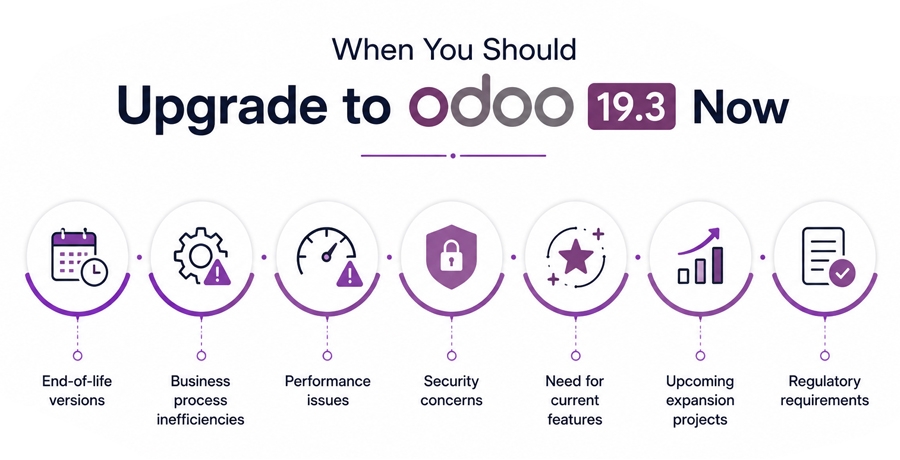
End-of-life versions
When Odoo 19 shipped in September 2025, Odoo 16 dropped out of the three covered versions and as of April 2026, staying on it adds a 25% legacy surcharge to your Enterprise subscription. On a typical annual license, that's a quarter of your subscription cost paid simply for staying put, with no new features in return.Business process inefficiencies
If manual data entry, disconnected reporting, or slow approvals are already slowing your team down, waiting for a future release only extends those daily frustrations further into the year.Performance issues
Sluggish reports, slow page loads, or database strain under growing transaction volumes signal it's time to move. Odoo 19.3's performance improvements address these issues today.Security concerns
Older Odoo versions accumulate known vulnerabilities over time. Upgrading to a current, actively maintained release closes those gaps and keeps your data meaningfully safer.Need for current features
If your team is already asking for AI-assisted record creation or better shop-floor visibility, those capabilities exist in Odoo 19.3 today rather than sitting on an uncertain roadmap.Upcoming expansion projects
Planning new warehouses, product lines, or new markets soon works better on a stable, current foundation than layering expansion onto an aging, unsupported ERP version.Regulatory requirements
Industries facing tightening compliance or reporting obligations benefit from the improved audit trails and data handling already available in current releases.
None of these scenarios require betting on Odoo 20's Agentic AI. They're practical, business-driven reasons to move forward with a proven, currently available version instead.
When Waiting for Odoo 20 Makes Sense
Waiting isn't the wrong call for everyone. If you're planning a brand-new Odoo implementation with a go-live date realistically landing after Odoo 20's stable release, building directly on 20 avoids an unnecessary two-step migration.
Businesses building an AI-first transformation strategy specifically around autonomous, agentic workflows may also want to see the confirmed feature list before committing budget and timeline to a plan built on speculation.
If your upgrade isn't urgent no end-of-life version, no pressing performance or security issues and you can tolerate a few more months on your current setup, waiting for ecosystem maturity is a reasonable position.
The risk is waiting too long. "Wait and see" can quietly turn into a year of delayed productivity gains if there's no defined trigger for when you'll actually move.
Business Risks of Delaying an Upgrade
Waiting isn't free. Every month spent deciding without acting carries real costs that compound the longer a business delays.
Missed productivity gains
Every month without AI-assisted record creation or improved kanban visibility is a month of manual work your team could have already eliminated.Higher technical debt
Older versions accumulate more customizations and workarounds over time, making the eventual upgrade longer, costlier, and more complex than acting now.Increased maintenance costs
Unsupported or aging versions often need more custom patches and workarounds to keep running smoothly, quietly raising your total upgrade cost over time.Security vulnerabilities
Delaying extends the window your business operates on a version with known, unpatched security gaps.Compatibility challenges
The longer you wait, the more third-party integrations and modules may drift out of compatibility, making a future migration more disruptive than it needs to be.Delayed digital transformation
Every quarter spent waiting is a quarter competitors may spend automating workflows, widening the operational gap between businesses that moved and those that didn't.
None of this means rushing blindly. It means recognizing that delay itself carries cost, and that an informed decision usually favors moving rather than waiting indefinitely.
How to Build an Upgrade Strategy That Supports Future AI Adoption
Whether you upgrade to 19.3 now or plan for Odoo 20 later, the same groundwork applies. Here's how to build a strategy that holds up either way.
Assess current ERP usage
Document how your team actually uses Odoo today, not just the original implementation plan. This baseline shows what's working, what's outdated, and what needs attention first.Review customizations
Audit existing customizations and note which modules interact most deeply with core workflows. This helps estimate effort and flags what might need rework later.Plan phased upgrades
Rather than a single disruptive jump, consider a staged approach that moves your business forward incrementally while still capturing value from each release.Prepare data quality
Clean, standardized data isn't optional for AI features to work well. Duplicate records and inconsistent naming quietly undermine both current and future AI capabilities.Ensure integrations are documented
Keep a current record of every third-party integration and API connection. Undocumented integrations are the most common source of surprises during any upgrade.Stay compatible with future AI capabilities
Building clean data habits and documented workflows now means you'll be ready to adopt Odoo 20's Agentic AI features quickly once they're actually confirmed and released.
This preparation isn't wasted effort regardless of timing it's the same foundation any Odoo migration services engagement needs, whether you move today or wait for the next release.
Conclusion
This decision isn't about chasing the newest AI headline. It's about matching your upgrade timing to your business goals, readiness, and operational needs.
Odoo 19.3 offers proven, available value today. Odoo 20's Agentic AI remains promising but unconfirmed. Working with an experienced Odoo consulting partner helps you decide with confidence, not guesswork.
Frequently Asked Questions
1. Is Odoo 19.3 worth upgrading to?
Yes, for most businesses. It brings working AI agents, a redesigned manufacturing kanban, and offline mobile support all tested and available now, rather than waiting on features that aren't confirmed yet.
2. Will Odoo 20 require another migration?
Upgrading from 19.3 to Odoo 20 will still involve a migration, but it's a smaller step than jumping from an older version directly to 20 once it's released.
3. Can Odoo 19.3 users upgrade to Odoo 20 later?
Yes. Odoo's upgrade path is designed for sequential version moves, so upgrading to 19.3 now doesn't lock you out of moving to Odoo 20 once its feature set is finalized.
4. Should small businesses wait for Odoo 20?
Usually not, unless there's no urgent operational need and a new implementation is planned well after Odoo 20 ships. Most small businesses benefit more from acting on proven 19.3 features today.
5. What factors determine the best upgrade timing?
Your current Odoo version, the extent of your customizations, how AI-ready your data is, and whether you have any urgent performance, security, or compliance pressures driving the decision.